Operation Section 3
3-8
Part Number 020003996 4/12
QUICKDRAW ICE PORTION ADJUSTMENTS
The quickdraw ice dispensing system has adjustable ice portion sizes. Follow the directions below to set the ice
portion size. Each portion size must be checked according to customer specification at the time of installation.
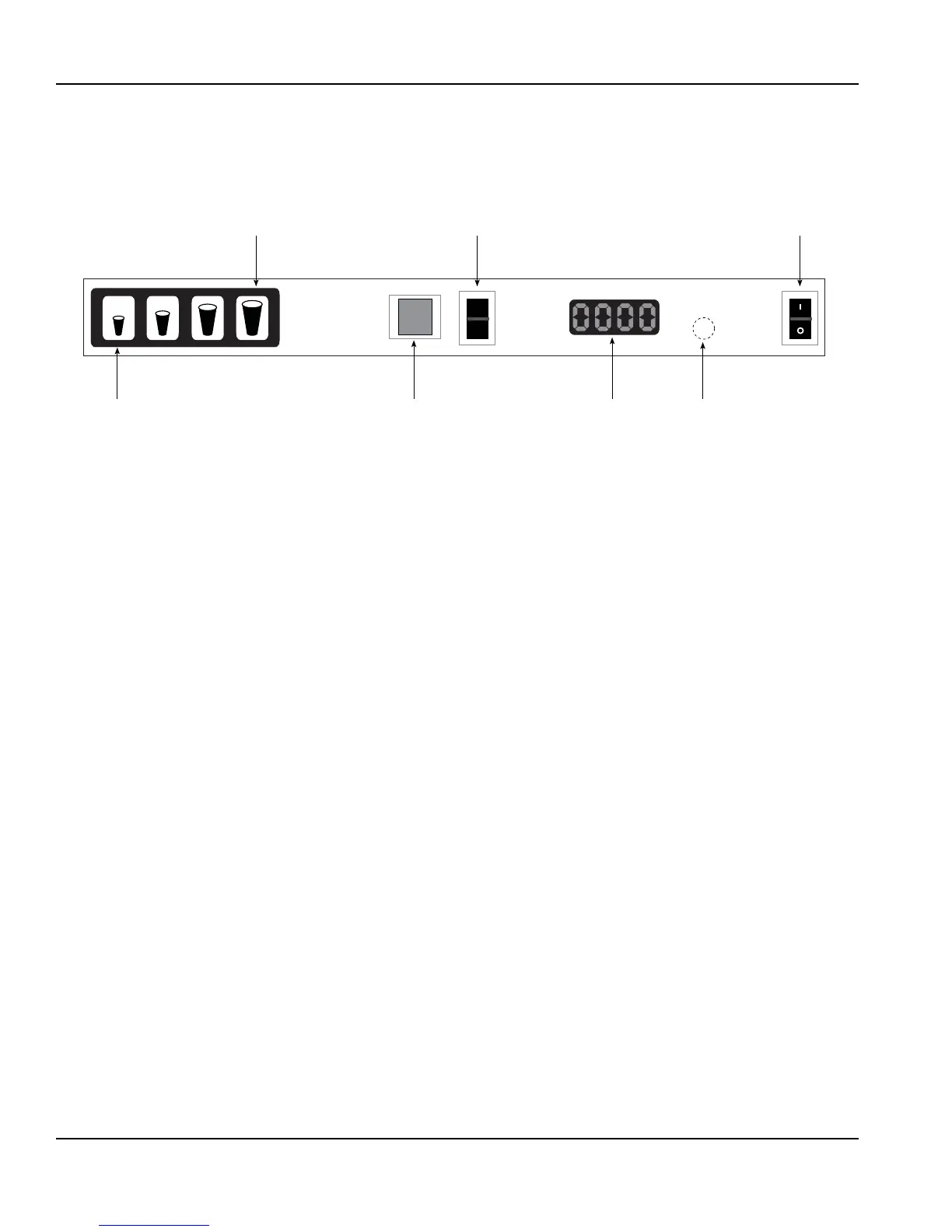
1. To set the ice portion sizes, press the program
switch 1 time in 3 seconds. The display will read
“0001”.
2. Press the ice portion size that is to be adjusted.
Once the portion size that is to be adjusted is
pressed, the display will show the present pulse
setting for that size.
3. To increase the portion size, press the largest size
button. To decrease the portion size, press the
smallest size button.
NOTE: The pulse count will increase, or decrease, by 1
with each press of the smallest or largest size buttons.
4. Press the program button 1 time to exit program
mode and save settings.
5. Repeat steps 1 through 4 for each cup size as
necessary.
NOTE: For Data Display Mode, and Test Mode
instructions please refer to the quickdraw Portion
Control Program flow chart in this manual.
SMALLEST SIZE /
DECREASE BUTTON
MANUAL PUSH
FOR ICE SWITCH
DISPLAY HIDDEN
PROGRAM
SWITCH
ICE DISPENSE
POWER SWITCH
ICE DISPENSE
MODE SWITCH
LARGEST SIZE /
INCREASE BUTTON
MANUAL
AUTO


 To Next Page