EasyManua.ls Logo

Sfere DGN175 U - Main Menu

Sfere DGN175 U
30 pages
Print Icon
To Next Page IconTo Next Page
To Previous Page IconTo Previous Page
Loading...
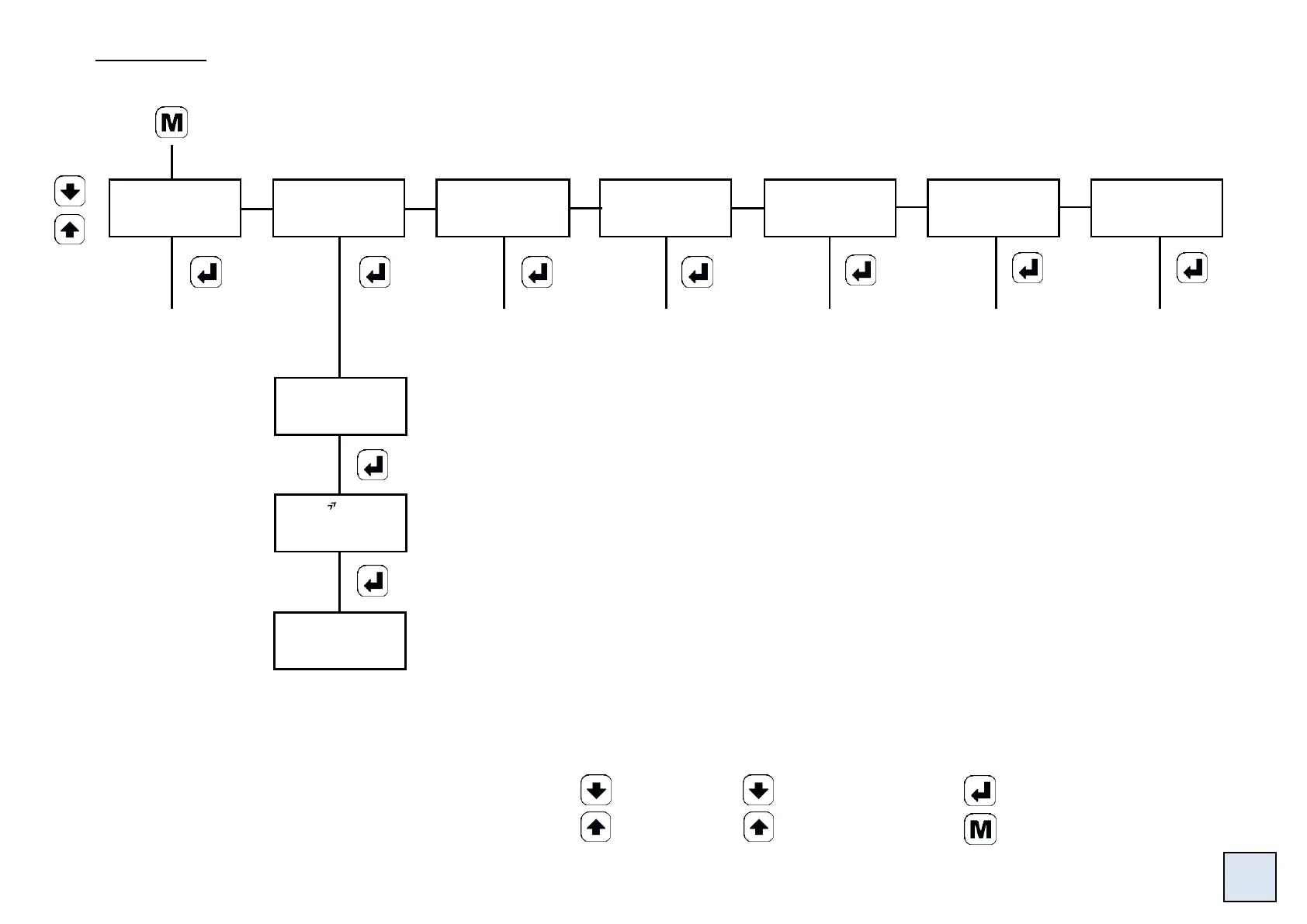
4.3 Main menu
Simulation of
the input, the
display or the
analogue
output.
(see p20)
Authorized by
access code
Scrolling of
the menus
Vertical move /
Validation
Upwards move /
Increase
Downwards move /
Decrease
Menu exit / access
Move through the menus:
rEAd
PrOG
P.COdE
SINUL
FUnCt
SEnS
AbOUt
Mode reading of the
configuration: Access to the same
menus as for the menu PrOG
without access code and without
any possibility to modify the
programming.
Programming of
the access code
(see p19)
Access to the
list of the direct
functions
(see p20)
Access to the
menu setting of
the keyboard
sensitiveness
(see p20)
Access to the
menu
information
about the
product (see
p21)
CodE
0000
If code correct,
access to the
programming
menu (see p9)
Entering of the access code.
The access to the programming menu is
protected by a 4-cipher code.
The code is 0000 on factory exit
(to change the code, see page 19)
p8
gOOd

Related product manuals