13
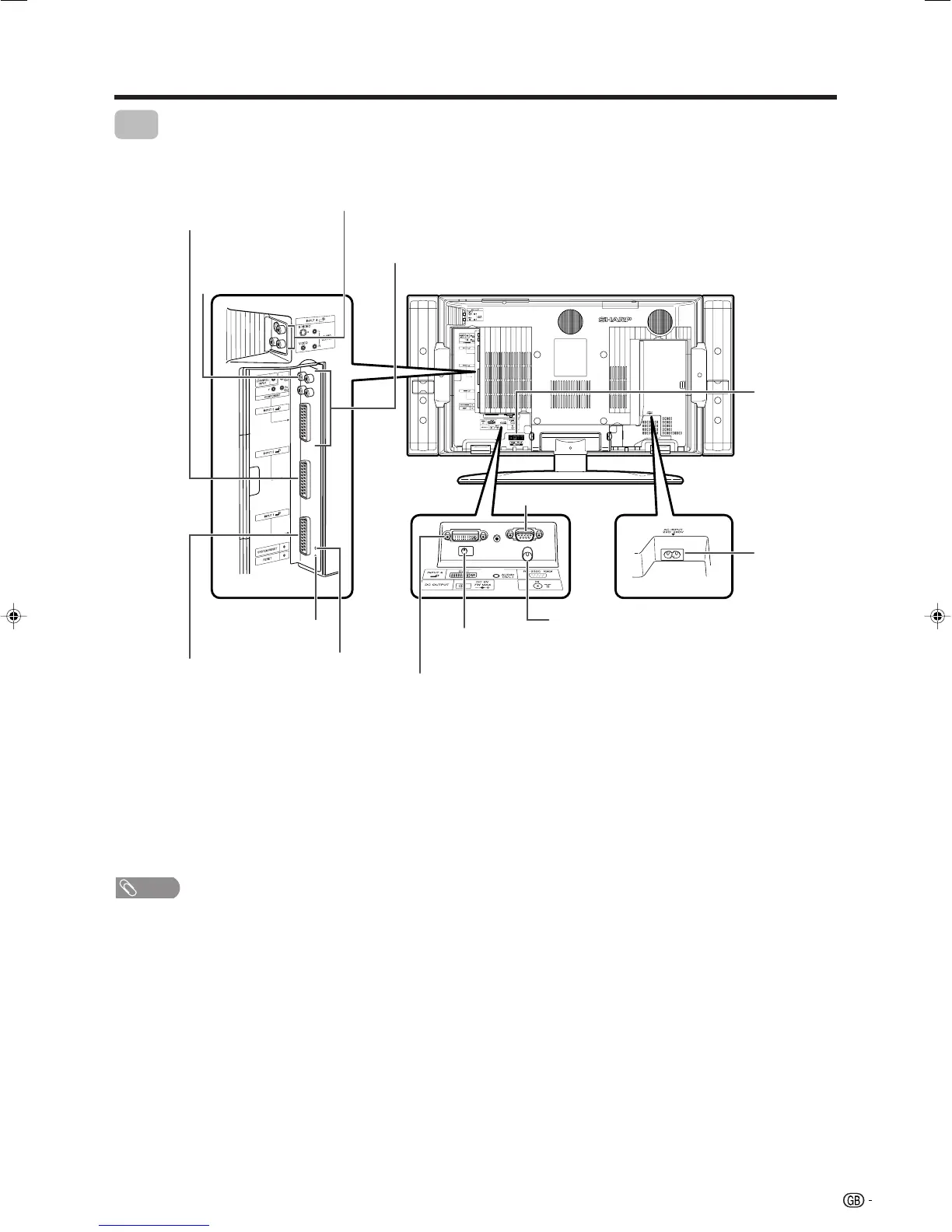
Part names
RESET*
INPUT 3 terminals
SYSTEM RESET**
TV
Antenna input terminal
* Press RESET if the TV cannot return to its original state after performing various operations.
• AV MODE resets to USER.
• Analogue TV channel resets to channel 1.
• Dual picture resets to normal.
• Audio setting initializes.
• Dolby Virtual resets to Off.
• Image position initializes.
** Press SYSTEM RESET if the TV does not operate after starting up.
NOTE
• Pressing RESET will not work if the TV is in standby mode (indicator lights red).
• Pressing RESET will not delete channel preset and PIN. See page 47 for resetting the PIN when you know it. See page 59
for initializing to the factory preset values when you forget your PIN.
DC OUTPUT terminal
(Terminal for expanded
functionality in the near future.)
SPEAKER
terminals
AC INPUT
terminal
RS-232C terminal
INPUT 2 terminal
INPUT 1 terminal
INPUT 5 terminal
CENTRE CHANNEL
INPUT terminal
INPUT 4/
AUDIO OUTPUT terminals
(switchable)
LC-32GA4E(E)-b 04.5.30, 9:06 AM13












 To Next Page