36
Using external equipment
NOTE
• Macintosh adaptor may be required for use for some Macintosh computers.
• When connecting to a PC, the correct input signal type is automatically detected. (See page 44.) If the PC image does
not come in clearly, you may need to set the Auto Sync. adjustment in the “Setup” menu. (See page 38.)
Connecting a PC
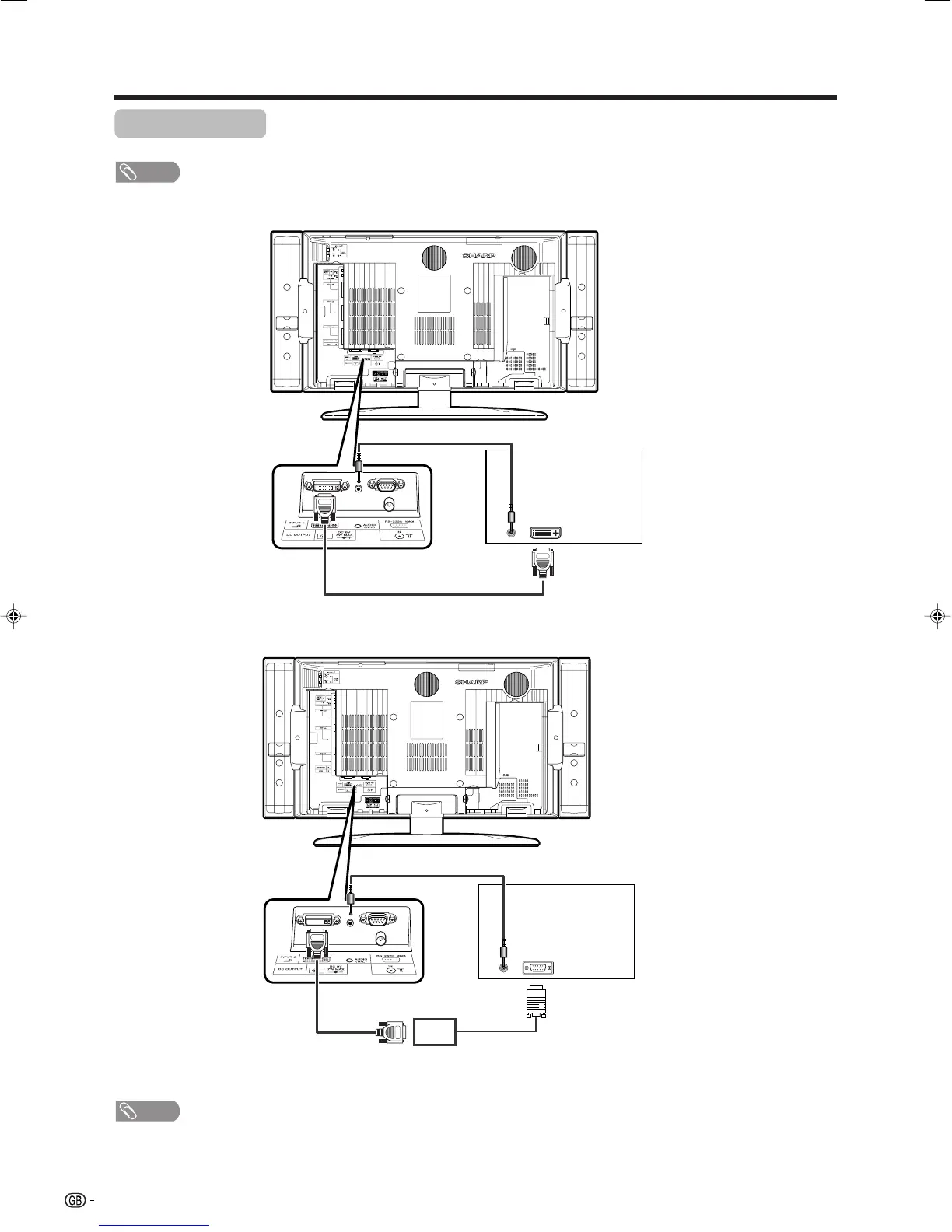
Use the INPUT5 terminals to connect a PC.
NOTE
• The PC input terminals are DDC1/2B-compatible.
• Refer to page 53 for a list of PC signals compatible with the TV.
ø 3.5 mm stereo minijack cable (commercially available)
PC
ø 3.5 mm stereo minijack cable (commercially available)
RGB/DVI conversion cable
(commercially available)
DVI cable
(commercially available)
To watch the image from this
input terminal, you may
select input source (see
page 39) and input signal
type (see page 44).
PC
LC-32GA4E(E)-g 04.5.30, 9:15 AM36












 To Next Page