34
Using external equipment
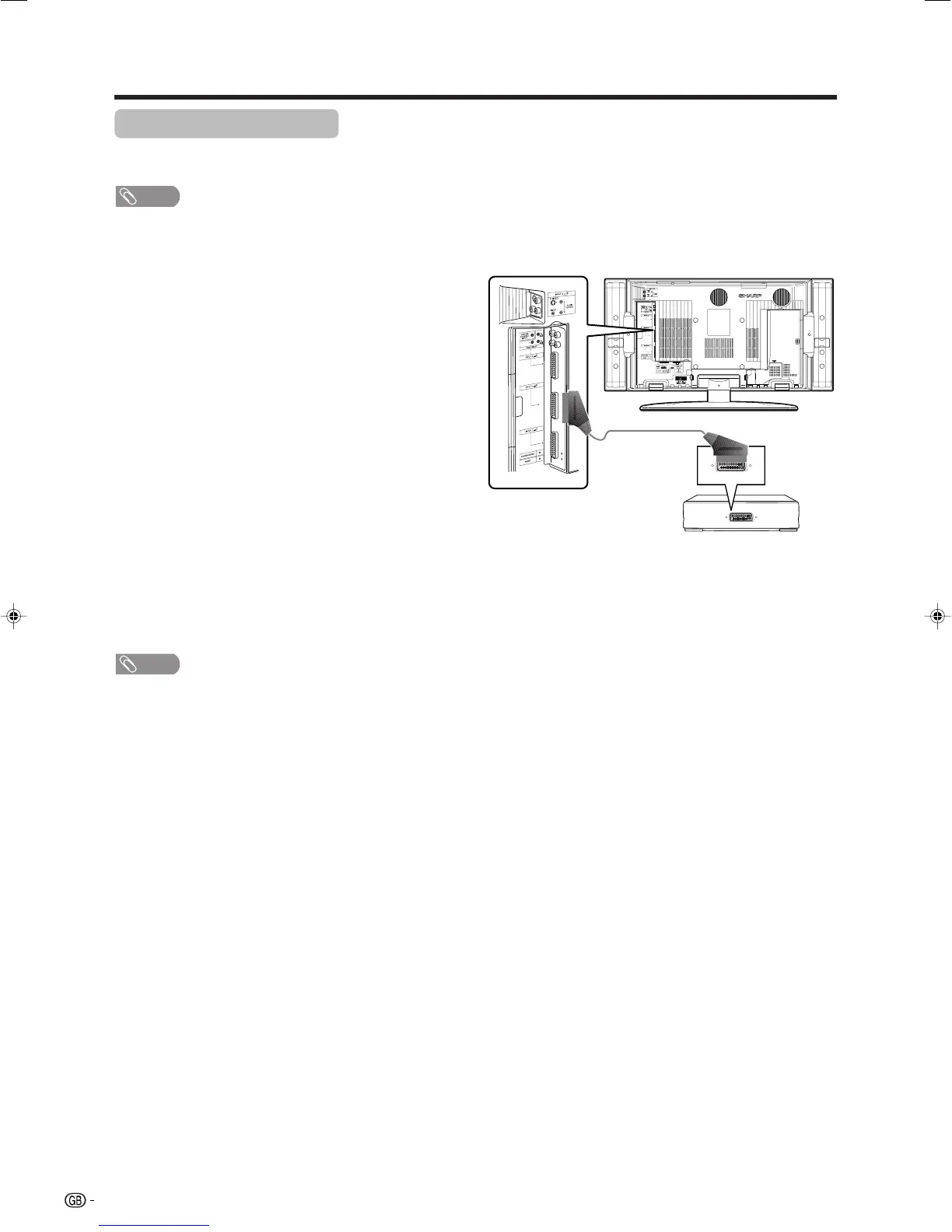
SCART cable
(commercially
available)
VCR
Using AV Link function
This TV incorporates four typical AV Link functions for smooth connections between the TV and other audiovisual
equipment.
NOTE
• Only works when the audiovisual equipment is connected to the INPUT 2 terminal on the TV with AV Link via a fully wired
SCART.
One Touch Play
While the TV is in standby mode, it automatically turns
on and plays back the image from the audiovisual
source (e.g. VCR, DVD).
TV Standby
When the connected audiovisual equipment (e.g. VCR,
DVD) enters standby mode, so does the TV.
WYSIWYR (What You See Is What You Record)
When the remote control unit of the connected VCR
has the WYSIWYR button, you can automatically start
recording by pressing the WYSIWYR button.
Preset Download
Automatically transfers the channel preset information
from the tuner on the TV to the one on the connected
audiovisual equipment (e.g. VCR) via the INPUT 2
terminal.
NOTE
• Refer to operation manuals of each external equipment
for the details.
LC-32GA4E(E)-g 04.5.30, 9:15 AM34












 To Next Page