7
TV (rear view)
Setting the TV
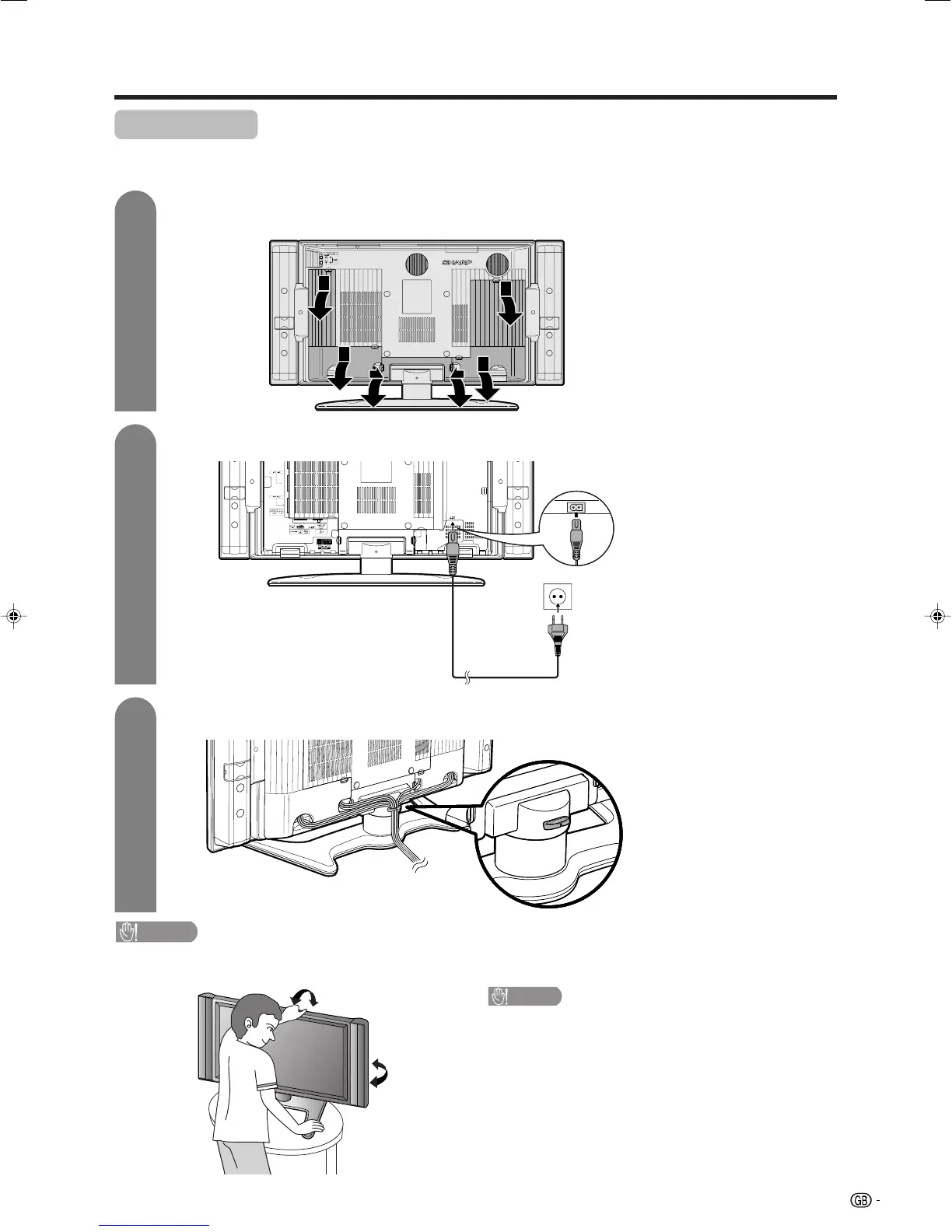
After putting the TV in place, connect the AC cord.
Connecting the AC cord to the TV
1
2
3
Removing the terminal cover
Bundling the cables
CAUTION
• TO PREVENT RISK OF ELECTRIC SHOCK, DO NOT TOUCH UN-INSULATED PARTS OF ANY CABLES WITH THE
AC CORD CONNECTED.
Press down the hooks
to remove the cover
toward you.
AC cord
CAUTION
Adjust the screen with both hands. Put one
hand on the Display and tilt the screen while
steadying the stand with your other hand.
You can adjust the screen vertically up to 2 de-
grees forward or 6 degrees backward, or rotate 20
degrees horizontally.
Product shape varies in some
countries.
Preparation
LC-32GA4E(E)-a 04.5.30, 11:17 AM7












 To Next Page