6
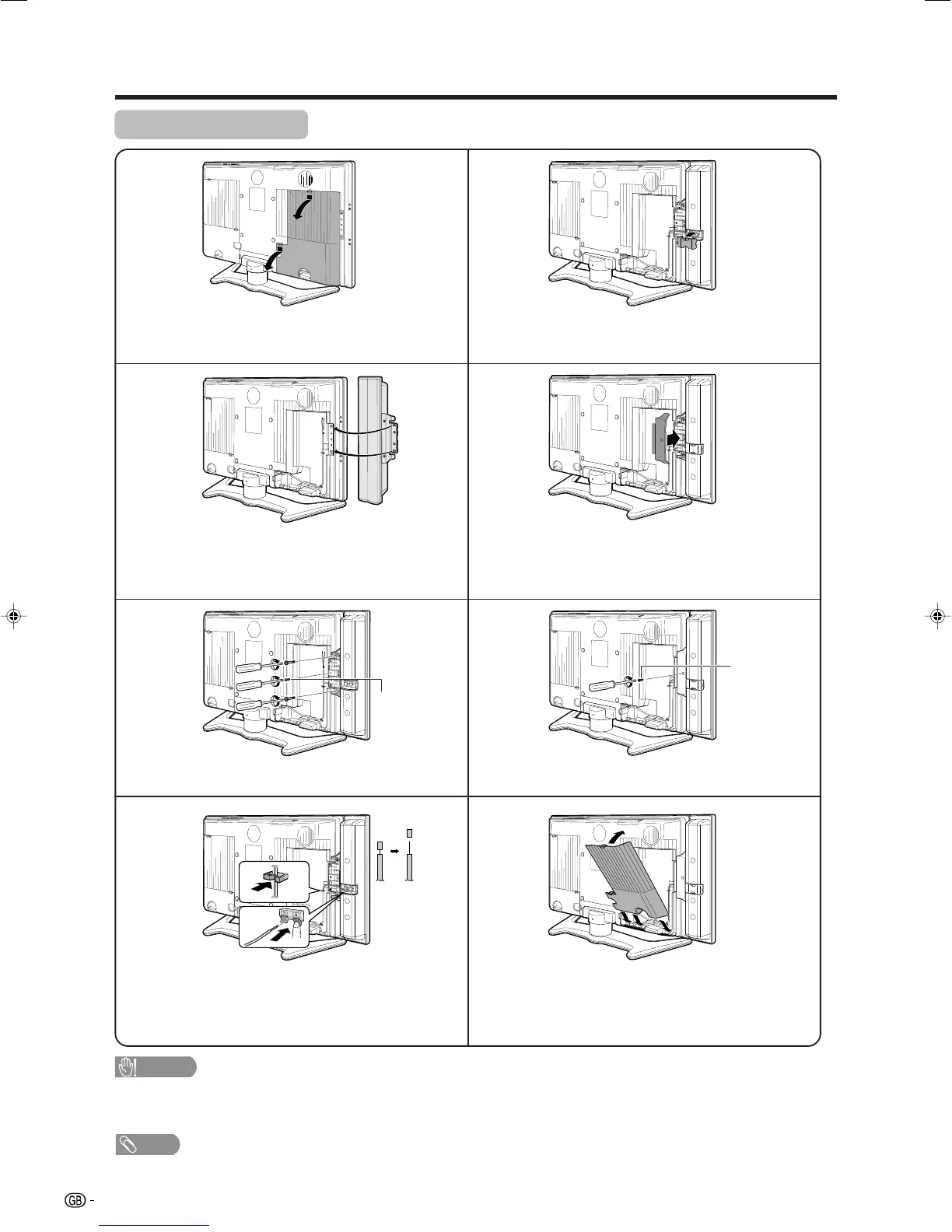
Attaching speakers
NOTE
• Perform the same steps for right speaker.
• To remove the speakers, perform the steps in reverse order.
CAUTION
• Do not remove the stand and speaker from the TV unless using an optional bracket to mount it.
• Before performing work spread cushioning over the base area to lay the TV on. This will prevent it from being
damaged.
1
2
3
6
5
4
7
8
Remove the terminal cover as shown in the
illustration.
Fasten the screw.
Fasten the speaker cable with the holder. Connect
the ends of the cable to the speaker terminals as
shown in the illustration.
Insert the projecting bulges on the side of the
speakers into the corresponding slots in the
display.
Attach the speaker terminal cover.
Fasten the bracket with the screw.
Attach the terminal cover as shown in the
illustration.
Align nub of the bracket with the groove and slot it
into place.
Screw
(BLACK)
Screw
(SILVER)
Preparation
LC-32GA4E(E)-a 04.5.30, 11:17 AM6












 To Next Page