46
Useful adjustment settings
INPUT 4
You can change the terminal settings depending on
the purpose of your usage, such as connecting
recording equipment to the INPUT 4/AUDIO OUTPUT
terminals to record broadcast programs or connecting
a player to play programs.
Press MENU and the MENU screen displays.
1
2
Press a/b to select “INPUT 4”, and then
press OK.
3
Press a/b to select ”AV In”, ”Audio Out
(Fixed)” or “Audio Out (Variable)”, and then
press OK.
4
Description
• Functions as the INPUT 4 terminals.
• Sound via speakers is adjusted with
il/k on the remote control unit or the
Display.
• Sound via the AUDIO OUTPUT terminal is
not adjustable and constantly outputs.
• Sound via the AUDIO OUTPUT terminal is
adjusted with il/k on the remote
control unit or the Display.
• Sound via speakers is muted.
Selected item
AV In
Audio Out
(Fixed)
Audio Out
(Variable)
Press c/d to select “Option”.
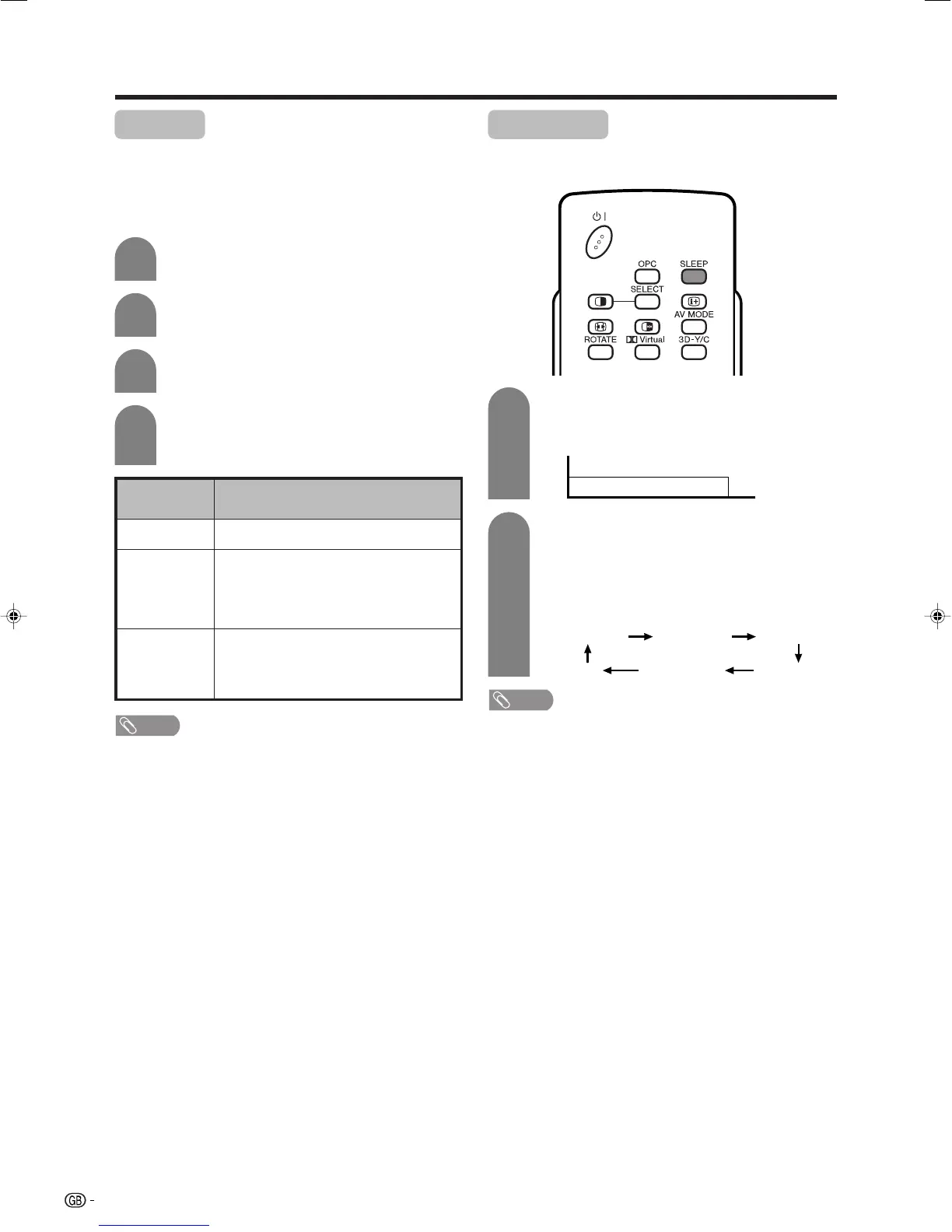
Sleep timer
Allows you to set a time when the TV automatically
switches to standby.
0 hr. 30 min. 1 hr. 00 min. 1 hr. 30 min.
2 hr. 30 min. 2 hr. 00 min.
Off
Each time you press SLEEP, the remaining
time switches as shown below.
• When the time has been set, countdown
automatically starts.
• Five minutes before the preset of time expires,
the remaining time displays each minute.
Press SLEEP.
• Remaining time displays when sleep timer has
been set.
Sleep Timer: Remain 2 hr. 00 min.
1
2
NOTE
• Select “Off” by pressing SLEEP to cancel the sleep timer.
NOTE
• ”INPUT 4” is greyed out when “Audio Out (Fixed)” or
“Audio Out (Variable)” is selected.
LC-32GA4E(E)-i 04.7.2, 8:13 AM46













 To Next Page