47
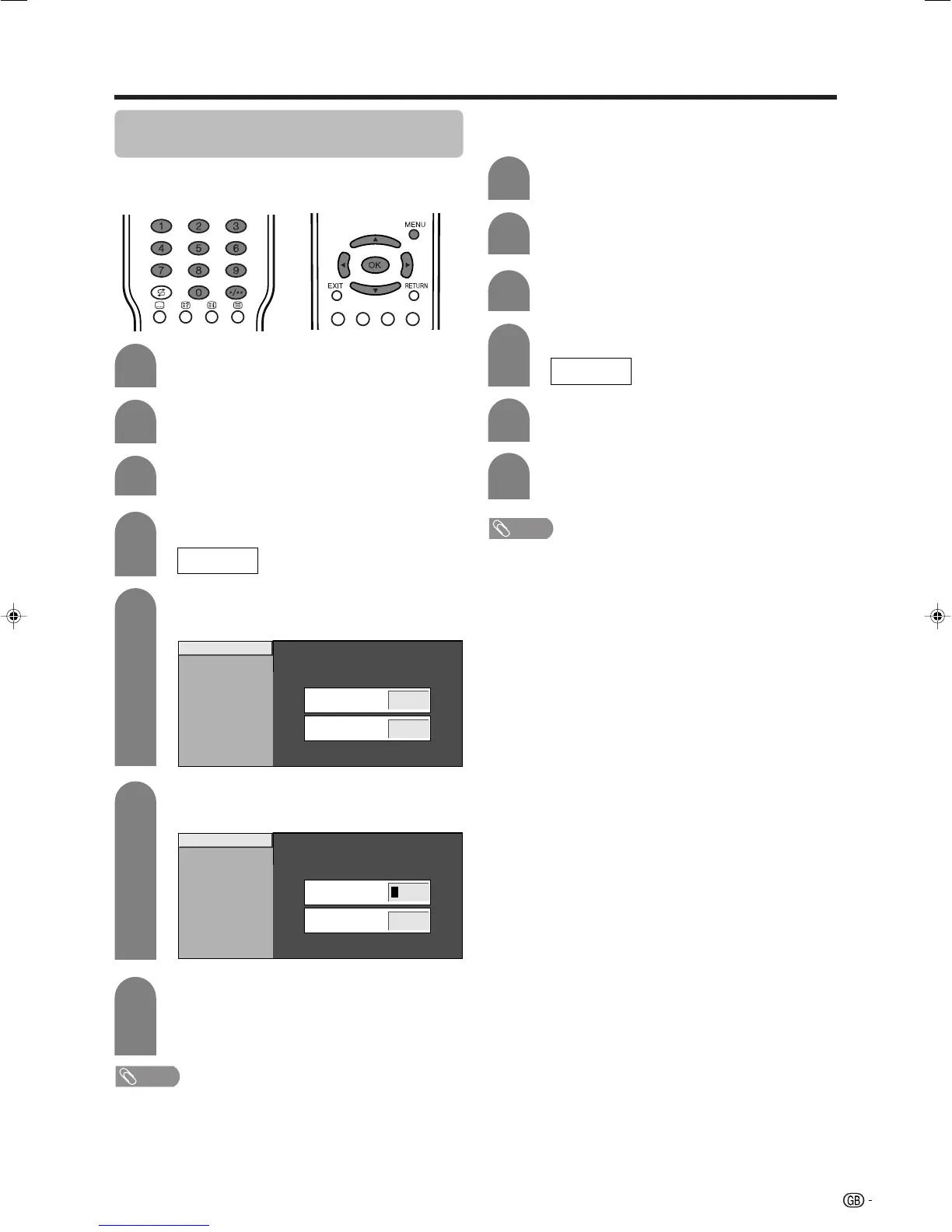
PIN setting for child lock (for TV/AV
input mode)
Allows you to use a PIN to protect certain settings from
being accidentally changed.
Press MENU and the MENU screen displays.
1
2
3
Press a/b to select “Child Lock”, and then
press OK.
5
6
Enter the 4-digit number as a PIN using 0 –
9.
Press a/b to select “Change PIN”, and then
press OK.
Enter the same 4-digit number as in step 6
to confirm.
• “The system PIN has been changed
successfully” displays.
7
NOTE
• To view a locked channel (Lock setting in Programme
Setup “Manual Adjust” is set to “On”), you must enter a
PIN. (See page 24.) When you select a locked channel, a
PIN prompt message pops up. Press OK to display the
PIN input window.
Press c/d to select “Setup”.
Useful adjustment settings
Resetting the PIN
Allows you to reset your PIN.
Press a/b to select “Child Lock”, and then
press OK.
Press a/b to select “Cancel PIN”, and then
press OK.
Press c/d to select “Yes”, and then press
OK.
Press MENU and the MENU screen displays.
Press c/d to select “Setup”.
NOTE
• As a precautionary measure, make a note of your PIN
and keep it in a familiar place. If you lose or forget
your PIN, initialise the TV to return all settings except
for the TV channel settings to factory preset values.
(See page 59.)
• This function is available for TV tuner mode.
New PIN
–––
Reconfirm
––––
–
Change PIN
Cancel PIN
New PIN
–––
Reconfirm
––––
–
Change PIN
Cancel PIN
2
3
5
6
1
4
If you already set the PIN, enter it here.
4
Enter the PIN.
––––
––––
LC-32GA4E(E)-i 04.5.30, 9:25 AM47













 To Next Page