MX-M350/M450 N/U SPECIFICATIONS 3 - 3
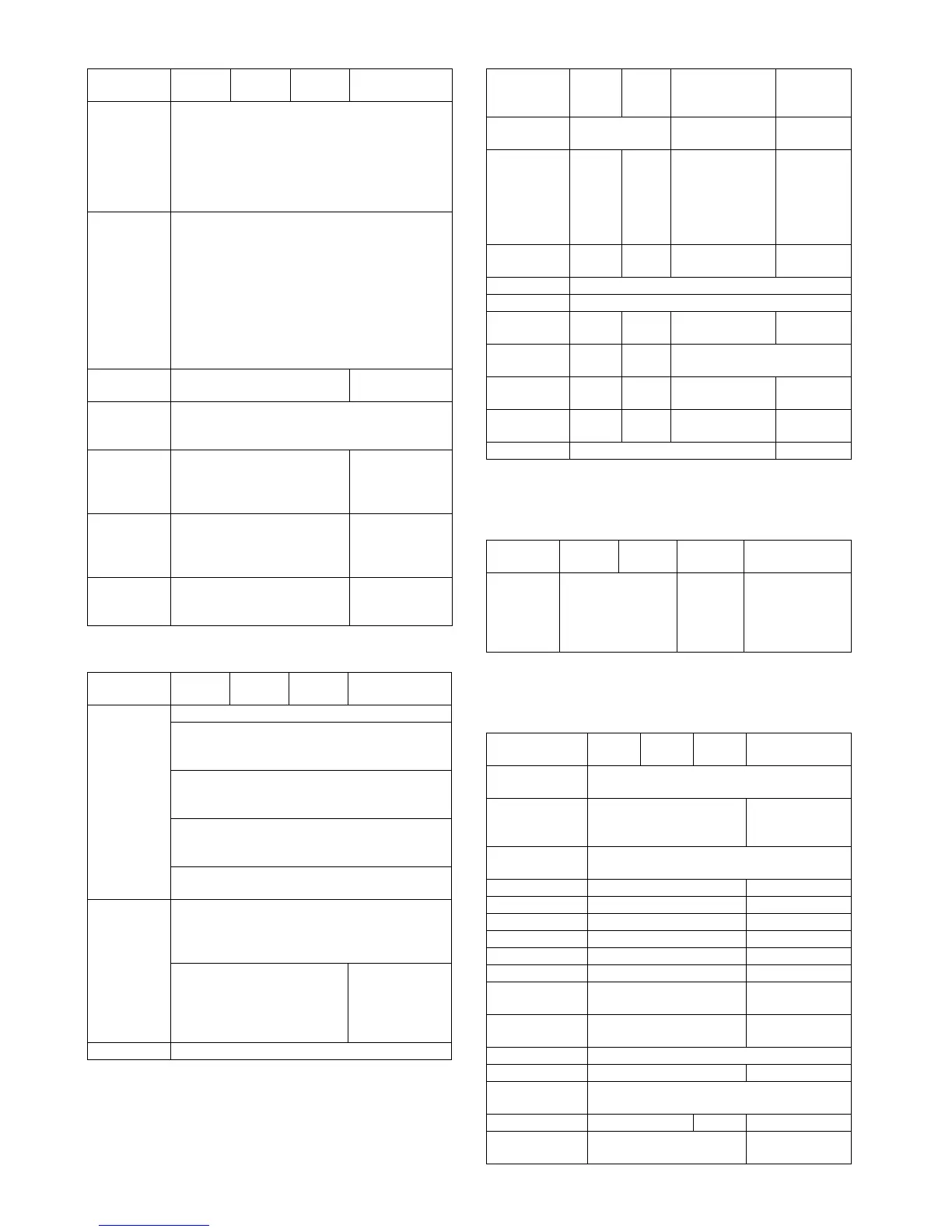
b. Paper Input
*1: For printing, PS driver bundled with the Windows is required.
c. Paper Output
*1: For printing, PS driver bundled with the Windows is required.
d. Graphic
*1: For printing, PS driver bundled with the Windows is required.
*2: Since the function is of PS driver bundled with Windows, spec-
ification may vary according to the OS.
e. Font
*1: For printing, PS driver bundled with the Windows is required.
*2: Since the function is of PS driver bundled with Windows, spec-
ification may vary according to the OS.
f. Others
Function PCL5e PCL6 PS
PPD file *1
(for Windows XP)
Paper size A3 / B4 / A4 / B5 /
A5 / Ledger /
Legal / Foolscap /
Letter / Executive
/Invoice/8k / 16k
/COM10/C5/
Monarch/DL
Paper type Plain
Letter Head
Pre-Print
Pre-Punch
Recycle
Color
Label
Heavy Paper
Transparency
Envelope
Custom
paper type
7 type –
Source
selection
Automatic
Tray 1/2/3/4
Bypass-tray
Cover Yes/No
User can select from
1-sided/2-sided/
No print
–
Insert page Yes/No
User can select from
1-sided/2-sided/
No print
–
Transparency
inserts
No
Yes (Blank)
Yes (Printed)
–
Function PCL5e PCL6 PS
PPD file *1
(for Windows XP)
Output tray
selection
Center tray
Finisher
• Top tray
• Offset tray
Saddle Stitch
Finisher
• Offset tray
Mailbin stacker
• Mailbin top tray
• Mailbin (1-7)
Duplex module
• Left tray
Staple Finisher
• No staple
•1 staple
• 2 staples
Saddle Stitch
Finisher
• No staple
•1 staple
• 2 staples
Saddle Stitch
Finisher
• No staple
• 1 staple
• 2 staples
Offset cancel Yes/No
Function PCL5e PCL6 PS
PPD file *1
(for Windows
XP)
Resolution
setting
600/300 dpi 600dpi 600dpi
Halftone
setting
– No Screen frequency
8.0 to 360.0
in 0.1 steps
Screen angle
0.0 to 360.0
in 0.1 steps
–
Graphics
mode
Raster
HP-GL2
Raster
Vector
––
Smoothing Yes/No
Toner save Yes / No
Photo
enhancement
–Yes/No – –
Negative
image
––Yes / No
Mirror image – – Horizontal
Vertical
Horizontal
(*2)
Zoom – – 25-400%
(XY zoom)
1-1000%
(*2)
Fit to page Yes / No –
Function PCL5e PCL6 PS
PPD file *1
(for Windows XP)
Download
font
Bitmap
Tr u eTy pe
Bitmap
Type1
TrueType
Auto
Outline
Bitmap
Native TrueType
(*2)
Function PCL5e PCL6 PS
PPD file *1
(for Windows XP)
Configuration
setting
Ye s
Watermark Yes Yes
(functionality is
limited)
Line width
setting
–
Form overlay Yes –
Print hold Yes –
Confidential print Yes –
Sample print Yes –
Print accounting Yes –
Quick sets Yes –
Auto
configuration
Ye s –
Job end
notification
Ye s –
Tandem print Yes
Carbon print Yes –
Multi-
enlargement
–
XY zoom – Yes –
Cover insert +
pamphlet
Ye s –



 To Next Page