28
PG-C30XU
No. Adjusting point Adjusting conditions Adjusting procedure
17 Video AGC 1.
Feed the split color bar signal.
Group : VIDEO 1
Subject : AGC
» Using the control switches or the remote controller
buttons, adjust the setting until the white signal
becomes bit-less.
16 Video
brightness
adjustment
1. Feed the baseband (split
color bar) signal. (The ON-
AIR signal is not accepted
because of its too much
noise.)
Group : VIDEO 2
Subject :
VROS/VGOS/VBOS
2. Press the control switch or
the remote control’s mute
button (to set the gamma
correction to the process
setting).
» Using the control switches or the remote controller
buttons, adjust the setting until the black signal
becomes bit-less.
18 Tint 1. Feed the split color bar sig-
nal.
Group : VIDEO 1
Subject : TINT
2. Connect the oscilloscope to
pin (4) of P801.
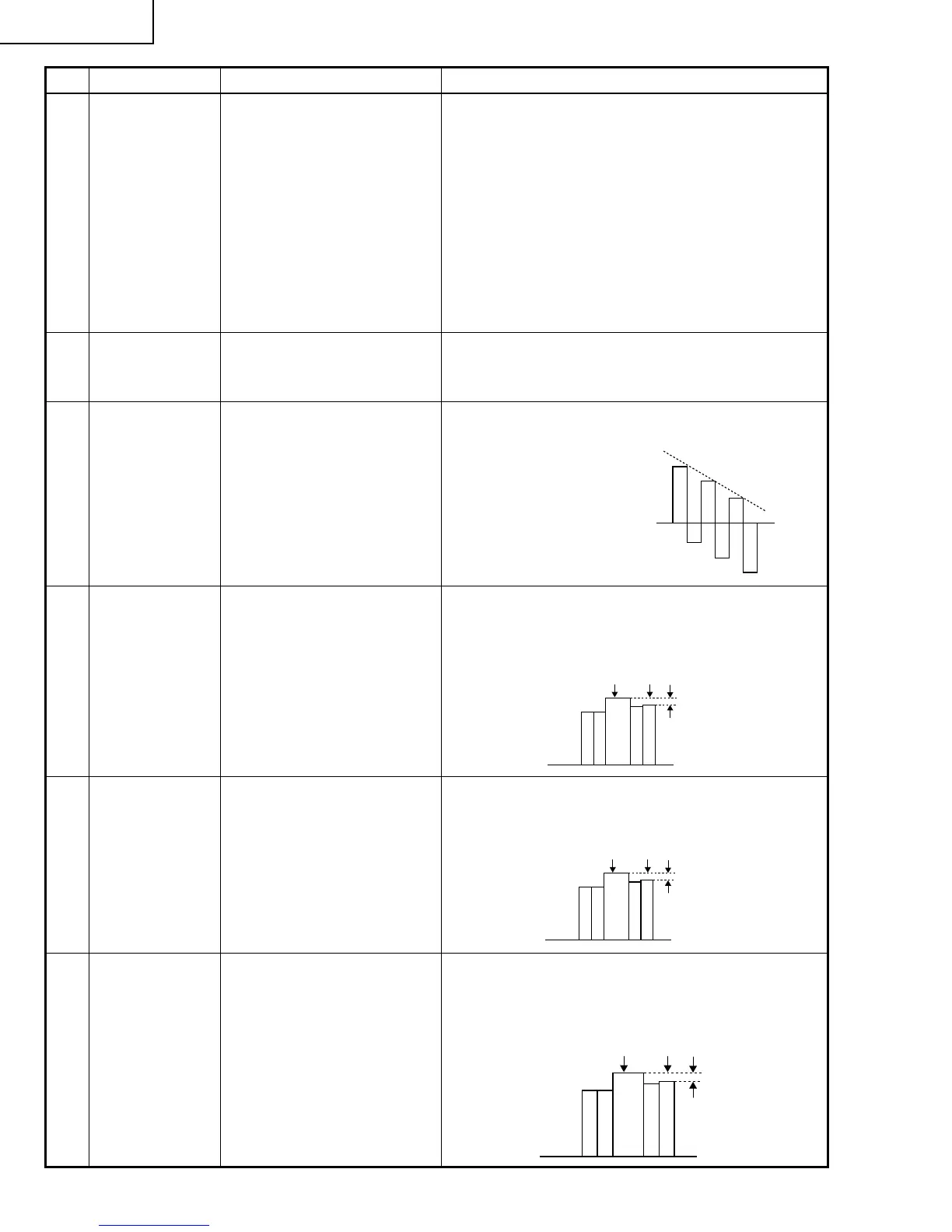
» Using the control switches or the remote controller
buttons, adjust the data to have the -(B-Y) wave-
form downhill straight.
19 NTSC color
saturation level
1. Feed the split color bar sig-
nal.
Group : VIDEO 1
Subject : N-COLOR
2. Connect the oscilloscope to
pin (1) of P801.
» Using the control switches or the remote controller
buttons, adjust the difference between the 100%
white portion and the red portion to 0.00 ±0.05 Vp-p.
(same as 100% white)
20 PAL color
saturation level
1. Feed the PAL color bar sig-
nal.
Group : VIDEO 1
Subject : P-COLOR
2. Connect the oscilloscope to
pin (1) of P801.
» Using the control switches or the remote controller
buttons, adjust the difference between the 100%
white portion and the red portion to 0.2 ±0.05 Vp-p.
100% White Red
21 SECAM color
saturation level
1. Feed the SECAM color bar
signal.
Group : VIDEO 1
Subject : S-COLOR
2. Connect the oscilloscope to
pin (1) of P801.
» Using the control switches or the remote controller
buttons, adjust the data to have a level difference
of 0.2 ±0.05 Vp-p between the 100% white portion
and the red portion.
100% White Red
» After adjusting, adjust the value
of TINT up 3 point.





 To Next Page