PN-K321/K322B SERVICE MENU/VARIOUS SETTING TOOL OPERATING PROCEDURES 4 - 6
4 – 3. METHOD3
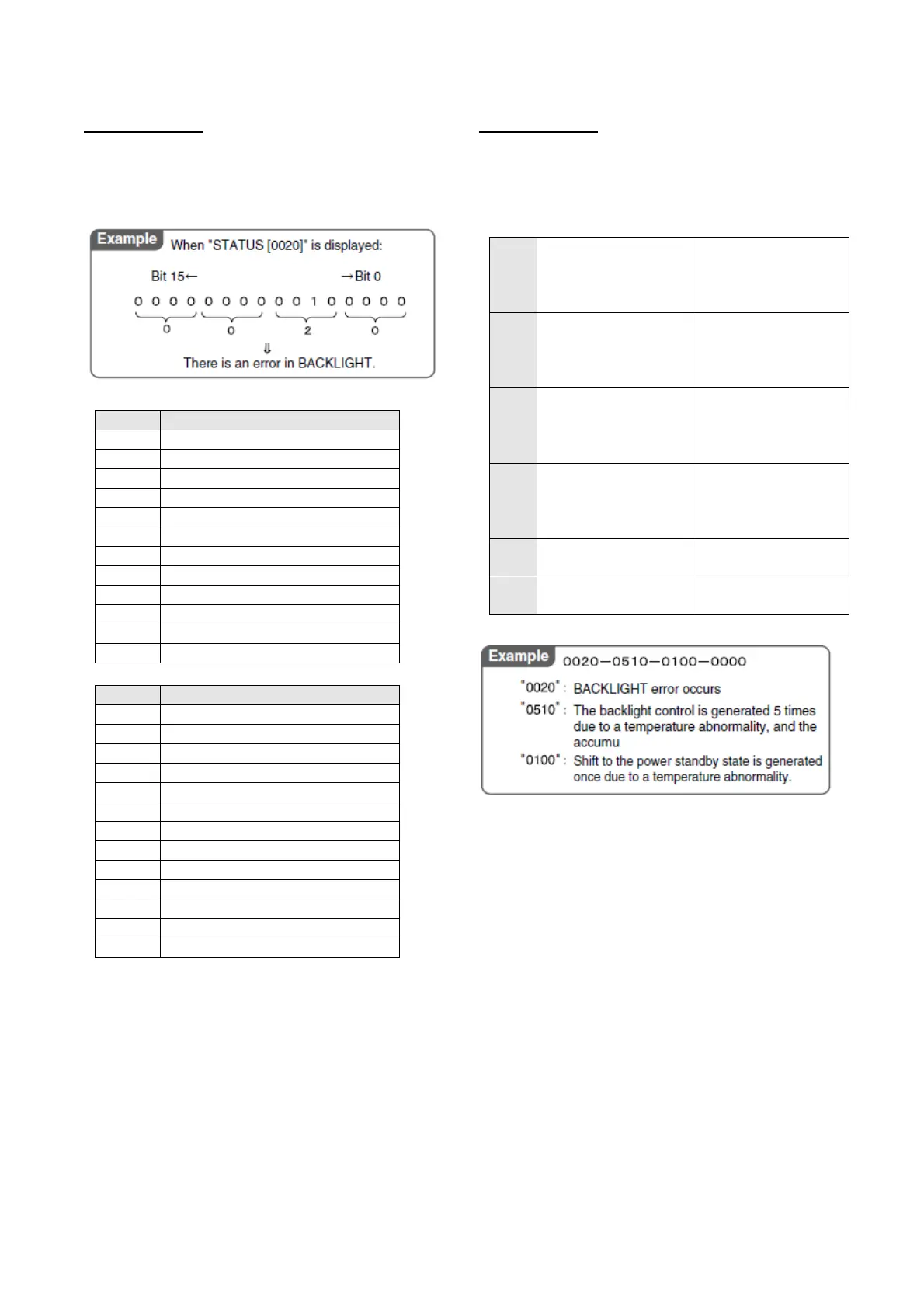
Check with the "STATUS[XXXX]" number.
1) When an error occurs, four-digit figures are displayed after the
message of "STATUS" on the left lower section of the screen.
They are assigned as follows.
Bit PN-K321
0 SYSTEM POWER1
1 SYSTEM POWER2
2 SYSTEM POWER3
3 SYSTEM POWER4
4 Reserved
5 BACKLIGHT
6 – 10 Reserved
11 Over current
12 AC_DET abnormality
13 Reserved
14 Temperature sensor abnormality
15 Temperature abnormality
Bit PN-K322B
0 SYSTEM POWER1
1 SYSTEM POWER2
2 SYSTEM POWER3
3 SYSTEM POWER4
4 Reserved
5 BACKLIGHT
6 TOUCH SENSOR
7 – 10 Reserved
11 Over current
12 AC_DET abnormality
13 Reserved
14 Temperature sensor abnormality
15 Temperature abnormality
4 – 4. METHOD4
Check with the item of “STATUS” on the “Product information
(INFORMATION)” screen.
When [Other] menu is pressed, the “INFORMATION” screen is
displayed. Check with the “STATUS” item on the screen.
It takes some time necessary for judgment of a temperature
abnormality and a hardware abnormality as shown below:
*Temperature abnormality:
Min. 2 minutes (Exceeding the threshold value 3 times
continuously in the interval of 1 minute).
*Hardware abnormality:
Min. 18 seconds (Exceeding the threshold value 4 times
continuously in the interval of 6 seconds).
Though, therefore, the threshold value is exceeded on the
"HARDWARE CHECK" screen of SERVICE MANU 2 or in the
periodic send/test mail, "OK" may be displayed.
In addition, when "NG" judgment is made once, "NG" state is
maintained until the power is turned OFF/ON. Even if, therefore,
the target value is reduced below the threshold value, the
judgment may be "NG" with a normal value.
A Hardware monitoring
result
The error detection
position is displayed with
the same number as the
" 4 - 3 METHOD 3".
B
The number of controls
of the backlight when a
temperature abnormality
occurs
Displayed in 2 digits.
For more than 99 times,
"99" is displayed.
C
Accumulated control time
of the backlight when a
temperature abnormality
occurs
Displayed in 2 digits.
For more than 99 hours,
"99" is displayed.
D
Number of shifts to the
power standby state
when a temperature
abnormality occurs
Displayed in 2 digits.
For more than 99 times,
"99" is displayed.
E
Reserved
(Not used for this time)
F
Reserved
(Not used for this time)



 To Next Page