EasyManua.ls Logo

Sharp SF-2022 - Page 65

Sharp SF-2022
76 pages
Print Icon
To Next Page IconTo Next Page
To Previous Page IconTo Previous Page
Loading...
20-BIN
STAPLE
SORTER
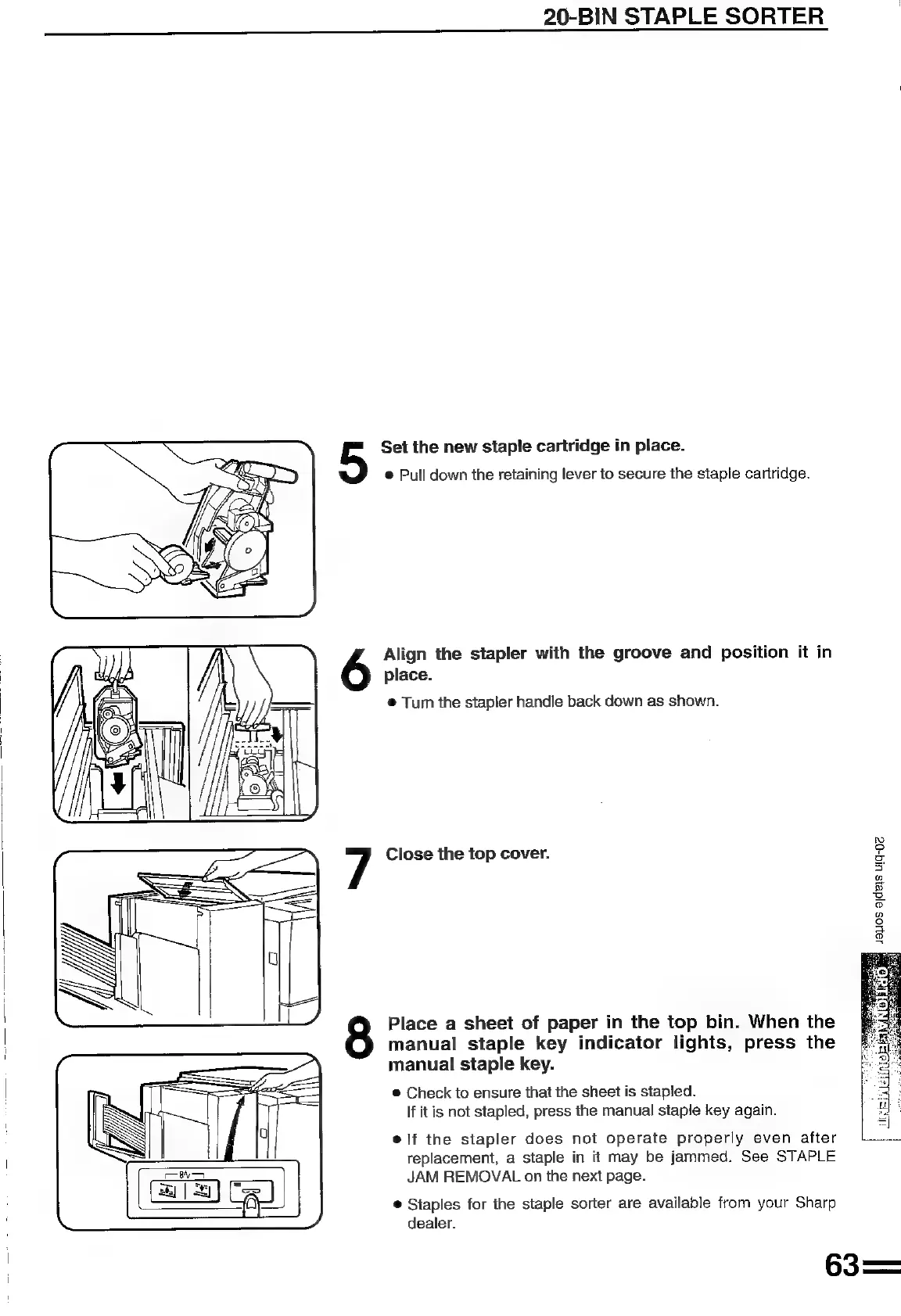
Set the
new
staple
cartridge
in
place.
@
Pull
down
the
retaining
lever
to
secure
the
staple
cartridge.
Align
the
stapler
with
the
groove
and
position
it
in
place.
®
Turn
the
stapler
handle
back
down
as
shown.
Close
the
top
cover.
©
2
2;
5
g
ay
=a
oO
2
°
a
2
Place
a
sheet
of
paper
in
the
top
bin.
When
the
manual
staple
key
indicator
lights,
press
the
manual
staple
key.
®
Check
to
ensure
that
the
sheet
is
stapled.
If
itis
not
stapled,
press
the
manual
staple
key
again.
@
lf
the
stapler
does
not
operate
properly
even
after
replacement,
a
staple
in
it
may
be
jammed.
See
STAPLE
JAM
REMOVAL
on
the
next
page.
@
Staples
for
the
staple
sorter
are
available
from
your
Sharp
dealer.

Related product manuals