85
SmartMedia Card Features
Playback
SmartMedia Card
Features
Folder of still images
Transferring the Data on a
SmartMedia Card to a
Computer
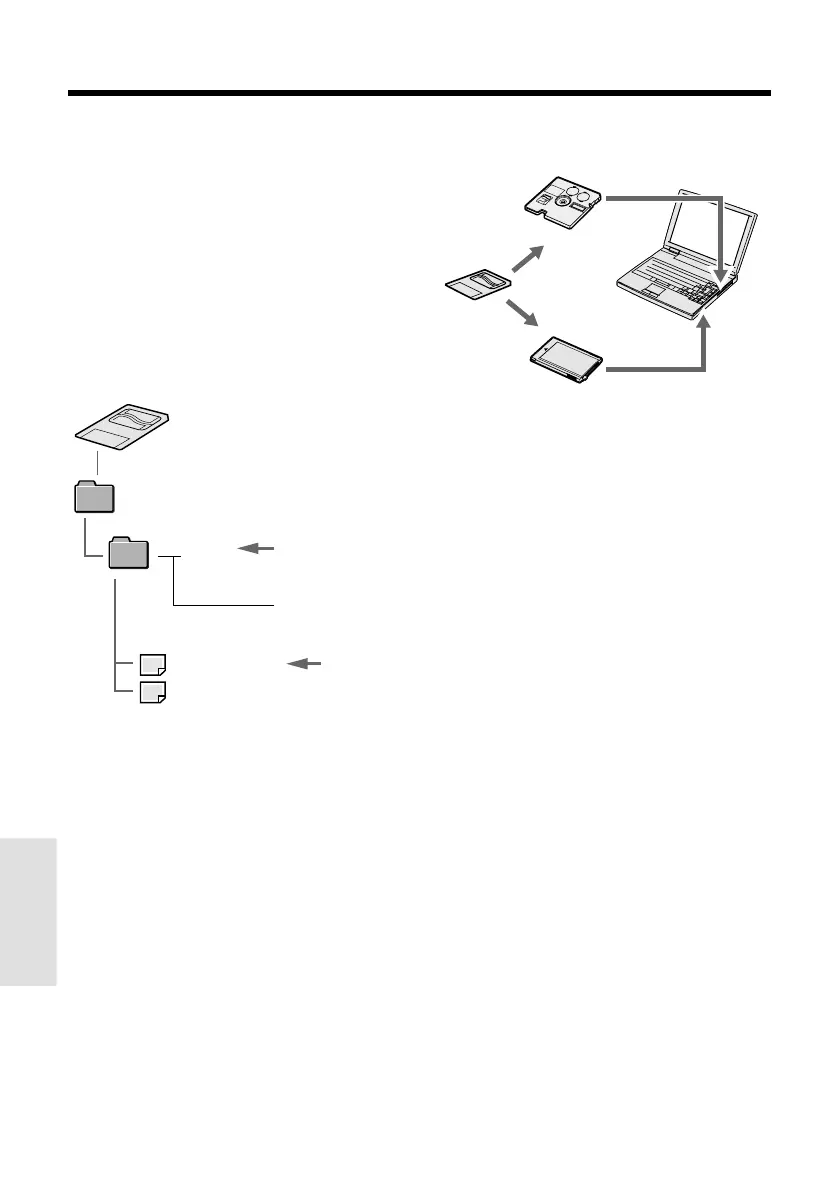
In addition to using the supplied PC connect-
ing cable, it is possible to directly transfer still
images on the SmartMedia card by using a
commercially available floppy disk adapter or
PC card adapter.
Adapters for the SmartMedia Card
DCIM
100SHARP
DVC00001.JPG
DVC00002.JPG
••••••
Notes:
• Be careful when using a floppy disk adapter as it
is possible to write and erase data even when a
write-protect seal is affixed to the SmartMedia
card.
• Remove the write-protect seal from the
SmartMedia card before inserting the card to a
PC card adapter.
• For details, see the operation manuals of the
computer, floppy disk adapter, and PC card
adapter.
Sub-folder of still
images
Serial number
(100 to 999)
Still image
Via a floppy
disk adapter
To floppy
disk drive
Via a PC card
adapter
To PC card
slot
Image Folders and File Names
Still images recorded using the camcorder are
stored on a SmartMedia card as shown below.










 To Next Page