81
SmartMedia Card Features
Playback
SmartMedia Card
Features
Deleting One Stored Image
You can delete unwanted images to free up
memory of a SmartMedia card for new images.
Note:
• Deleted images cannot be restored. Check
whether or not you want the images before
performing the procedure below.
1 In CARD-VCR mode, press the MENU/
DISPLAY button until the menu screen
appears.
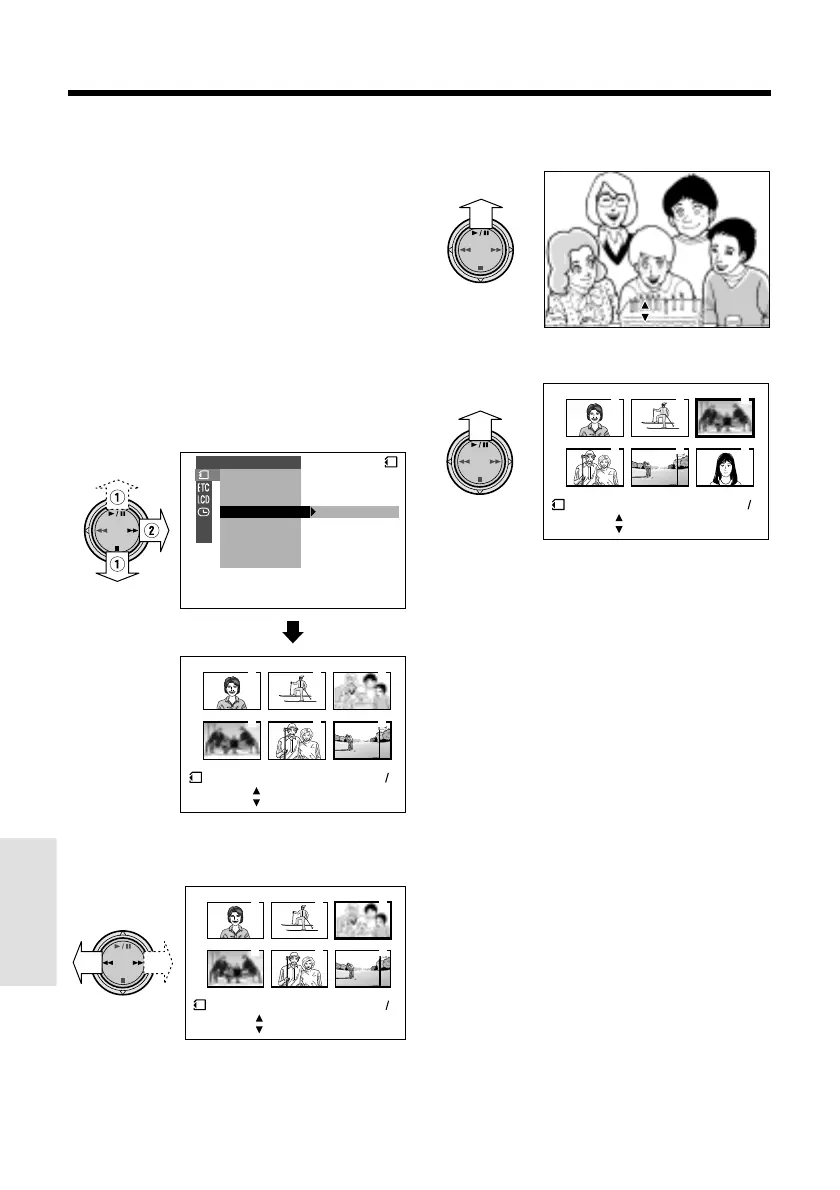
2 Select S, then press r on the
Operation button. Select “DELETE” (1),
then press r (2).
3 Press e or r to select the image to
be deleted.
4 Press y to set the image.
• To cancel deletion, press d.
3
6
2
5
1
4
DELETE
SL IDE SHO
W
EFFECTPIC.
DELETE
PROTECT
PRI. ORDER
DELETE ALL
PLAYBACK SET
CARD
100 0006-
SET
[ BU
TTON]
[ BU
TTON]
END
SET
[ BUTTON]
[ BUTTON]
NORMAL
21
3
6
2
5
1
4
DELETE
100 0003-
CANCEL
SET
[ BUTTON]
[ BUTTON]
END
SET
[ BUTTON]
[ BUTTON]
NORMAL
21
5 Press y to delete the image.
• If you want to delete another image,
repeat steps 3 to 5.
6 Press d, then press the MENU/
DISPLAY button to turn off the menu
screen.
Caution:
• Do not turn the power off while deleting an
image.
DEL E TE
DEL E TE ?
YES [ BUTTON]
NO [ BUT TON]
DELETE
DELETE ?
YES [ BUTTON]
NO [ BUTTON]
100 0003-
NORMAL
3
6
2
5
1
4
21
SET
[ BUT TON]
[ BUT TON]
END
DELETE
SET
[ BUTTON]
[ BUTTON]
Notes:
• The protected images cannot be deleted.
Cancel the protection setting to delete the image
(see page 80).
• You cannot delete images on the SmartMedia
card with a write-protect seal affixed.










 To Next Page