34
Useful Features
Gain-up
When you are recording in a dark or poorly-
illuminated location, “LIGHT” is displayed on
the screen. Use the gain-up function to record
a brighter picture.
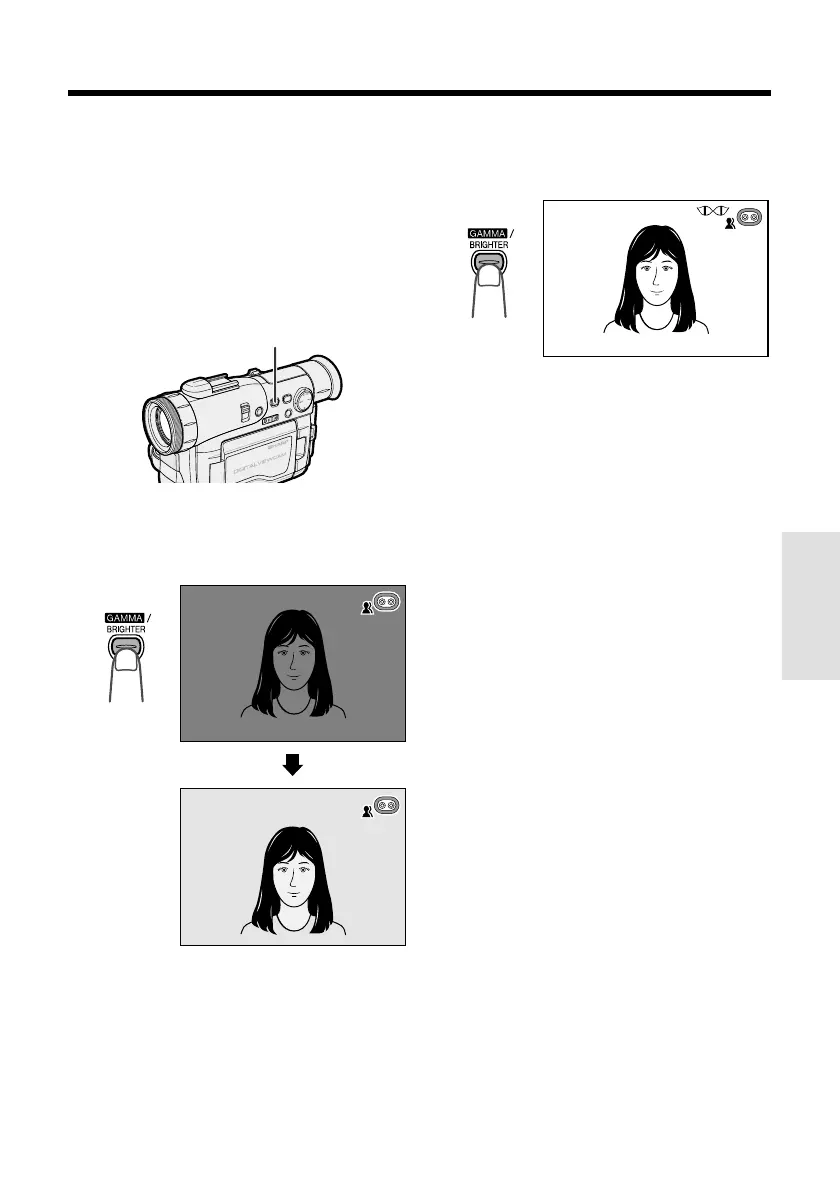
GAMMA/BRIGHTER button
Note:
• At locations where lighting is adequate, “LIGHT”
will not appear. The gain-up function cannot be
used in this case.
In TAPE-CAMERA or CARD-CAMERA mode,
press the GAMMA/BRIGHTER button once.
•“GAMMA” appears, indicating that the gain-up
function is now working.
AUT
O
AUTO
GAMMA
AUTO
AUTO
GAMMA
L IGHTLIGHT
L IGHTLIGHT
To obtain a brighter picture
Press the GAMMA/BRIGHTER button again.
• The ` indicator appears.
To cancel the gain-up function
Press the GAMMA/BRIGHTER button until
“GAMMA” disappears.
Notes:
• Some picture noise appears in Gain-up mode.
The picture noise increases when the `
indicator is displayed.
• When the ` indicator is displayed, a
residual image may appear behind a subject
that exhibits a lot of movement.
• Fine brightness adjustment is possible using the
manual exposure function (see page 51).










 To Next Page