53
Advanced Features
Camera Recording
Advanced Features
Digital Picture Effects
These digital picture effects let you record the
subject with a more dramatic effect.
Type of Digital Picture Effects
B/W: To record in black-and-white.
SEPIA: To record in sepia color similar to that
of an old photograph.
MOSAIC: To record a picture divided up into
tiles.
SOLARI: To record with enhanced contrast,
creating a unique artistic image.
NEGA: To record a picture whose blacks and
whites of the image are reversed and colors
of the image are inverted.
1 Set the camcorder to TAPE-CAMERA or
CARD-CAMERA mode.
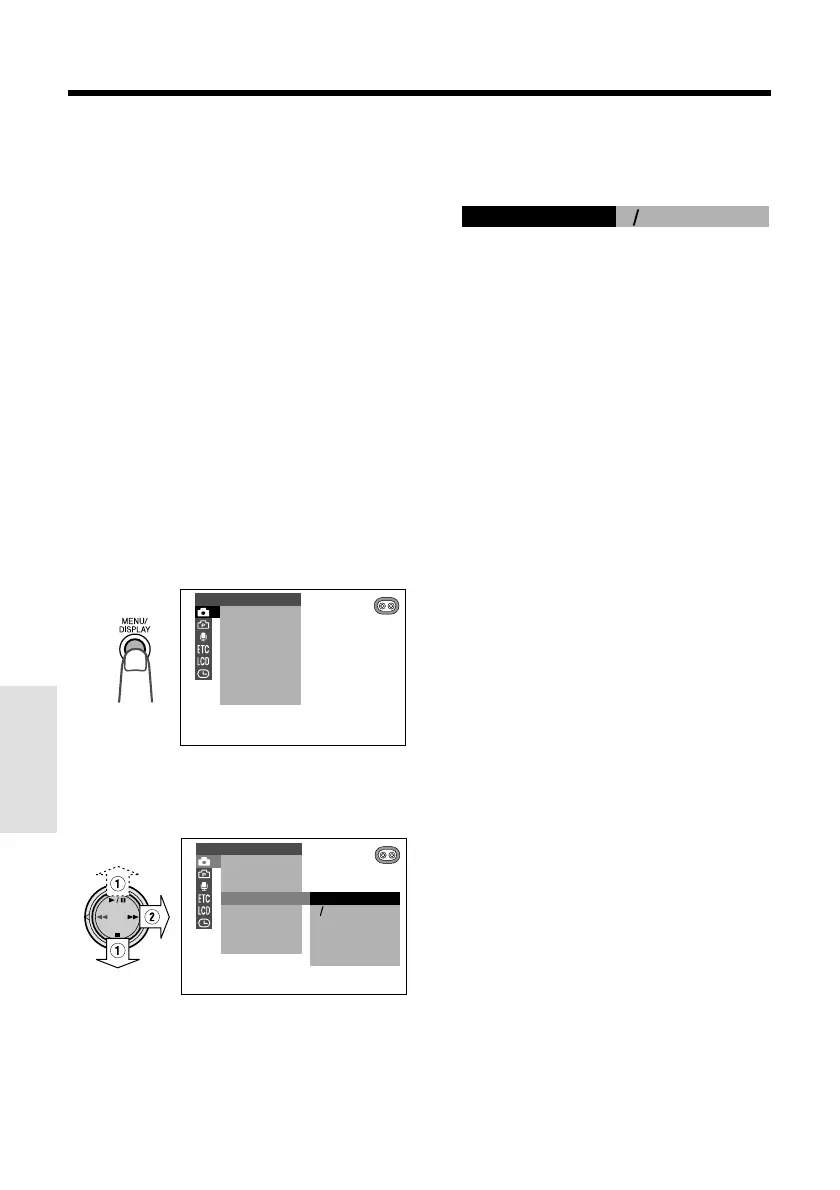
2 Press the MENU/DISPLAY button until
the menu screen appears.
3 Select T, then press r on the
Operation button. Select “PIC. EFFECT”
(1), then press r (2).
4 Press d or y to select the desired
digital picture effect, then press e.
• The selected digital picture effect is
displayed on the menu screen.
5 Press the MENU/DISPLAY button to
turn off the menu screen.
To cancel the digital picture effect
Select “OFF” in step 4 above.
OFF
BW
SEPIA
SOLARI
NEGA
M
OSAI C
M
AN. FOCUS
EXPOSURE
SHUT. SPEED
PIC. EFFECT
SCENE MENU
FADE
QK. RETURN
DIS
MANUAL SET
BW
PIC. EFFECT
M
AN. FOCUS
EXPOSURE
SHUT. SPEED
PIC. EFFECT
SCENE MENU
FADE
QK. RETURN
DIS
MANUAL SET
Note:
• Digital picture effects cannot be used when a
still image is displayed.










 To Next Page