48
Advanced Features
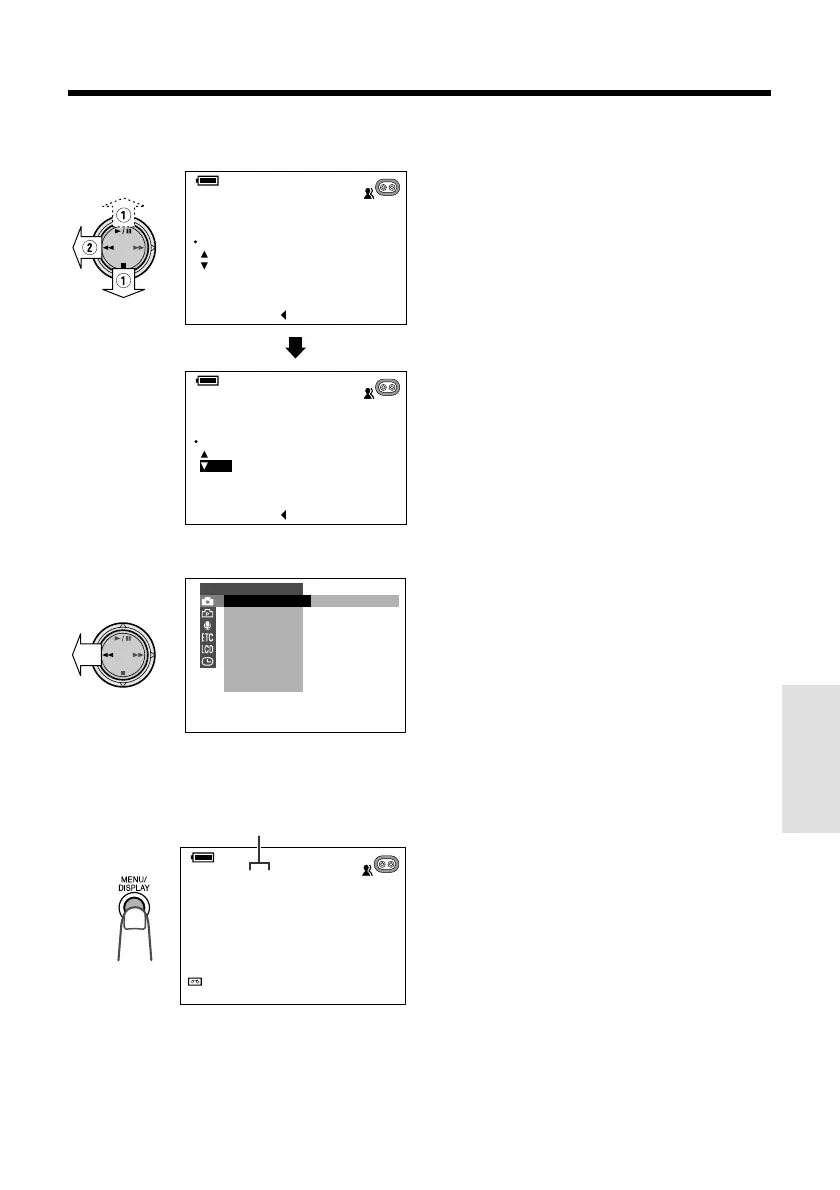
7 Press d or y (1) to focus on the
subject, then press e (2).
8 Press e.
9 Press the MENU/DISPLAY button to
turn off the menu screen.
• “MF” is displayed.
Manual focus indicator
To cancel Manual Focus mode
After performing step 4 above, select “AUTO”,
then press e.
Notes:
• The camcorder may not be able to focus
correctly if the subject is within approximately 6
feet (1.8 m). Set the zoom control to wide angle,
and then try refocusing.
• If the lens is dirty or fogged, the camcorder may
not be able to correctly focus.
• When “MF” is displayed, you can manually
adjust the focus by pressing d or y, even if
the focus setting screen is not displayed.
• When you want to cancel all manual settings and
return to Auto mode, press the AUTO ON/OFF
button.
MANUAL MF
FOCUS
FAR
NEAR
12bit
SP
SET [ BUTTON]
MANUAL MF
FOCUS
AUTO
12bit
SP
SET [ BUTTON]
SET
M
AN. FOCUS
M
ANUAL
EXPOSURE
SHUT. SPEED
PIC. EFFECT
SCENE MENU
FADE
QK. RETURN
DIS
MANUAL SET
AUTO
SP
33
min
0
SP
min
0
MANUAL MF
12bit










 To Next Page