viii
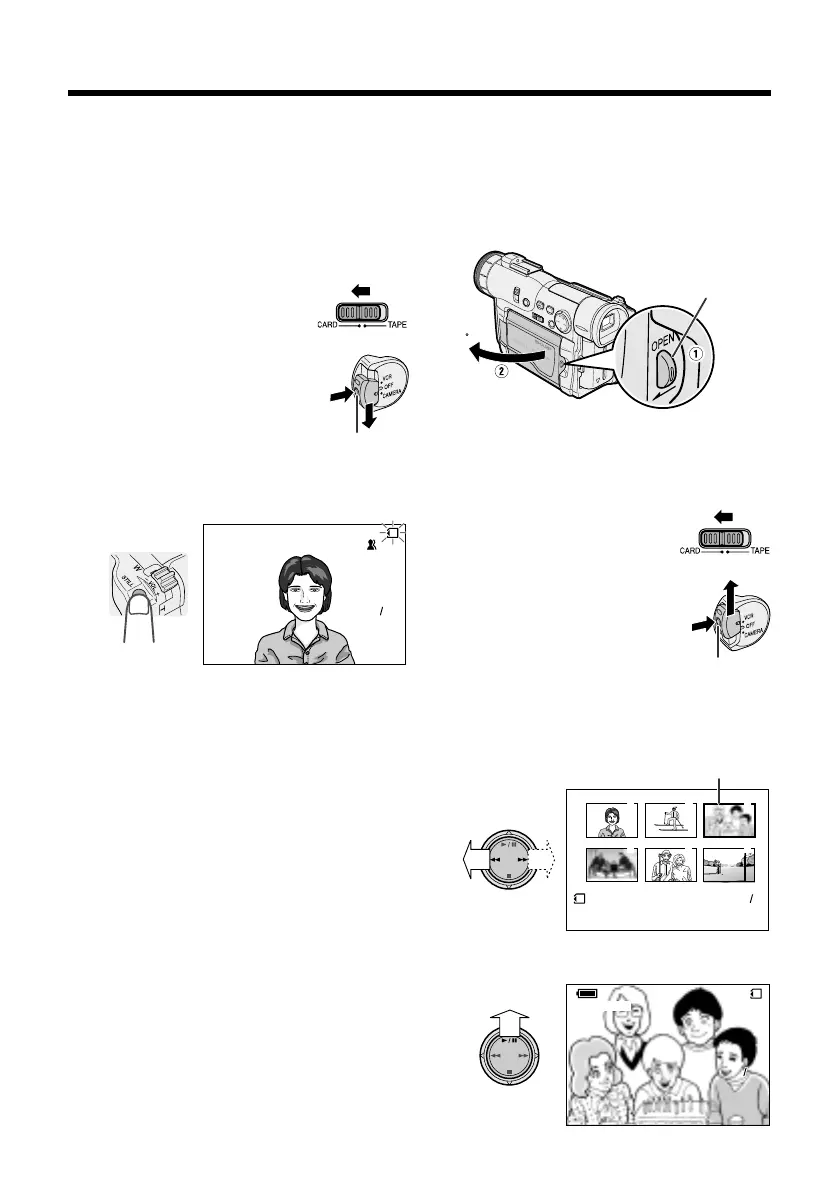
Card Recording
1 Make sure that a SmartMedia card
(commercially available) is inserted.
Lock button
Card Playback
1 Press the LCD monitor OPEN release
button (1), and open the LCD monitor
to a 90° angle to the camcorder body
(2).
2 Remove the lens cap, and lift up the
viewfinder.
3 Set the Media Selection
switch to CARD.
4 Hold down the Lock button
and set the Power switch to
CAMERA.
5 Press the STILL button to begin
recording.
AUTO
CARD
9001
90
3 Set the Media Selection
switch to CARD.
4 Hold down the Lock button
and set the Power switch to
VCR.
5 Press e or r on the Operation button
to move the selection frame to the
desired image.
3
6
2
5
1
4
100 0003-
NORMAL
21
6 Press y.
NORMAL
103 103
NORMAL
100 0003-
CARDCARD
LCD monitor OPEN
release button
Lock button
Selection Frame
2 Adjust the LCD monitor to an angle that
allows easy viewing on the on-screen
picture.










 To Next Page