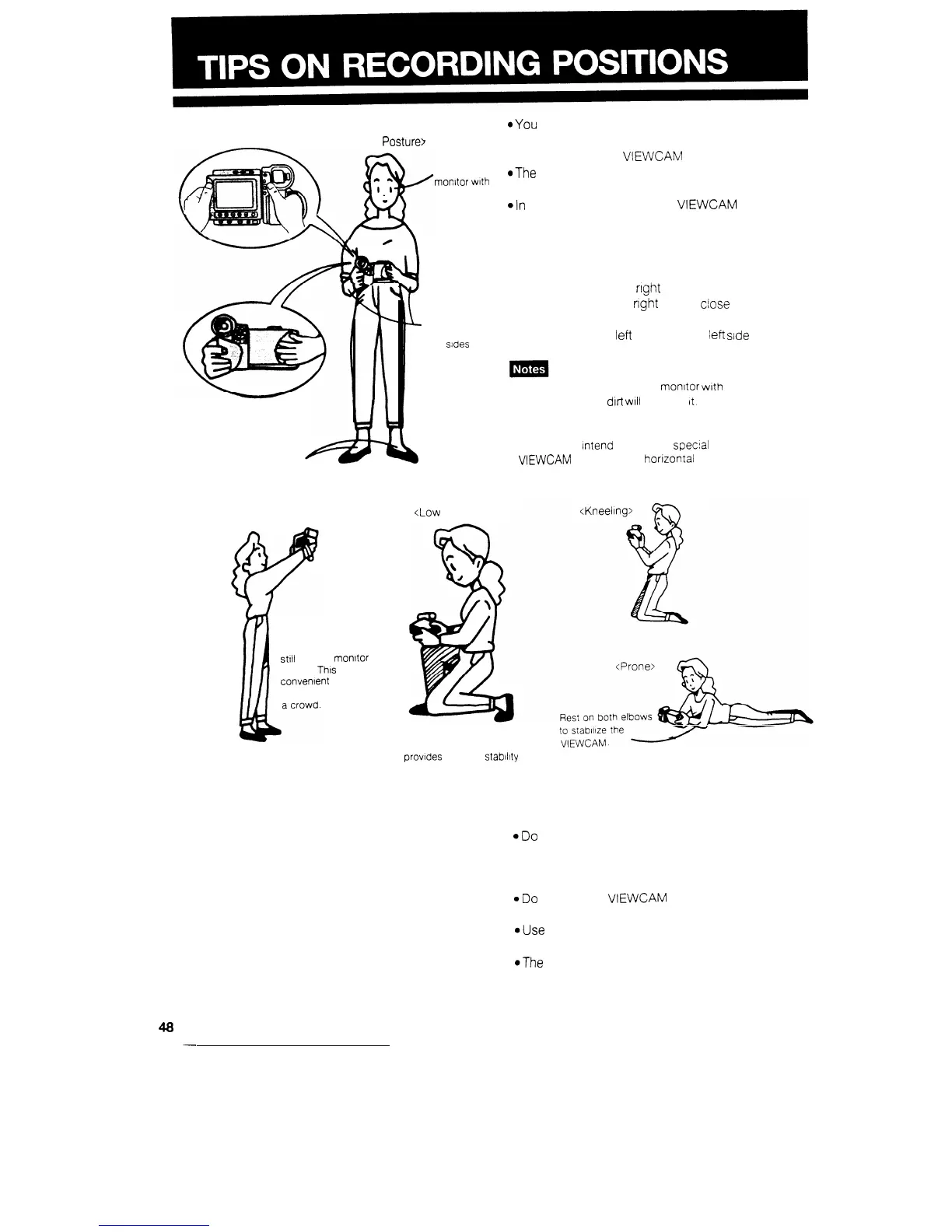
<Basic
Posture>
Look at the
morxtor with
both eyes
Place your feet
at a 45” angle and
take a firm stance.
<High Angle>
You can record and
still
see the monltor
screen.
This
IS
convenient when you
want to record over
I
Press your
elbows against
your
sdes
b
<Low
Angle>
*You
can record using more natural body postures
since you can see the subject on-screen, without
having to hold the VIEWCAM against your eye.
*The
LCD monitor also makes high-angle and
low-angle shots easy.
4n
hand-held recording, the VIEWCAM has to be
steadied to prevent image shake.
l Use a tripod for very stable recording.
BASIC RECORDING POSITIONS
Put the fingers of your right hand through the hand
strap, and place your
right
thumb
close
to the
Record Start/Stop and Power Zoom buttons. Place
the thumb of your
left
hand on the
left
side
of the
LCD monitor.
l Take care not to touch the monitor with your fingers, as
perspiration and dirt
WIII
smudge
it.
l The supplied shoulder strap and hand strap should also
be used
l Unless you
Intend
to create a
specal
effect, keep the
VIEWCAM
level with the honzontal plane.
When kneeling, putting
one knee on the ground
provides the best stabMy
HANDLING OF THE LCD MONITOR
@Do
not let anything press against the monitor
screen, or expose it to shock, as it may bleak.
l Make sure that the shoulder strap fittings do not
touch the screen.
.Do
not put the VIEWCAM on a table, or any other
surface, with the monitor screen facing down.
@Use
the provided cleaning cloth or other soft cloth
to clean the screen.
@The
image may become blurred when the screen
or areas adjacent to the screen are pressed.
48
-


 To Next Page