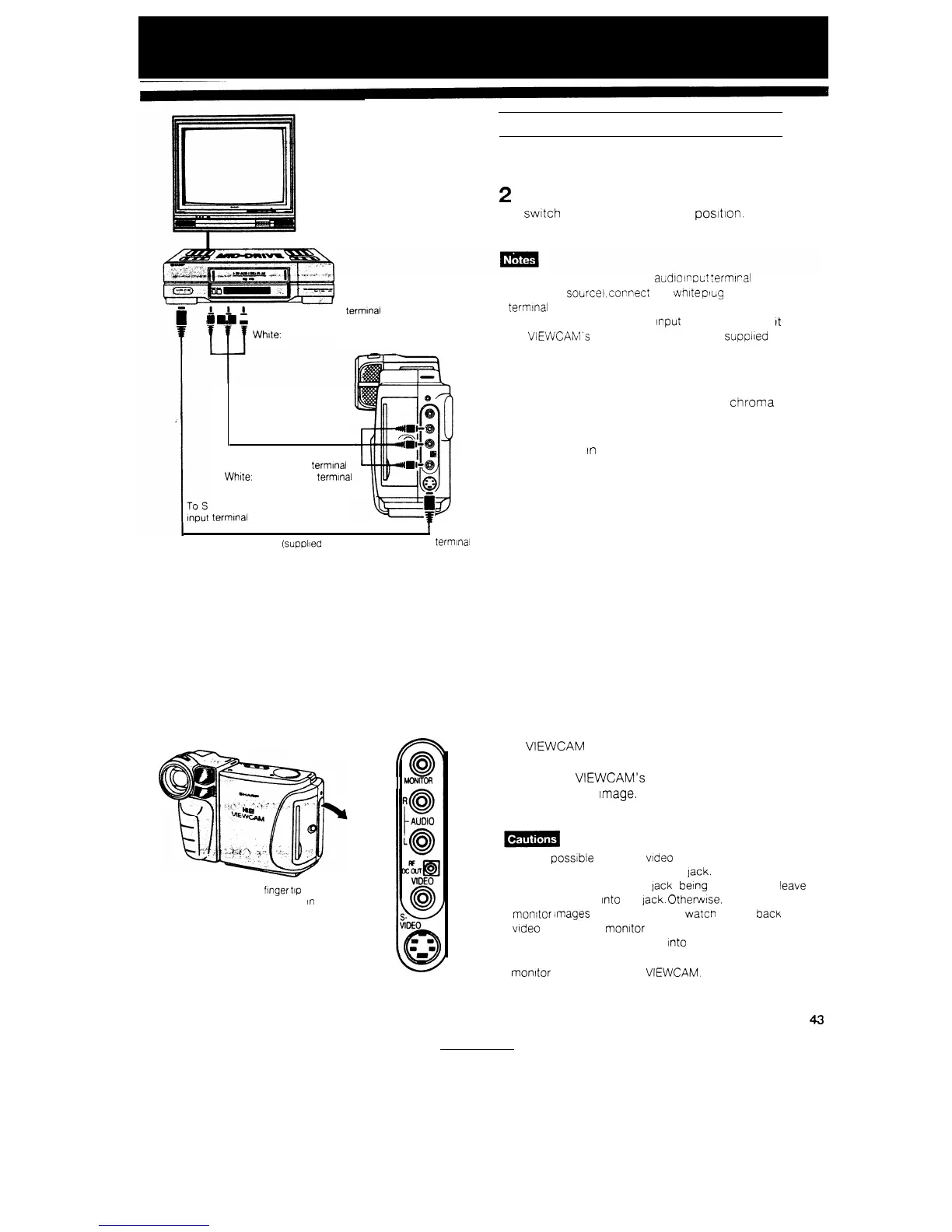
CONNECTION TO TV VIA VCR
1
Yellow: To VIDEO IN terminal
m
m
m Red: To AUDIO IN (R) terminal
White:
To AUDIO IN (L) terminal
Yellow: To VIDEO terminal
Red: To AUDIO (R) terminal
White:
To AUDIO (L) terminal
-VIDEO
terminal
I
To
S-VIDEO
S-Video cable
(suppiled
accessory)
terminal
Put your
fmger
tip
at the cover edge
and pull the cover
In
the direction
of the arrow
PHONES
0
0
MONITOR
IN
1 Set the TV to receive picture from the VCR.
2
Turn on the VCR, and set the source select
switch
to the external source
postlon.
l If your TV set has only one audio
~rpct
:ermlral
(for
monaural
source),
cornect
the
white
plug to that
terminal
l If your VCR has an S-video
Input
terminal, connect
It
to
the VIEWCAM’s S-VIDEO socket with the supplied
S-video cable.
S-Video terminal
S-video terminals are used to pass the chroma
(colour) and luminance (brightness) components of
video signals separately. They serve to Improve the
picture quality
In
both playback and recording.
ABOUT THE MONITOR IN JACK
The MONITOR IN jack is used to check video
pictures from an external source. When you connect
the VIEWCAM to other video’equipment (for exam-
ple, a video printer for prints of screen images), you
can use the VIEWCAM’s LCD screen to see and
check the video
Image.
There is no need to connect
a TV or other external monitor.
l It
IS
not
possible
to record
video
images from an external
source by using the MONITOR IN lack.
l Unless the MONITOR IN lack IS
being
used, do not leave
a cable plugged
Into
the
jack.
OtherwIse, you cannot
monitor Images from the lens, or watcn playea back
video on the LCD monitor screen.
l Do not leave a cable plugged
Into
the MONITOR IN jack
when you watch played-Back tapes on a 7-V of Other
monitor
connected to the
VIEWCAM.
43


 To Next Page