I
r-6
CONNECTION TO
-IV
WITH RF
CONVERTER
mdoor antenna
Q
ANTE’UNA
IN
or cable
3
TO ANTENNA IN
I
Momtor
2
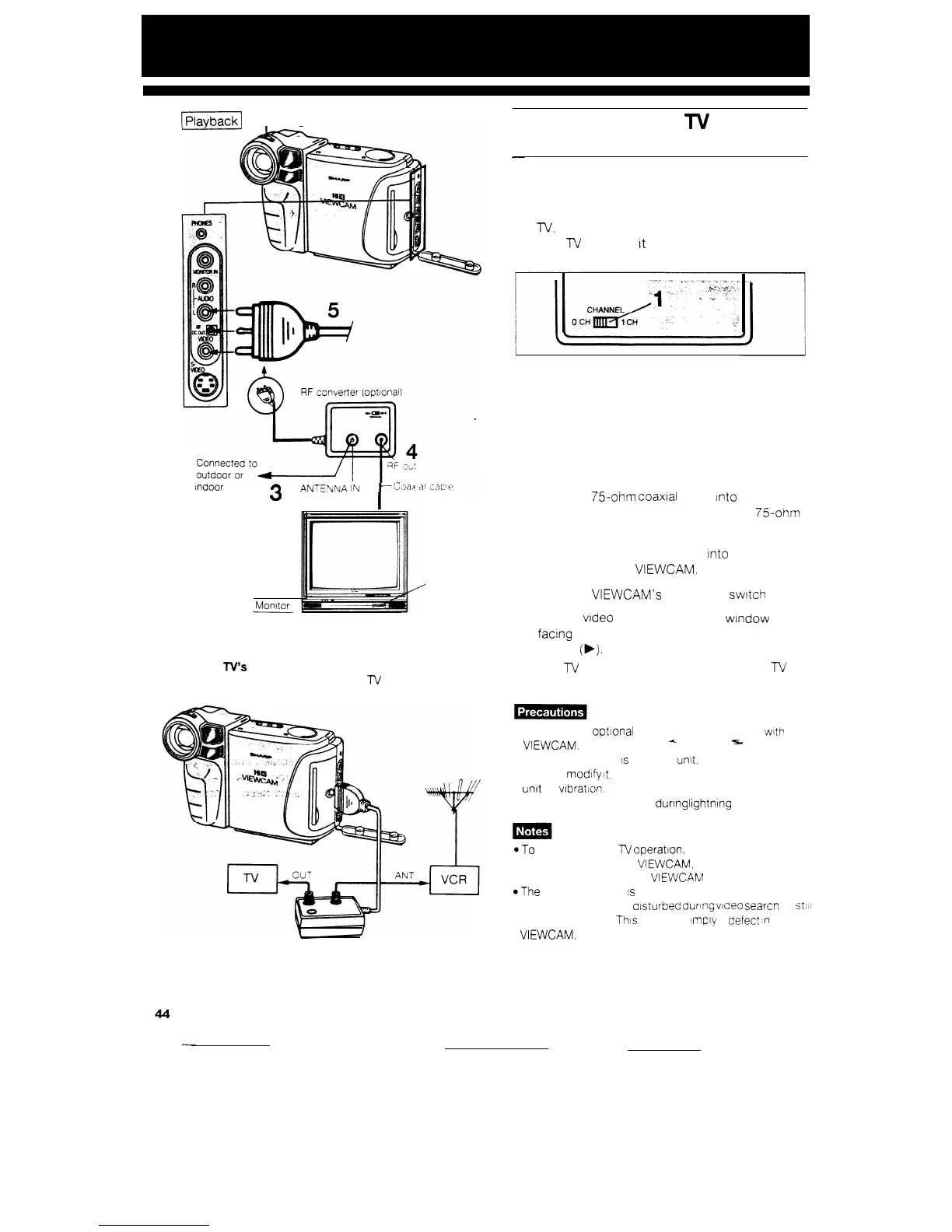
If your
TV’s
antenna input is connected to a VCR
Disconnect the cable between the
TV
and VCR, and
insert the RF converter between them as shown below
Use the RF converter and VHF connecting cable,
available as optional accessories.
1
To view the output from your camcorder on the
IV,
you must select an unused channel on
your
TV
and tune
It
to the output of the RF
converter (factory preset to channel 0).
2
3
4
5
6
7
Set the TV tuner to the same channel.
Remove the antenna cable from your TV and
then connect the RF converter to the cam-
corder as shown.
Then plug the antenna cable rnto the ANTENNA
IN terminal on the RF converter.
Plug the
75ohm
coaxial cable
Into
the RF OUT
terminal on the RF converter and the
75ohm
coaxial antenna terminal on the TV.
Plug the RF converter cable
Into
the AV out
terminals on the VIEWCAM.
Slide the VIEWCAM’s OPERATE
switch
to VCR.
Load a video cassette (cassette
wtndow
facing outward), and then press the PLAY
button
(b).
The
lV
may require tuning. Refer to the
n/
operation manual.
l Use only the optlonal RF converter VR-X30RF with the
VIEWCAM.
4
5.
l The RF converter
s
a sealed
unit.
Do not attempt to
open or modify
It.
Do not damage, drop or subject the
unit to wbratlon.
l Unplug the RF converter dunng
lightnng
storms.
*To
resume normal
lV
operation, set the OPERATE
switch to OFF on the
VIEWCAM,
or unplug the RF
converter cable from the
VIEWCAM
*The
playback sound
s
monaural
l The picture may be alsturbed during video searcn or
sthli
picture playback.
This
does not
‘rnply
a
aefec?
#n
the
VIEWCAM.


 To Next Page