8
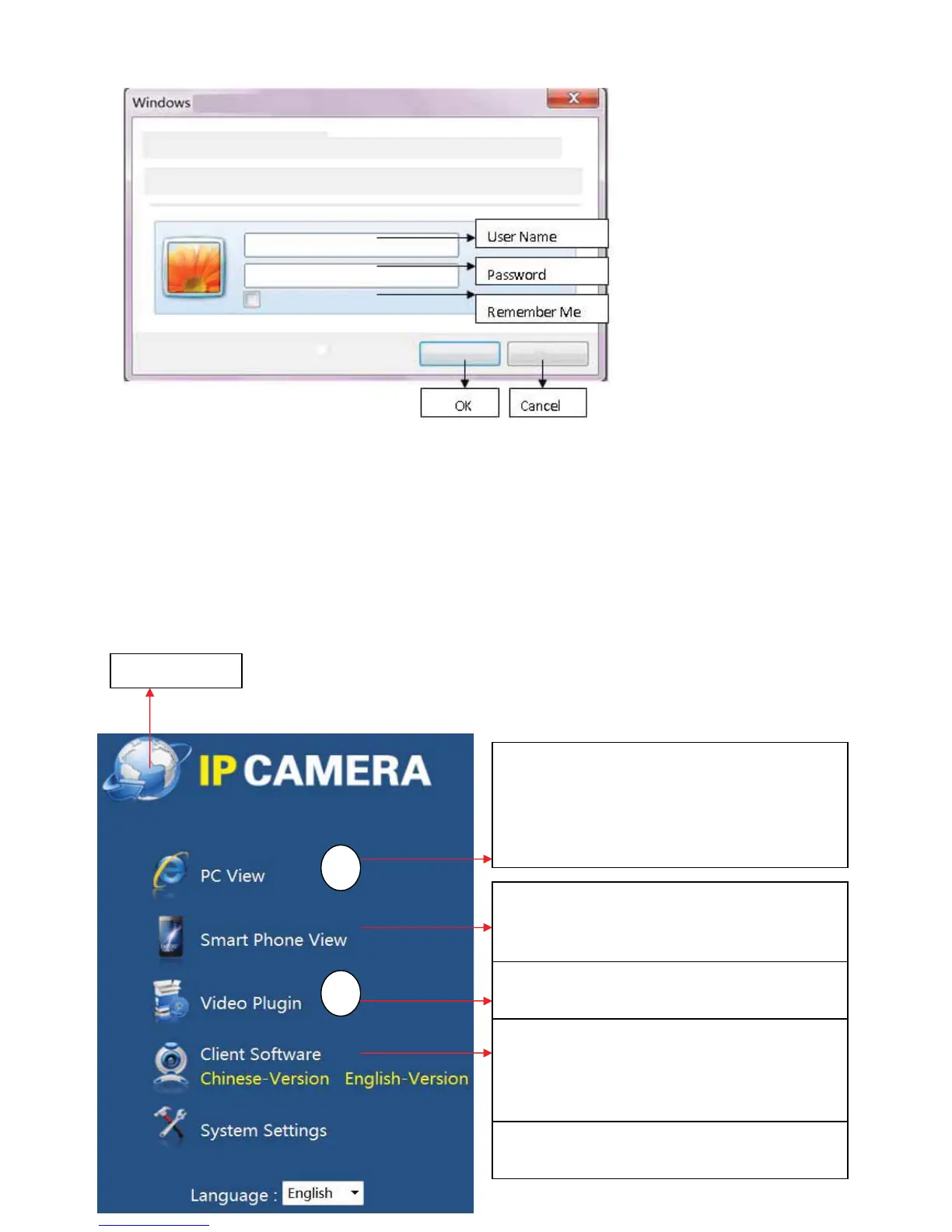
Fillin(Username):Admin
Fillin(Password):everycameraproducedbyushasauniquepassword,pleasefindout
the original password in the label attached to the bottom of device and the in the label
ontotheCD.
Click(OK)buttontogototheWebinterfacelikebelow
Please access to camera from “PC View” when you
view the video by computer, it supports many
functions, such as local recording onto computer,
listenͲin,talkback andsoon.PleaseoperateActiveX
forthefirsttimemonitoring..Refertopic2below
Please access to camera from “Smart Phone View”
when you viewthevideobysmartphone.IPhone,
Android,Windowsphonesystemallareavailable.
When you view camer a for the first time, Please
downloadandinstallplugͲin.Refertopic1below
User can down PC client software
(CenterͲManagement System) from here, the
detailed function and operation is referred to “7.
VistandmanageCamerabyCMS”
Check and set the device’s system parameters from
here
1
2
Go to home page



 To Next Page