5
GETTING STARTED
Welcome to your ShoreTel™ IP phone! Your phone has many unique features,
including an intuitive visual interface, custom keys, quick dialer directory, call
handling modes for when you do not want to be disturbed, intercom,
conferencing up to six parties, and much more.
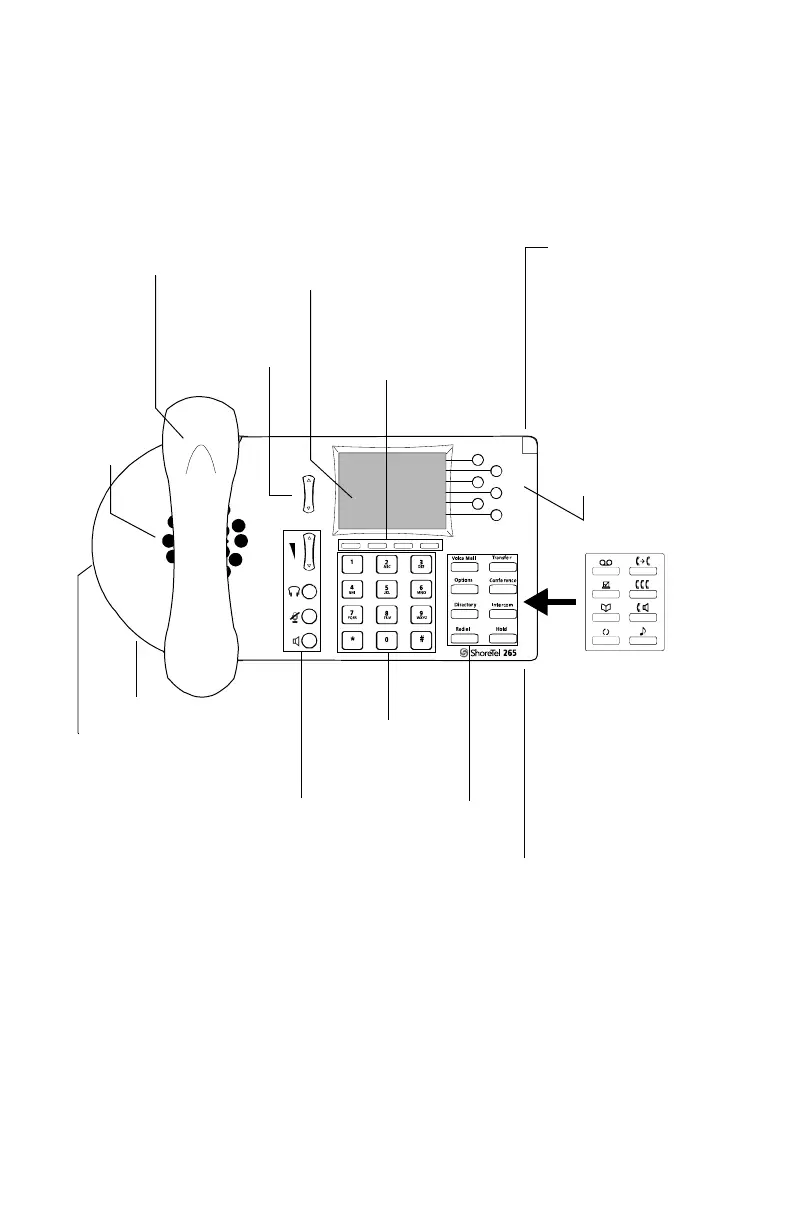
Handset with
Finger Rest
Scroll Button
Select options
in interface.
TFT-LCD Color Display
2.7 inch
320 x 240 pixels
Soft Keys
Context-sensitive
functions defined
on display.
Indicator LED
Flashing light alerts
the user to incoming
calls and unheard
voice messages.
Function Keys
Perform core
telephony
functions.
Microphone
Dial Pad
Audio Control Keys
Volume button controls
handset, headset, speaker,
and ring volume. Mute,
Speaker, and Headset keys
illuminate when functions
are active.
Function Keys
overlay
Vinyl overlay
imprinted with
international
symbols.
Custom Keys
Six custom keys with
tri-color LED
indicators can be
configured as call
keys, monitored
extensions, or speed
dial keys.
Headset Jack
Speaker
Delivers
high-
quality
wideband
sound.
Handset Jack



 To Next Page