19
8.5 Time
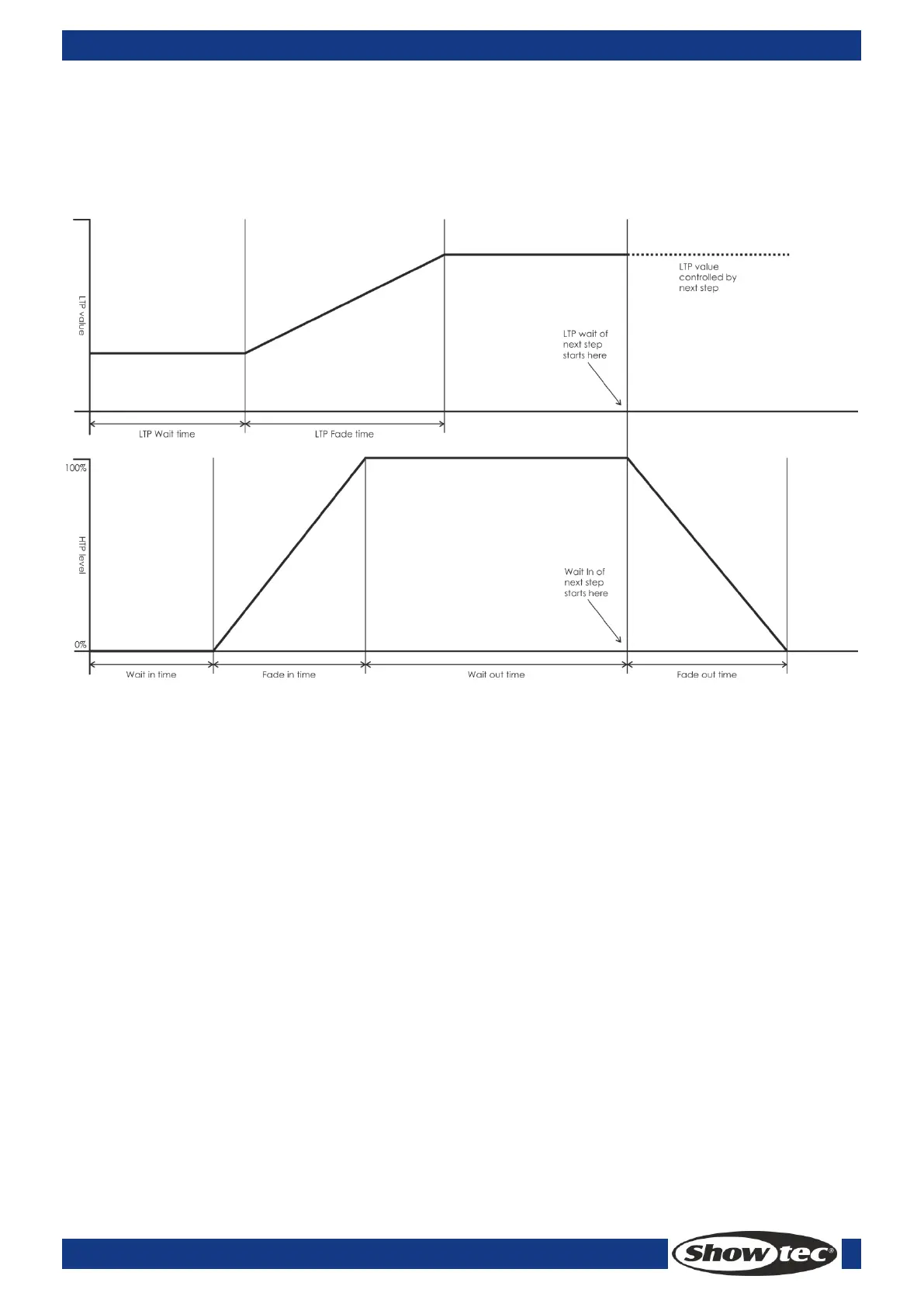
Press <Time>, then, press a desired <Playback> button for editing. You can set a fade in and fade out
time independently for every memory. The playback fades only affect HTP (intensity) channels. There is a
separate LTP timer which allows you to set movement times. LTP channels which were set to “I” during
Patching ignore LTP fade times. The effect of the times is shown in the following picture.
The times you enter are also affected by the scene mode:
Mode 0 – No timing information is used. The HTP channels faded with the 0-100% position with
playback faders.
Mode 1 –Channels fade as set by the HTP and LTP fade times (except Instant LTP channels). If you
enter times for a Mode 0 memory, it will automatically change to Mode 1. If HTP times are set to
zero, the HTP levels will fade with the fader
Mode 2 –HTP channels fade as set by the HTP times, or with the fader if times are set to zero. LTP
channels are controlled by the fader position (except Instant channels). Set the LTP fade time to 0
to use this mode.
8.6 Run scenes
Set the live mode as the running mode; Raise fader, the corresponding scene on the current page will be
output. Press a <Playback> button, the selected scene will be output while the other playbacks will be
closed. The running scenes will be highlighted in the LCD, “S” is scene, “C” is Chase.



 To Next Page