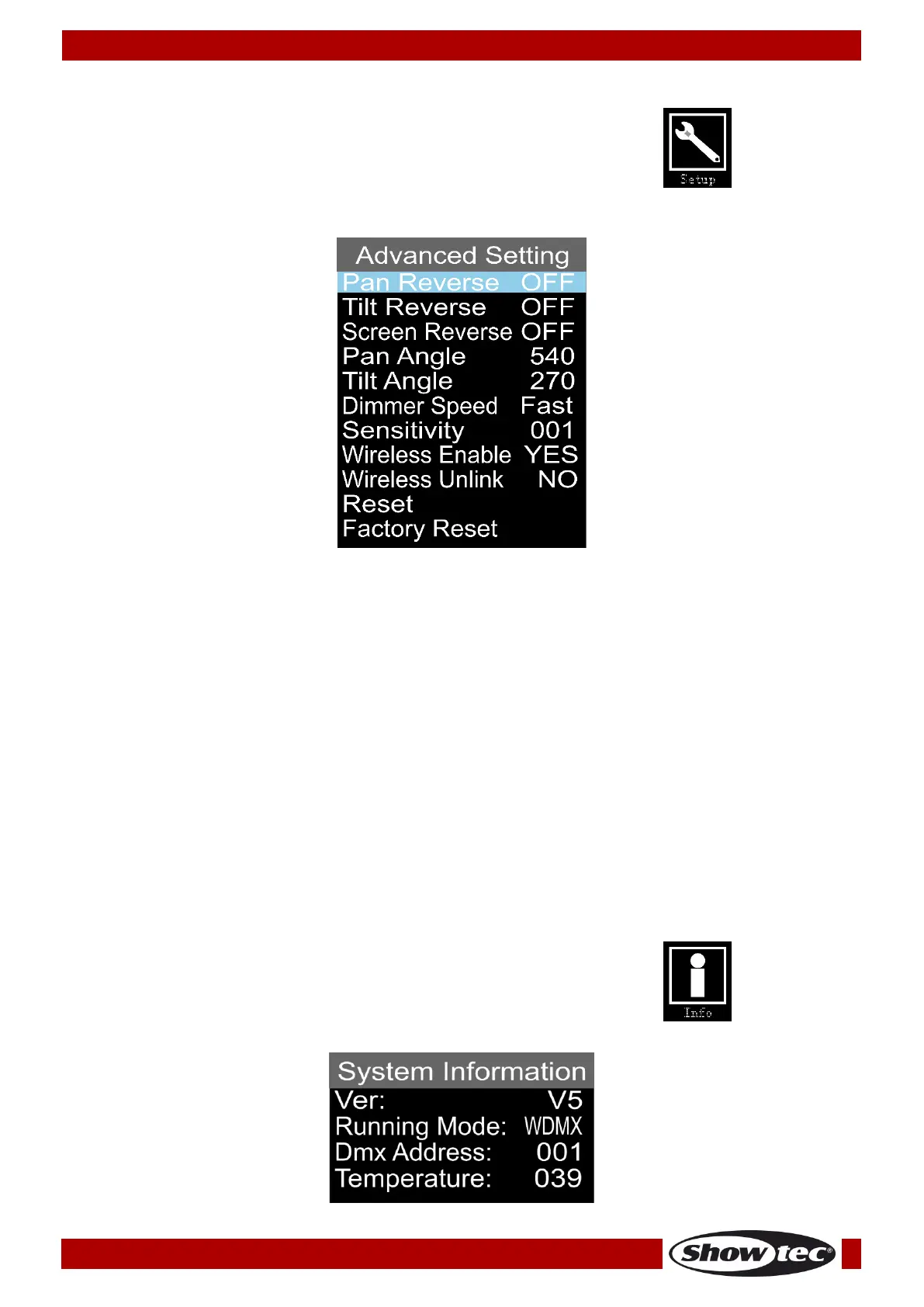
Advanced Settings
01) While in the main menu, press the UP/DOWN buttons until the display shows .
02) Press the ENTER button to open the menu.
03) The display will show:
04) Press the UP/DOWN buttons to toggle between the following options:
● Pan Reverse (ON/OFF)
● Tilt Reverse (ON/OFF)
● Screen Reverse (ON/OFF)
● Pan Angle (180º/360º/540º)
● Tilt Angle (90º/180º/270º)
● Dimmer Speed (Fast/Smooth)
● Sensitivity (001-100, from low to high sound sensitivity)
● Wireless Enable (activate wireless DMX, YES/NO)
● Wireless Unlink (unlink the device, YES/NO)
● Reset (Pan/Tilt reset)
● Factory Reset (Full reset, restores factory settings)
05) Press the ENTER button to edit the desired option.
06) Press the UP/DOWN buttons to set the value.
07) Press the ENTER button to save changes.
System Information
In this menu you can see the currently active mode, the DMX starting address, the current software
version and the temperature of the device.
01) While in the main menu, press the UP/DOWN buttons until the display shows .
02) Press the ENTER button to open the menu and view the parameters.













 To Next Page