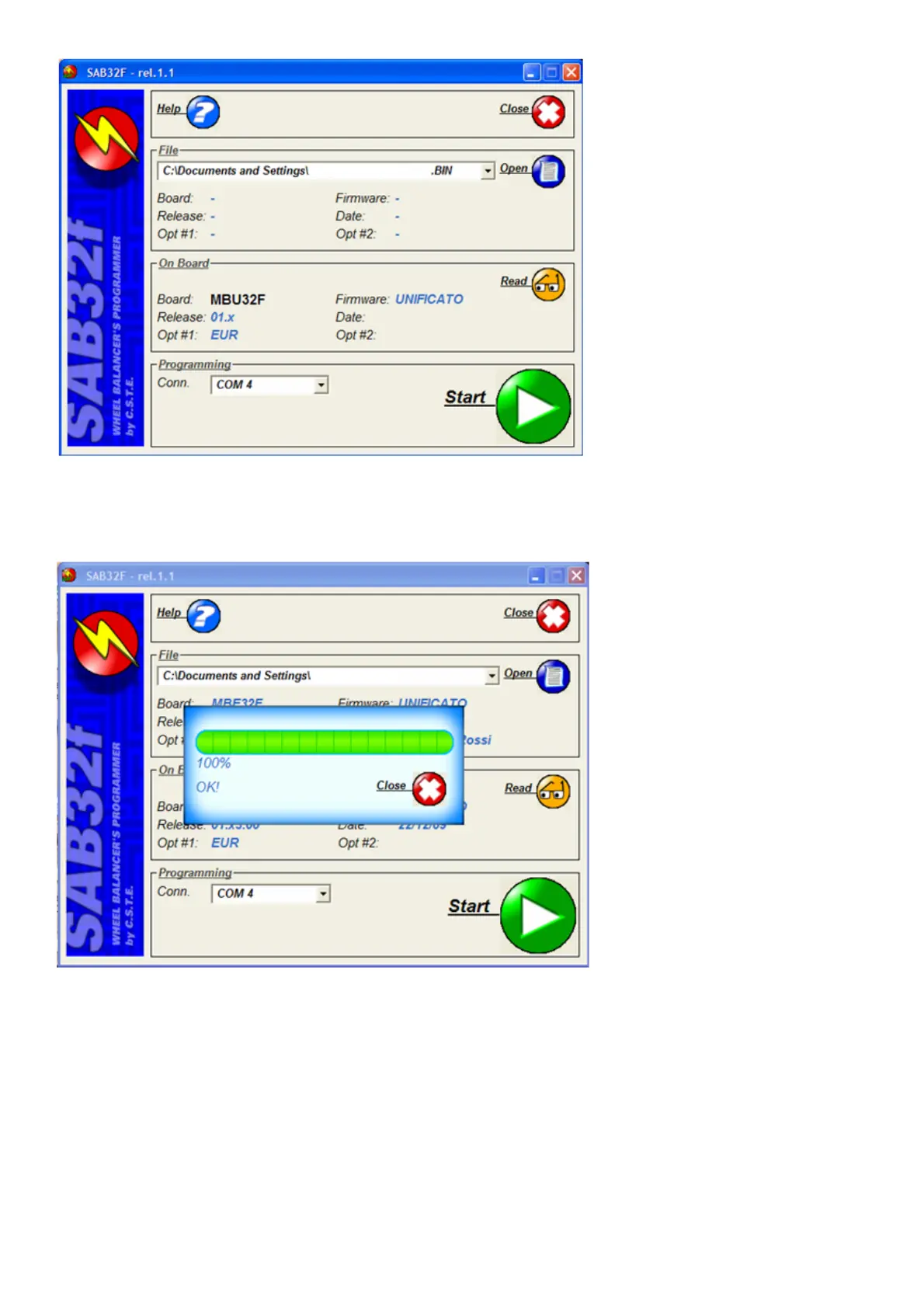
- Select the "OPEN" icon and load the file with the extension .bin of the firmware version to be updated previously downloaded from the
network.
- Select the COM serial port where the programming cable is connected to the PC.
- Select the "START" icon to start programming.
- When the message "OK 100%" appears, this means that the programming has been completed successfully.
- At the end of programming, press the "Close" key to close the program, switch off the machine and return the deep-switch to its original
position (all the switches are OFF).
- In the event that error messages are displayed, check the correct wiring of the serial cable and repeat the programming procedure by
switching the machine off and on again.
IMPORTANT: when the board FIRMWARE update is complete, test the E2PROM to reset the calibration parameters as described in the paragraph “E2PROM
MEMORY RESETTING PROGRAMME”.
After this test, the following operations must be repeated in this order:
1. configure the machine based on the version as described in the paragraph “MACHINE SOFTWARE CONFIGURATIONS”;
2. internal sensor calibration as described in the paragraph “INTERNAL SENSOR CALIBRATION”;
3. Calibrate the external sensor, if installed;
4. machine sensitivity calibration;
5. resetting the group, see paragraph “shaft assembly resetting”.



 To Next Page