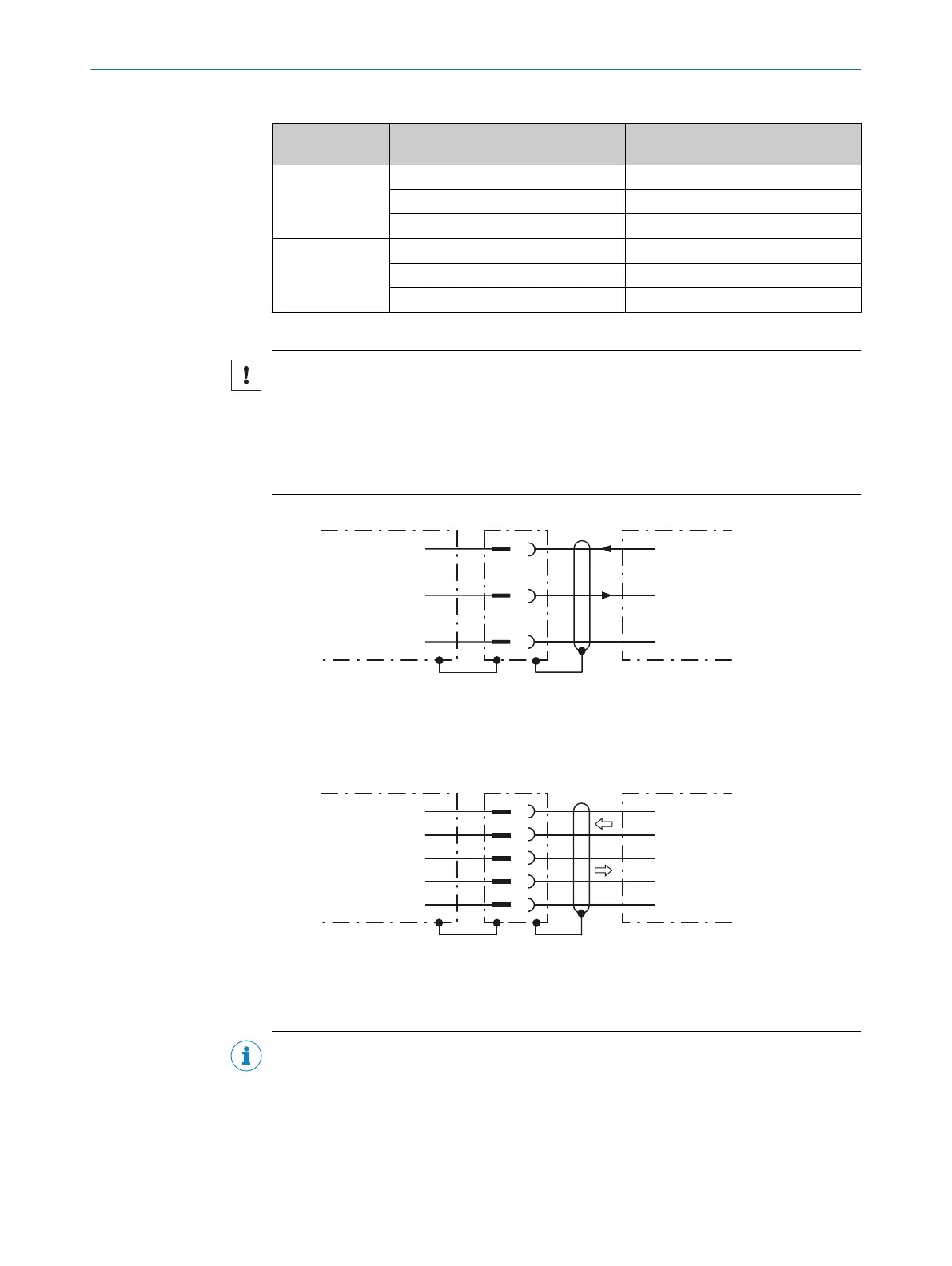
Table 13: Data transmission rates and recommended maximum lengths of cable
Interface Data transmission rate Distance to the target computer
(host)
RS-232 Up to 19.2 kBd Max. 15 m
38.4 kBd ... 57.6 kBd Max. 5 m
115.2 kBd … 500 kBd < 2 m
RS-422
1)
Up to 38.4 kBd Max. 1,200 m
38.4 kBd ... 57.6 kBd Max. 500 m
57.6 kBd … 500 kBd Max. 10 m
1)
For RS-422-compatible cable and corresponding cable termination as per specification
NOTICE
Risk of damage to the internal interface modules!
If the serial data interfaces are wired incorrectly, then electronic components in the
device could get damaged.
■
Observe the information on wiring.
■
Carefully check the wiring prior to switching on the device.
RS-232
2
3
4
Device 1 Host
TxD
RxD
GND
RxD
TxD
GND
Figure 13: Wiring of the RS-232 serial data interface
1
Device
2...4
Pin assignment: see RS-232 pin assignment for the respective device
RS-422
2
3
4
5
6
Device 1 Host
RD+
TD+
RD‒
TD‒
GND
TD+
RD+
TD‒
RD‒
GND
Figure 14: Wiring of the RS-422 serial data interface
1
Device
2...6
Pin assignment: see RS-422 pin assignment for the respective device
NOTE
Activate the serial data interface type in the device using a configuration tool, e.g., the
SOPAS ET configuration software.
ELECTRICAL INSTALLATION 6
8018071/1E1C/2021-12-16 | SICK O P E R A T I N G I N S T R U C T I O N S | Lector63x Flex C-mount and S-mount
45
Subject to change without notice





 To Next Page