Use the Siemens TCON function block
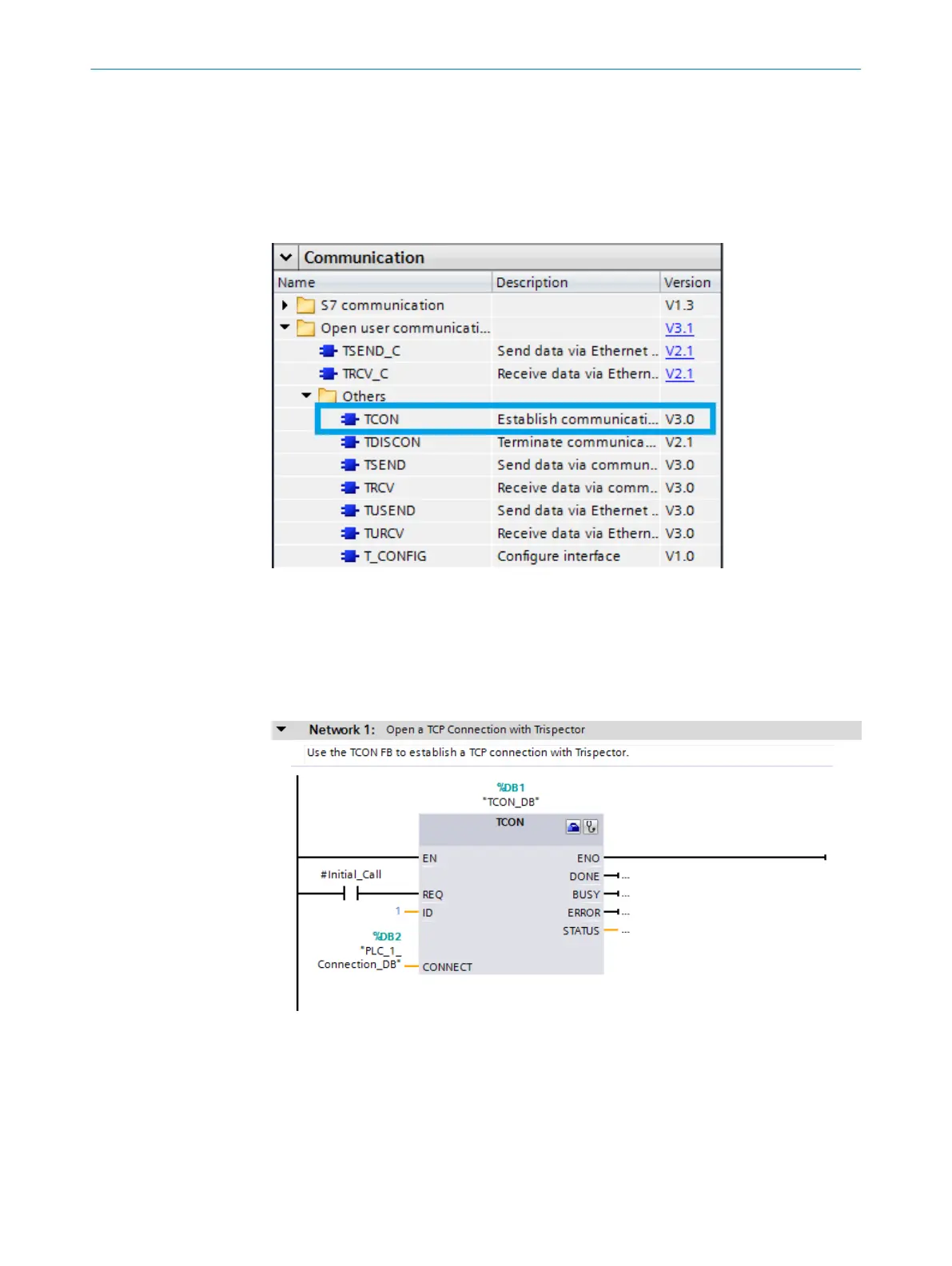
To establish an open TCP connection, the following communication blocks are available
in the Siemens standard library (see figure 21):
■
TCON for establishing the connection
■
TDISCON for terminating the connection
■
T_CONFIG for configuring the interface
Figure 21: Siemens standard library
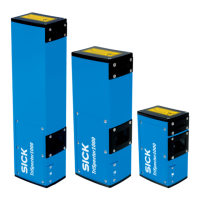
In this example, the TCON function block (see figure 22) is called in OB1 with the
instance data block TCON_DB. In the case of a reboot, the “#Initial_Call” flag triggers
the the TCON function block to open the TCP communication. The ID parameter of the
TriSpector1000 function block input must have the same value as the ID input of the
TCON function block (will be set up in next step).
Figure 22: Establish TCP connection
The connection parameters for setting up the TCP connection are stored in an automat‐
ically generated data block. Open the Properties tab for the TCON function block to make
the settings and generate the data block, see figure 23.
ANNEX
12
8022395/19OK/2020-12 | SICK O P E R A T I N G I N S T R U C T I O N S | TriSpectorP1000
51
Subject to change without notice








 To Next Page