Chapter 3 Operating Instructions
UE402
12 © SICK AG • Industrial Safety Systems • Germany • All rights reserved 8009874/YT67/2016-02-22
Subject to change without notice
Product description
3.3.2 PSDI mode
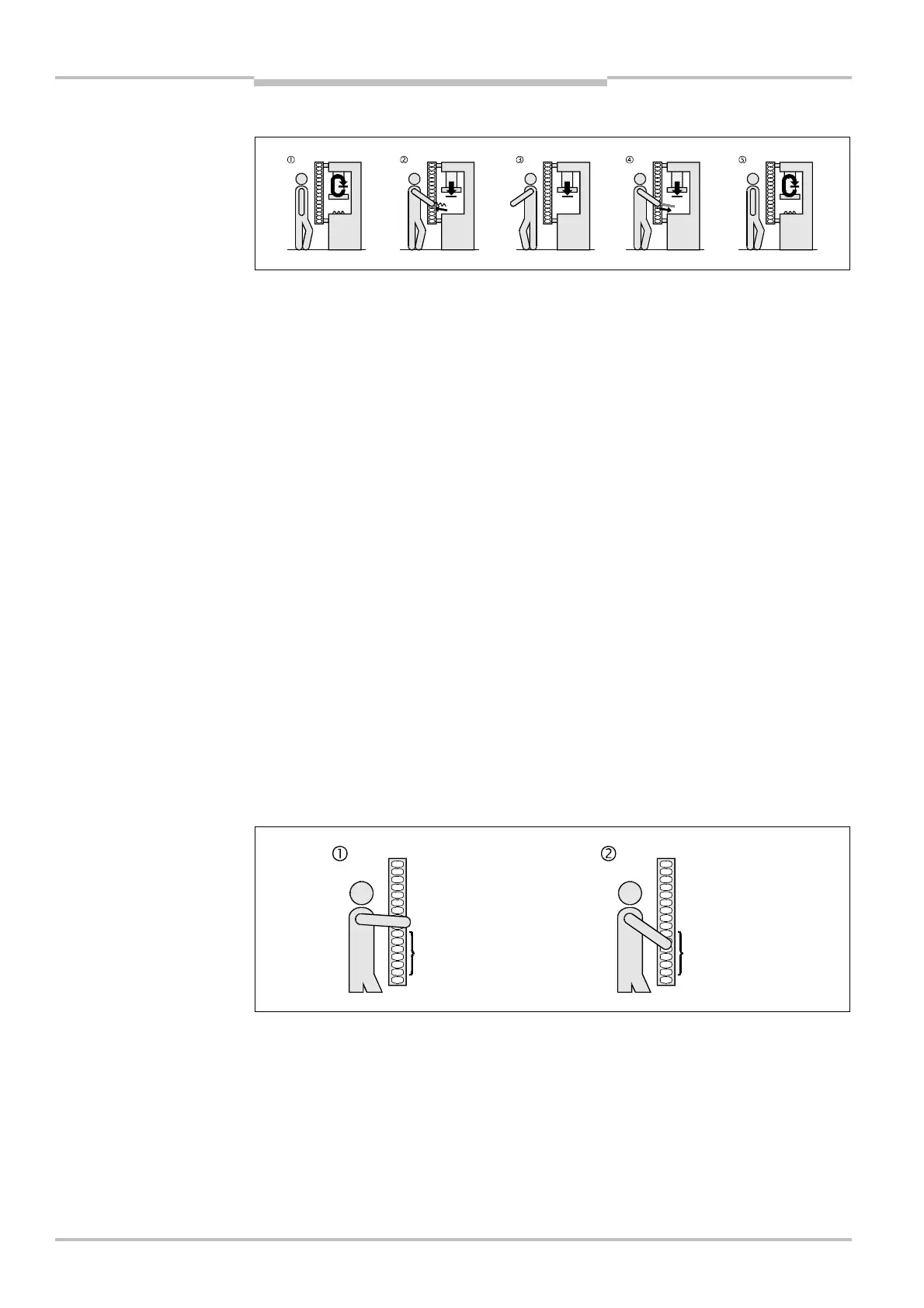
In the PSDI mode, the machine waits at the top dead centre for a defined number of inter-
ruptions by the operator. After a certain number of interruptions, the safety light curtain
automatically releases the dangerous movement. Dual mode PSDI means e.g., that the
safety light curtain causes the movement to block after the first interruption by the opera-
tor (). The safety light curtain does not release the movement until the operator has
completed the second interruption (, ).
The PSDI mode function can only be configured for light curtains with an effective opera-
ting resolution of 30 mm.
Device symbol C4000 Host (receiver), context menu Configuration draft, Edit, selection
of the operating mode, file card General, area PSDI mode.
PSDI time monitoring
In the case of active PSDI time monitoring, the maximum duration of an entire PSDI is
limited to 30 seconds.
The 30 seconds start by the machine being stopped at the top dead centre.
When the final PSDI interruption of an entire PSDI is not terminated within this time, the
safety light curtain remains red and waits until the reset button has been pressed.
PSDI time monitoring has been configured by default and can be deactivated.
Device symbol C4000 Host (receiver), context menu Configuration draft, Edit, selection
of the operating mode, file card General, option PSDI time monitoring active.
PSDI window
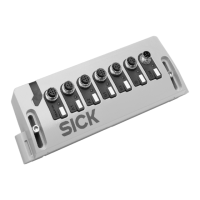
You can determine the section of the protective field in which the safety light curtain can
interpret an interruption as a PSDI. This section of the protective field is called the PSDI
window.
If you configure a PSDI window as shown in Fig. 3, the safety light curtain only interprets
as a valid PSDI interruption.
You can only define one PSDI window. This also applies to a cascading system.
At least one beam must be free between the PSDI window and adjacent blanked-out
areas.
If you do not define a PSDI window, all areas of the protective field that have not been
blanked out are PSDI windows.
the dual mode PSDI
Note
window
Notes
interruption
interruption


 To Next Page