EasyManua.ls Logo

Siemens SIMATIC RF220R - Installation, Commissioning, and Configuration; Hardware Installation Guidelines

Siemens SIMATIC RF220R
35 pages
Print Icon
To Next Page IconTo Next Page
To Previous Page IconTo Previous Page
Loading...
4 Installation and Commissioning
Read/write data with IO-Link
Entry ID: 73565887, V3.4, 06/2022
21
© Siemens AG
2022 All rights reserved
4 Installation and Commissioning
4.1 Hardware installation
The required hardware components are listed in Chapter 2.3.2 (used hardware and
software components).
NOTICE
Always follow the installation guidelines for all components.
NOTICE
Before you switch on the power supply, complete and check the
installation!
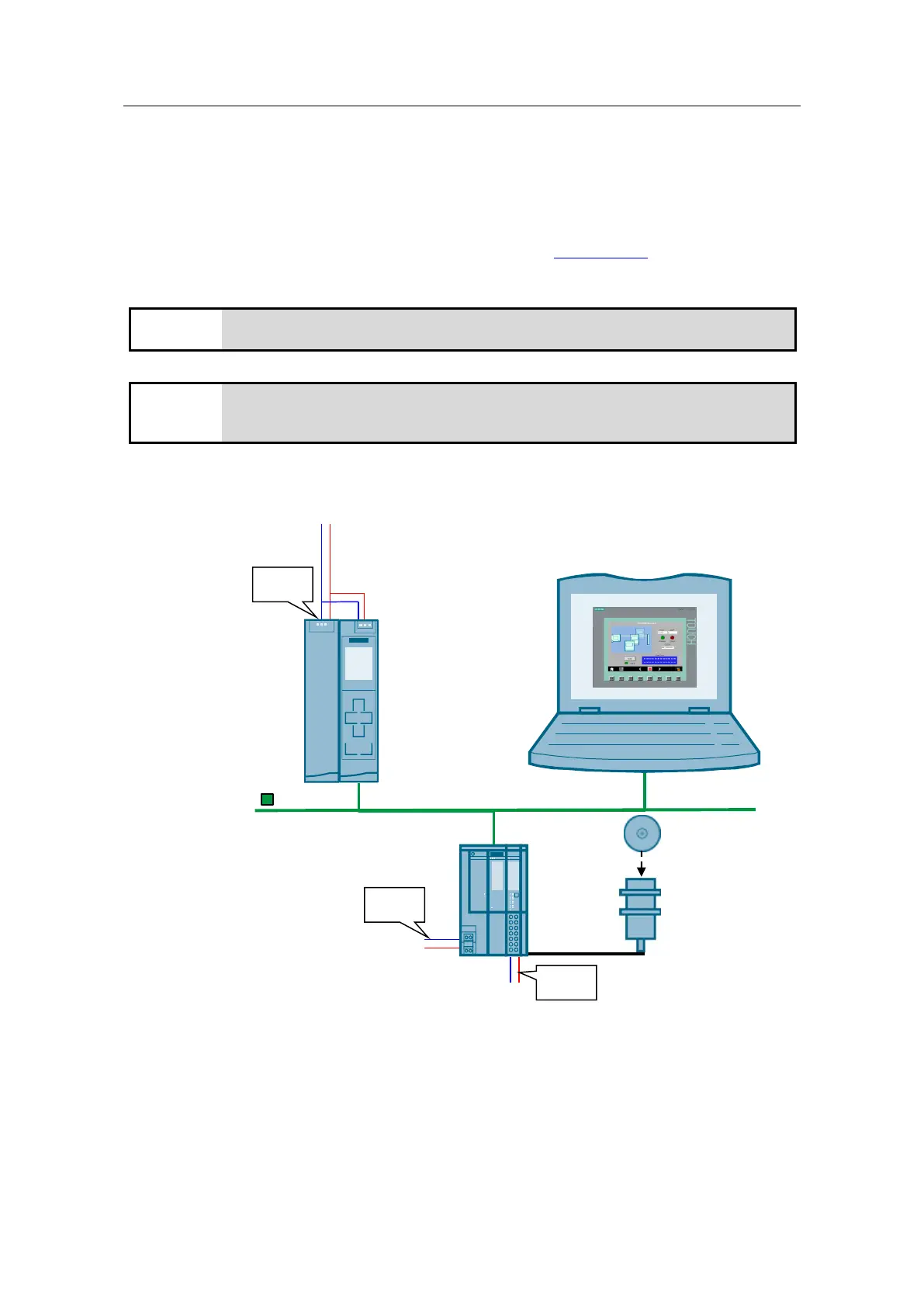
The figure below shows the hardware configuration of the application.
Figure 4-1
230 V
24 V
RF220R
(V1.0)
ET 200SP CM 4xIO-Link
PG/PC
MDS Dxx
CPU 1513-1 PN
PM 1507
24 V
24 V
PROFINET IE

Related product manuals