4 Installation and Commissioning
Read/write data with IO-Link
Entry ID: 73565887, V3.4, 06/2022
© Siemens AG
2022 All rights reserved
Result:
The CPU then performs a "Reset to factory settings" whilst the RUN/STOP LED
flashes yellow. If the RUN/STOP LED lights up yellow, the CPU has been reset to
factory settings and is in STOP mode. The "Reset to factory settings" event is
entered in the diagnostic buffer.
4.3.2 Setting the IP addresses
When assigning the IP addresses of your devices please ensure that they
are all located in the same subnet and each IP is only assigned once
across the subnets.
The following table shows the configured IP addresses:
Table 4-3
SIMATIC Basic Panel KTP1000
4.3.3 Changing the IP addresses of the PC/PG
The table below shows the network setting to which you have to change the
PC/PG:
Table 4-4
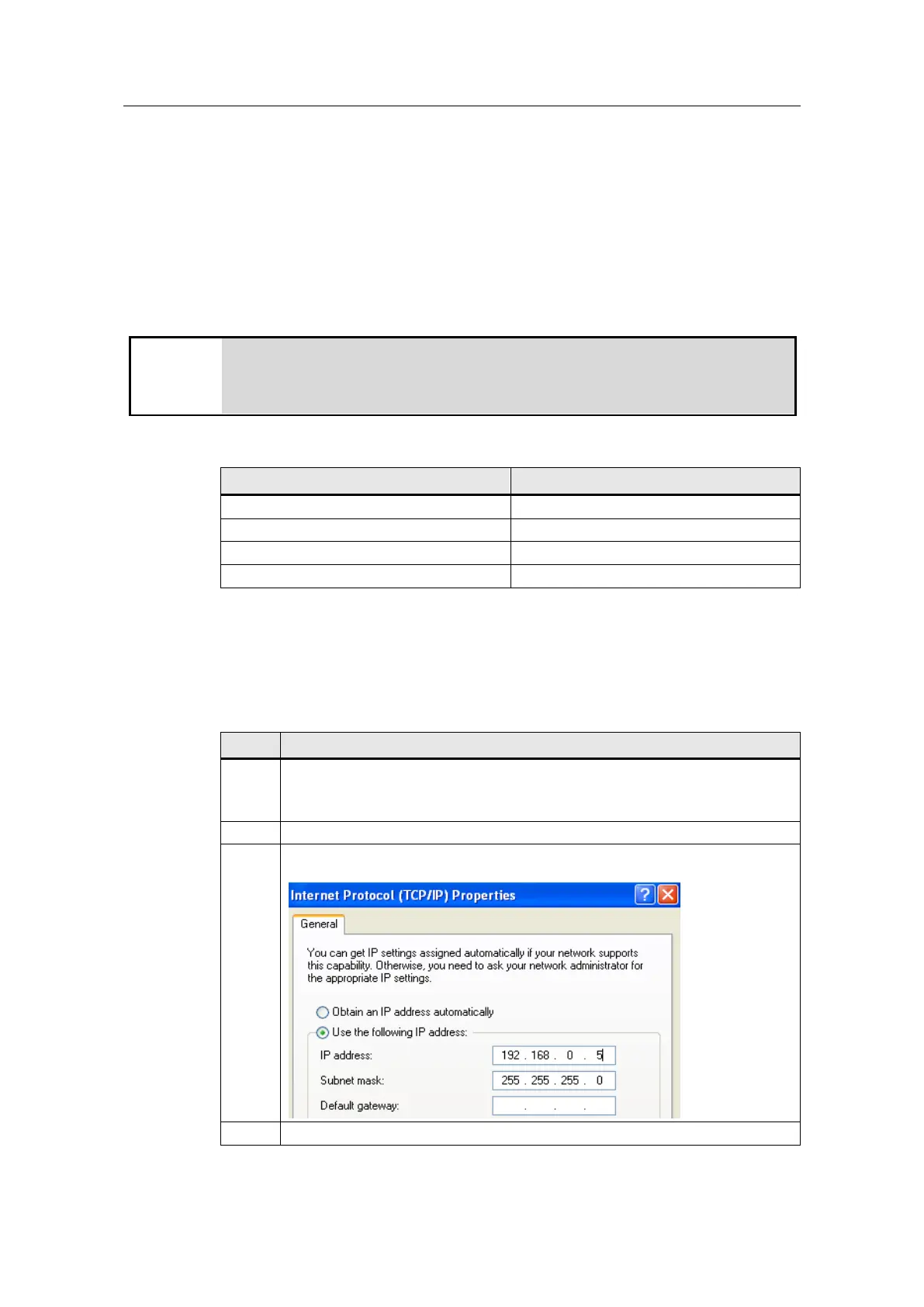
Open the Internet Protocol (TCP/IP) Properties by selecting
"Start > Settings > Network Connections > Local Connections".
In the open window, select Internet Protocol (TCP/IP) and open Properties.
Select the option box "Use following IP address" and fill in the box as shown in
the picture. Close the dialog boxes with "OK".
If your PG has an IWLAN interface, switch it off.










 To Next Page