Operating Manual SIGMA 4-15C, page 55 of 95
03/06
5.1.4 Alteration of the Configuration
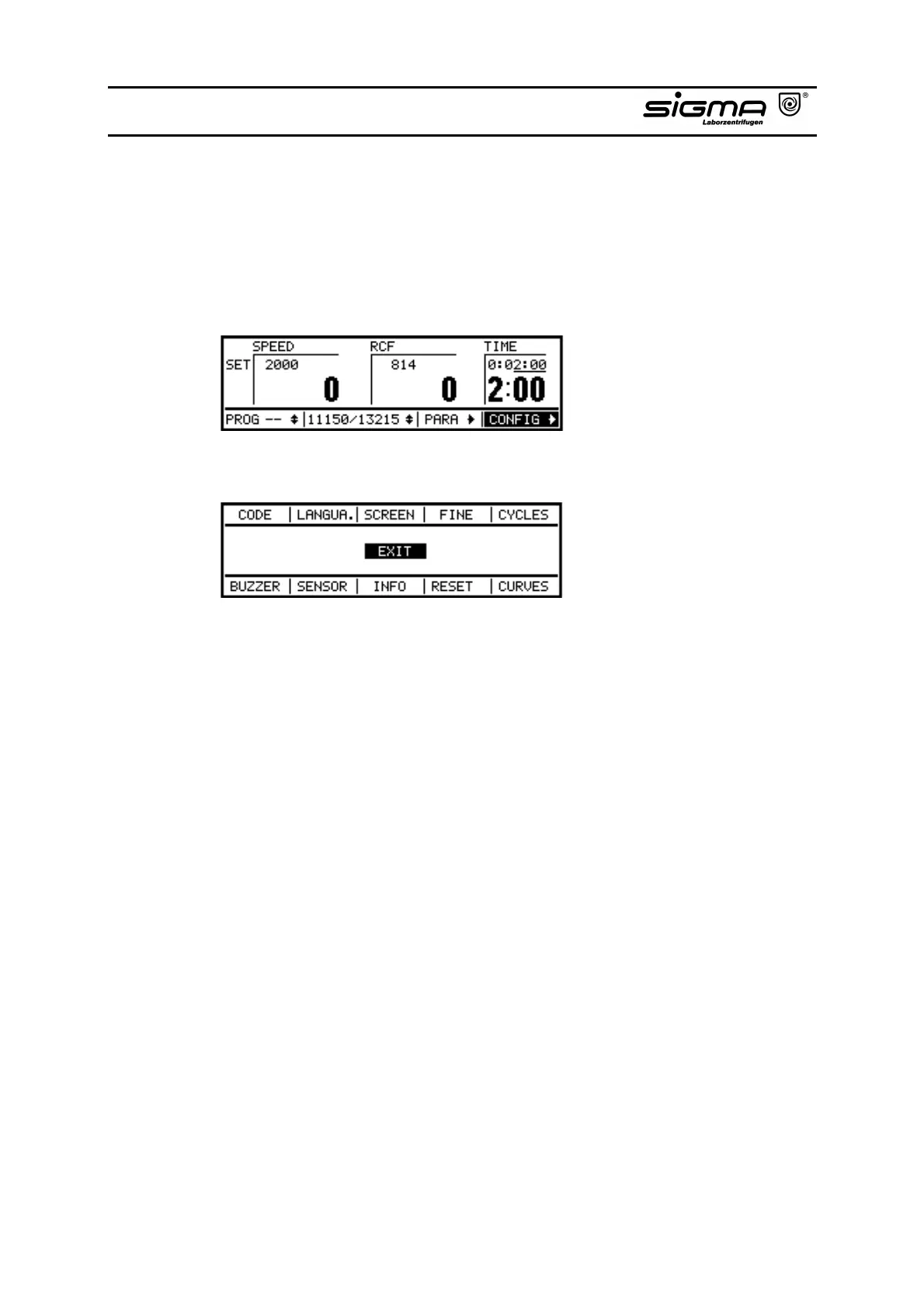
In the configuration mode, several background functions can be changedand
data can be read.
• Select the configuration mode by turning the knob.
• After pressing the knob, the configuration menu appears.
• Select by turning the knob the desired area and activate the function by
pressing the knob.
• CODE: Protection of specific functions by a code, deactivation of the protection and
changing of the code
• LANGUAGE: Selection of the language of the operation
• SCREEN: Magnification of the speed or the RCF display
• FINE: In this function it is possible to preselect the set speed in steps of 1 or 10
min
-1
.
The set time can be preselected in steps of 1 min or 1 sec. Exeption:
Curve input in 1/10 sek.
• CYCLES: For each bucket/rotor combination cycles and run time are stored. The data
of the used rotors are displayed.
• BUZZER: An acoustic signal can be activated for a preselected time after termination
of a run or in the event of an imbalance or an error message. In the event
of "IMBALANCE" or "ERROR" the acoustic signal is already activated.
• SENSOR: The sensor menu displays different signals. In case of a failure of the
instrument this makes the diagnosis of errors and their fast repair through
the service easier. Values can neither be entered nor altered.



 To Next Page