EasyManua.ls Logo

Sime FORMAT DGT 30i - Characteristics; Control Panel; Description of Controls; Description of Display Icons

Sime FORMAT DGT 30i
40 pages
Print Icon
To Next Page IconTo Next Page
To Previous Page IconTo Previous Page
Loading...
26
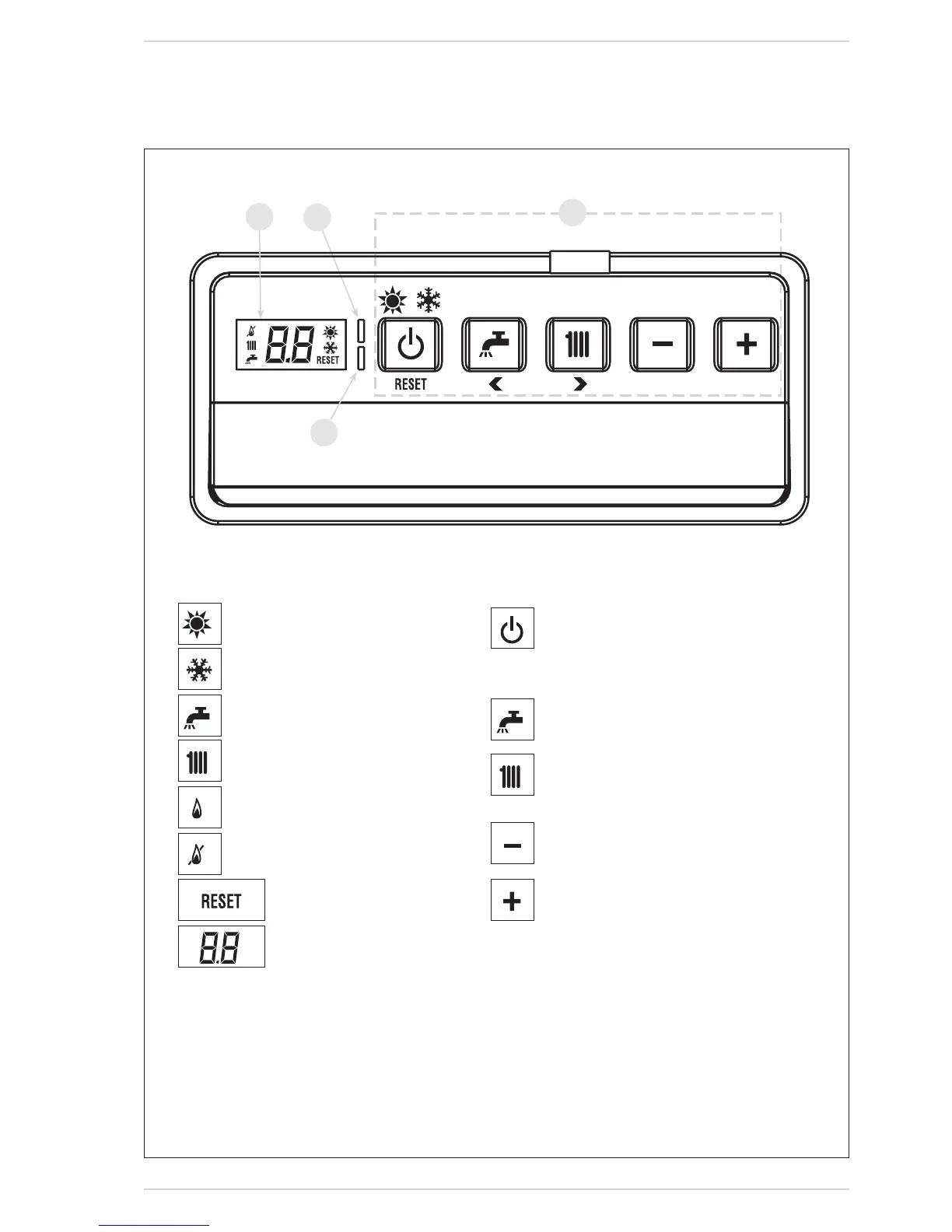
6.3.1 CONTROL PANEL
6.3 CHARACTERISTICS
1
2
3
4
1 - DESCRIPTION OF DISPLAY ICONS
1
2
3
4
1
2
3
4
1
2
3
4
1
2
3
4
1
2
3
4
SUMMER MODE ICON (Not applicable)
WINTER MODE ICON
D.H.W. MODE ICON (Not applicable)
HEATING MODE ICON
BURNER LIT ICON
1
2
3
4
LOCKOUT DUE TO IGNITION
OR FLAME DETECTION ERROR
1
2
3
4
NECESSITY OF RESET
1
2
3
4
MAIN DIGITS
Fig. 17
2 - DESCRIPTION OF CONTROLS
1
2
3
4
1
2
3
4
1
2
3
4
1
2
3
4
1
2
3
4
OPERATING MODE/RESET
By pressing the key in succession, pass to the
summerandwinterfunction(stand-byfunctionif
permaneonthekeymorethantwosecond).
RESETisonlyavailableifaresettableanomalyis
signalled
D.H.W. SET (Not applicable)
PressthekeytodisplaytheD.H.W.temperature
valueset
HEATING SET
Pressthekeytodisplaytheheatingtemperature
value set (value not realtive to the remote con-
trol)
DECREASE
Pressingthiskeydecreasesthevalueset
INCREASE
Pressingthiskeyincreasesthevalueset
3 - LED GREEN
ON=Indicatesthepresenceofelectricalvoltage.
Itswitchesofmomentarilyeverytimethekeysarepressed.
ItcanbedisabledbysettingPAR 3 = 0.
4 - LED RED
OFF=Regularfunctioning.
ON=Boileranomalysignalled.
Flashing whenthecontrol panel buttons arepressedinside
thePARAMETERSSECTION.

Table of Contents

Other manuals for Sime FORMAT DGT 30i

Related product manuals