2-3
Use the following procedure to acknowledge alarm(s).
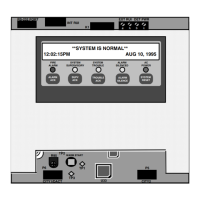
1. Unlock and open the enclosure door. Read the alphanumeric display . It alternates
between the display shown in fig 2.1 & the summary shown below.
***ALARM*** Press <FIRE ALARM ACK> to review.
ALARMS = 1 ISOLATED = 0 FAULT = 0
2. Press the <FIRE ALARM ACK> key. Pressing the ACK key causes the following to
occur:
• Buzzer silences
• Fire Alarm indicator changes from flashing to steady ON. Note that the Zone
Alarm indicator continues to flash until the zone is isolated or reset.
Acknowledging Alarms, Continued
Procedure



 To Next Page