Page 49
6.3 ADJUSTMENT OF THE SPEAKER VOLUMES
Cycraft has 5 speakers installed in the cabin – 2 front stereo speakers on each side of
the monitor, 2 rear stereo speakers in the chair shoulder area, and 1 woofer speaker
located behind the brake and accelerator pedals. Three knobs are provided on the
Operator Panel to set the front, rear, and woofer speaker volumes independently.
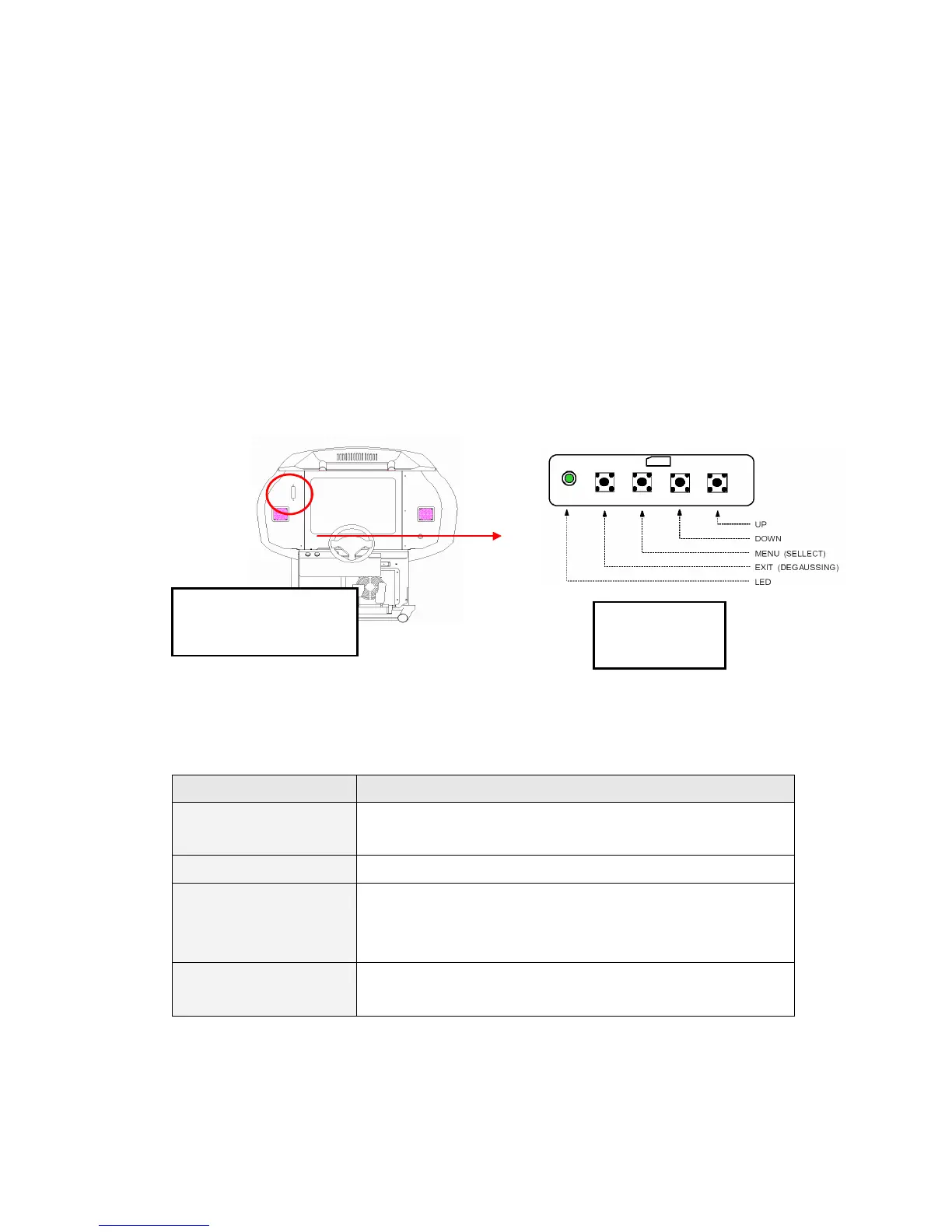
6.4 SETTING VIDEO MONITOR PARAMETERS
VIDEO CONTROLLER BUTTON FUNCTIONS
BUTTON FUNCTION
MENU (SELECTION) In the beginning, start the VIDEO controls.
In a sub menu, moves the control to the higher level.
EXIT (DEGAUSSING) In the main menu, exits the VIDEO controls.
UP In the beginning, proceeds to the contrast adjustment.
In the main menu, moves the control menu to the right.
In a sub menu, increase the adjustment.
DOWN In the main menu, moves the control menu to the left.
In a sub menu, decrease the adjustment
.
VIDEO CONTROLLER
LOCATION IN CABIN
VIDEO
CONTROLLER


 To Next Page