Key
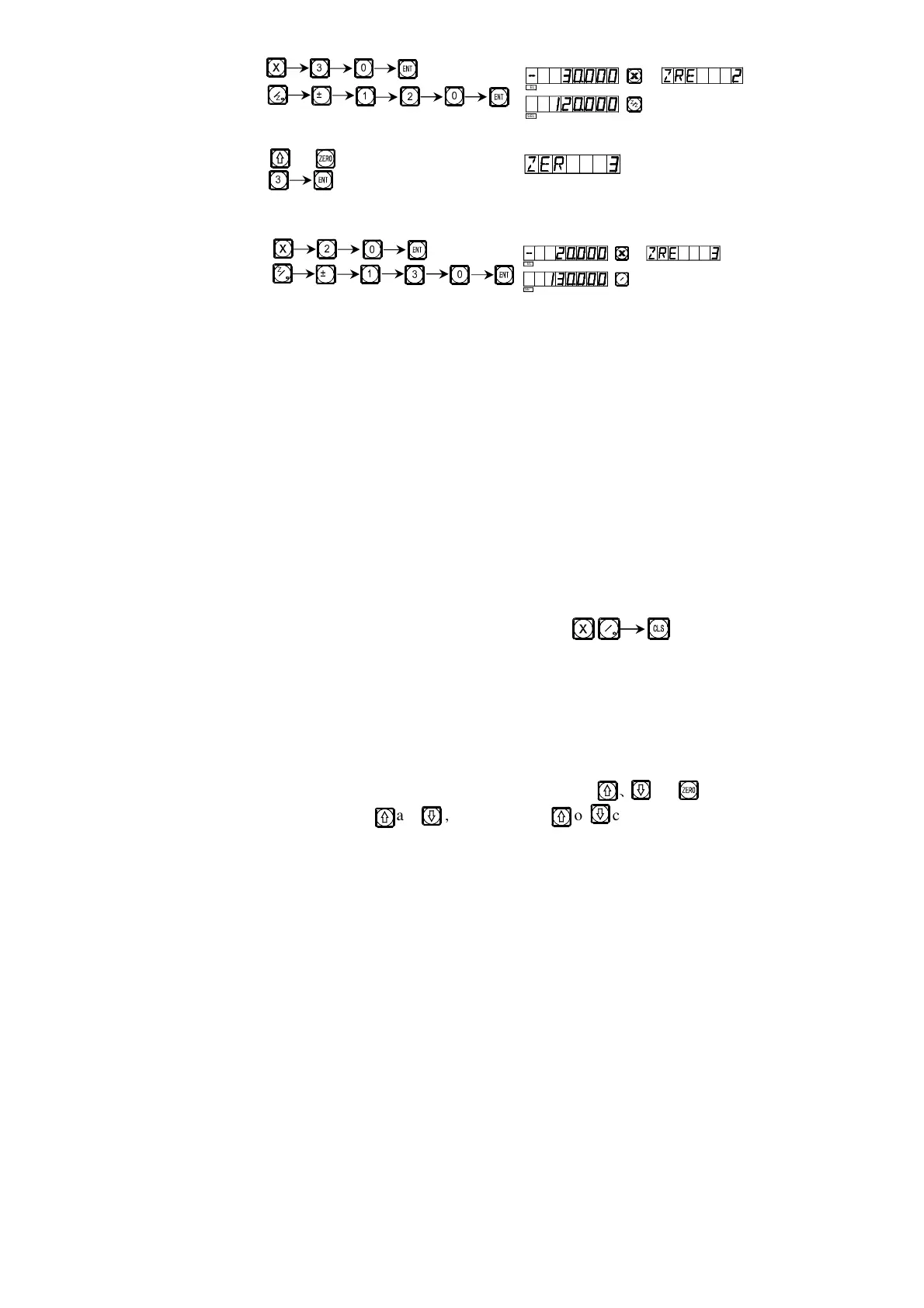
6) Enter the display mode of the third UCS.
Key or
Key
7) Enter the display mode of the third zero position.
Key
The setting of all the subsidiary zero positions of the working piece
shown in Fig. (1) has been finished.
Why the direction of each coordinate of your input auxiliary zero position
opposite to that of the display result? As the above example illustrates, under
the user coordinate display mode, if your enter the coordinate of auxiliary zero
position on the position of the zero position under absolute state, the display
result will be the position of absolute state zero position in this user coordinate.
Because the user coordinate display mode uses each auxiliary zero position as
the origin of user coordinate. Seeing from Fig. 1, Point O is exactly located at
the position of Point 1(-20, 70), the position of Point 2 (-30, 120) and that of to
Point 3 (-20, 130). If the operator enters the coordinate of auxiliary zero point
at any other point than the zero point under absolute state, the display result
will be the position of this point in this user coordinate.
Method 2: Clearing when the position is reached. When the machine tool
is at the position of the subsidiary zero point, key .
Method 2 is not suited to operations on lathe. The instructions for lathe
are not given in details in this manual.
Ⅳ
ⅣⅣ
Ⅳ. The usage of subsidiary zero positions.
After entering the display mode of the UCS, the corresponding subsidiary
zero positions may be used to help in the processing.
It is possible to enter a UCS display mode using key
O
or .
When using keys and , you may key or continuously until
entering the desired UCS.
M
N
Z
Z
L _
N
`
`
M
N
Z
Z
L
_
`
N
SEL
SEL
Z
Z
0
SEL
SEL
Z
Z
0
Z
Z



 To Next Page