4 Amalgam separation Sirona Dental Systems GmbH
4.1 Replacing the amalgam separator Care and cleaning instructions for the practice team C2
+
, M1
+
59 58 512 D 3370
12 D 3370.103.01.13.02
4 Amalgam separation
4.1 Replacing the amalgam separator
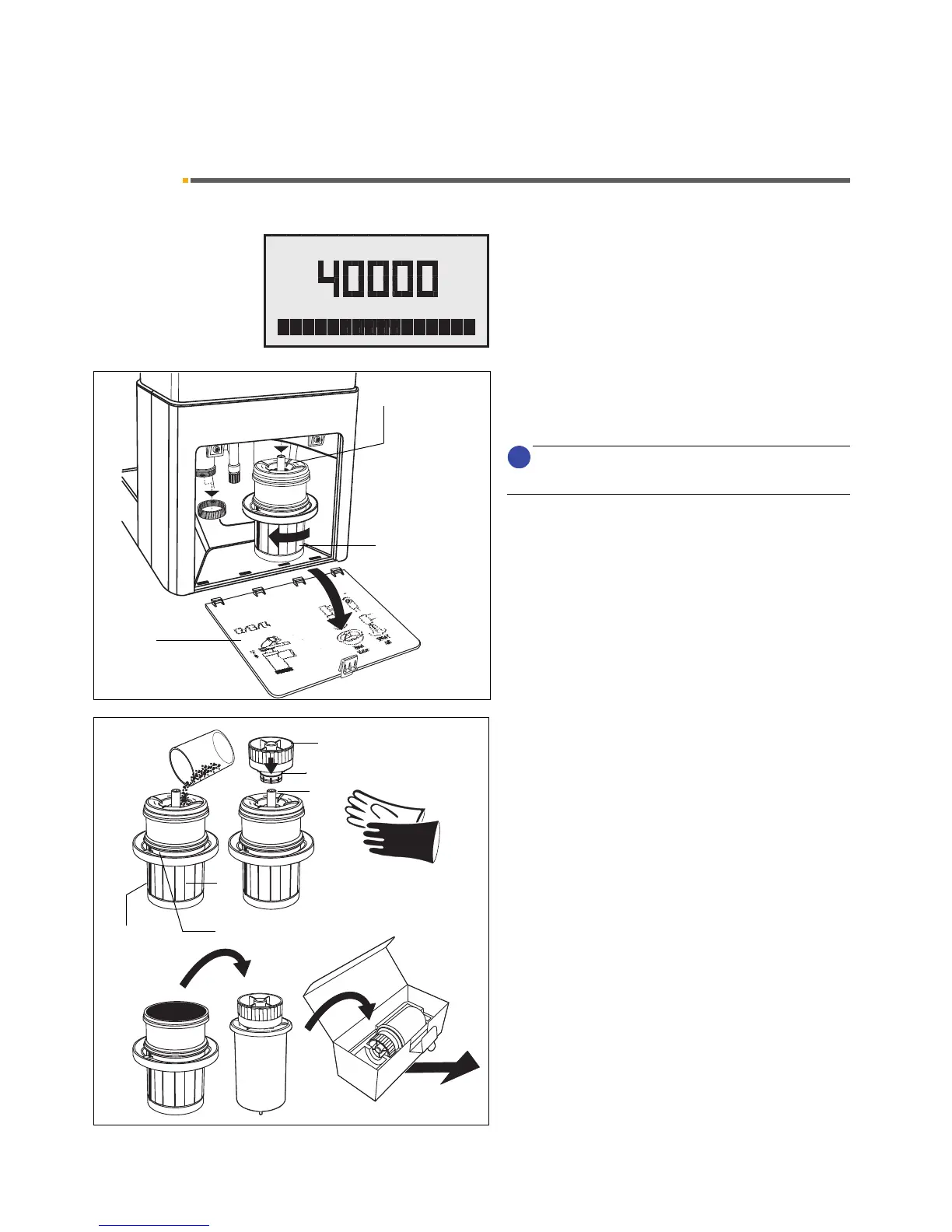
When AMALG lights up on the display on the dentist ele-
ment, the amalgam separator must be replaced.
To replace the amalgam separator, proceed as follows:
• Disinfect as described in Chapter 3 "Vacuum sys-
tem" .
Always wear work gloves when performing these tasks!
• Open flap (1) at the base of the water unit.
Do NOT turn the unit off!
• Turn the lower part (2) of the amalgam separator
with rotor (3) in the direction of the arrow until it can
be removed easily.
AMALG starts flashing on the dentist element
display and an audible signal sounds.
• Put any amalgam residues from the suction hoses
and the cuspidor into the dismantled rotor for dispos-
al (see pages 6 and 10).
• Hold the bottom part upright and click on the
transport cap (4). This releases a bonding agent.
Therefore, do not remove the transport cap
again!
• Remove the rotor with the cap from the lower part
and place it in the special packaging for disposal
.
• Insert the new rotor (3) in the lower part (2).
Do not install a used or recycled rotor!
• Reinstall the lower part and turn it in the opposite di-
rection of the arrow up to the stop. The bar (7)
should point to the chair at the start and to the siphon
(6) after it is screwed tight.
If, after the rotor is inserted, AMALG still flashes
on the display and the audible signal continues,
the lower part is not correctly locked into place.
• Close the flap (1) again.















 To Next Page