31
Rest Secure System Operating Instructions
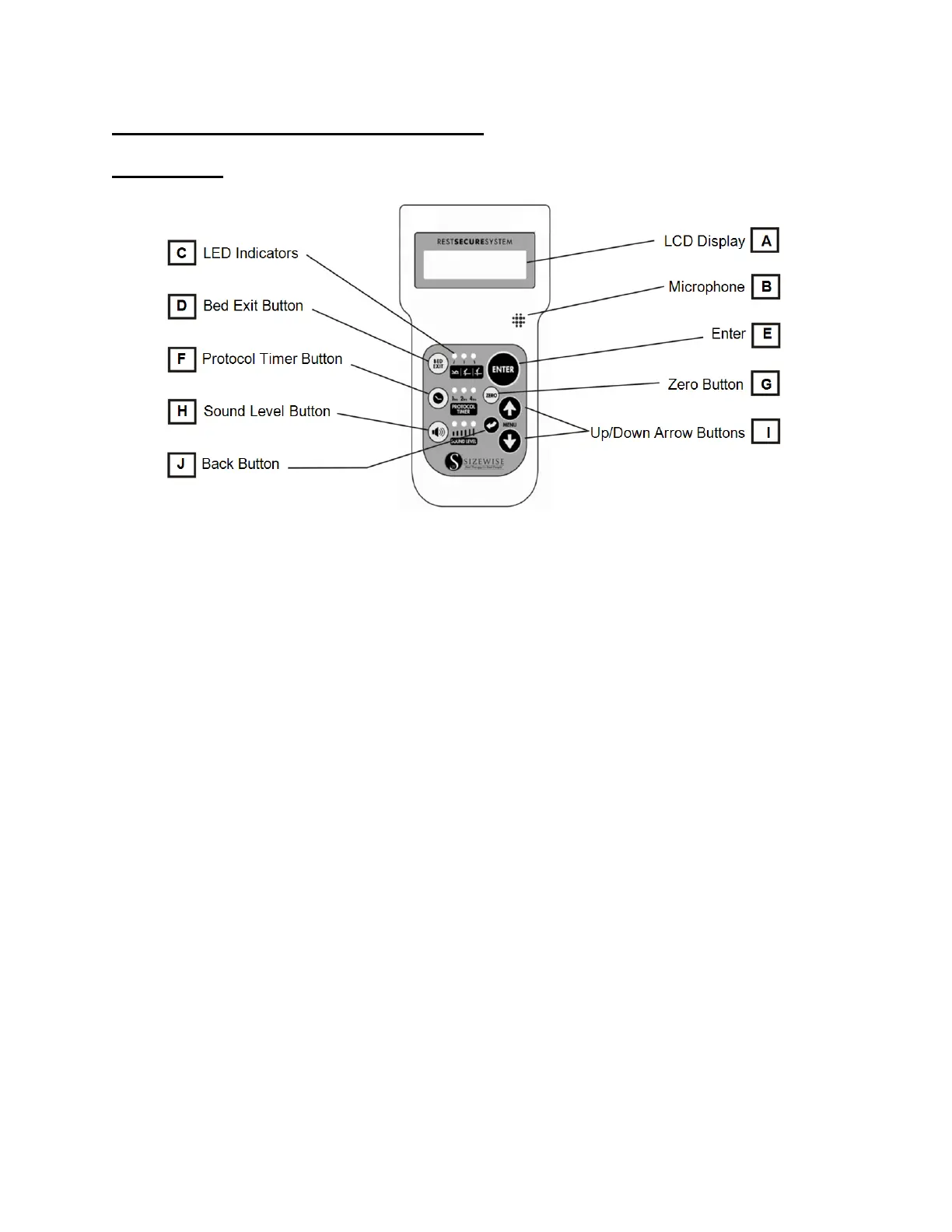
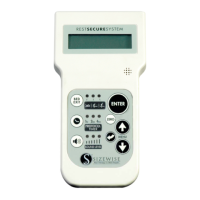
Hand Control
The hand control has glow-in-the-dark features; in case of power outages operation is not
impaired.
A. LCD Display – Lighted display shows the weight and allows the navigation of on-screen
menus.
B. Microphone – Use to record a message for the voice alarm.
C. LED Indicators – Green lights indicate what setting or function is selected.
D. Bed Exit Button – Use to set the bed exit alarm.
E. Enter Button – Use for making a selection when in the main and sub menus.
F. Protocol Timer Button – Use for the protocol reminder.
G. Zero Button – Use for zeroing the scale and establishing the tare weight (base weight).
H. Sound Level Button – Use for selecting low, medium and high volume.
I. Up/Down Arrow Menu Buttons – Use for accessing the menu and making adjustments
to menu items.
J. Back Button – Press this button once to go to the previous menu or press and hold this
button for 3 seconds at any time to go back to the Home Screen no matter what menu is
displayed.




 To Next Page