12
Highlight a category from Options
Menu and press .
1
SPEED: 4
PRESSURE: 2
8"x8"
Cardstock L
Flowers
Frames
Phrases
Rockin’ Janie.f
Shapes
H: 1.50" W: 1.50" QTY: 1
to open category
for more options
Select artwork from category
SPEED: 4
PRESSURE:2
8"x8"
Cardstock L
Shadow
Pieces
Embellishment
H: 1.50" W: 1.61" QTY: 1
Starter and Rockin’
Janie
suggested min
height=2.5"
Starter and Rockin’
Janie
H: 2.50" W: 1.61" QTY: 1
to edit height; to Esc
to apply changes; to width
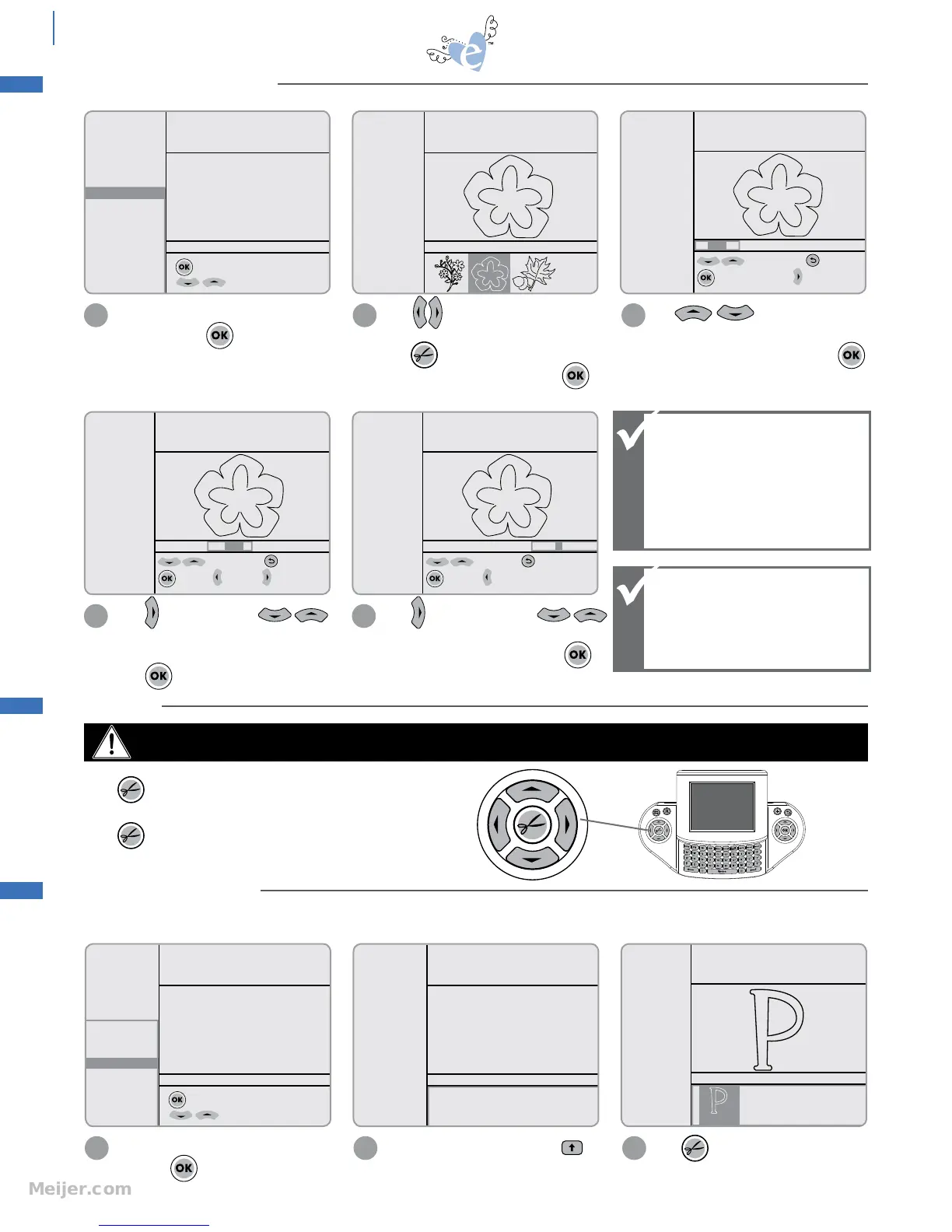
2
Press from right Screen
Navigator Control to highlight a shape.
Press to send the shape to be cut. To
change the size or quantity, press .
See pg. 14 for more options.
3
suggested min
width=2.7"
Starter and Rockin’
Janie
H: 2.25" W: 2.42" QTY: 1
to edit width; to Esc
to apply to height to QTY
4
easy start basics
Blade Positioner
Control
Use to edit height
incrementally or use red numbers on
Keypad for exact cutting size. Press
to apply changes.
Press to edit width. Use
to change width incrementally or use red
numbers on Keypad for exact cutting size.
Press to apply changes.
Press to send the shape to be cut to
the Machine.
Press again to pause the Machine.
WARNING: MOVING PARTS Keep fingers, hair and clothing away.
SELECTING A SHAPE
CUTTING
Starter and Rockin’
Janie
H: 2.25" W: 2.42" QTY: 1
to edit qty; to Esc
to apply; to width
5
Press to edit quantity. Use
to change quantity or use red numbers on
Keypad for specific quantity. Press
to apply changes.
When editing size, the
Options Menu displays
suggested minimums,
which should be used
for optimum results.
For smaller sizes,
perform test cut.
SELECTING A FONT
Highlight a font from Options Menu
and press .
1
SPEED: 4
PRESSURE: 2
8"x8"
Cardstock L
Flowers
Frames
Phrases
Rockin’ Janie.f
Shapes
H: 2.25" W: 2.42" QTY: 2
to open category
for more options
Select artwork from category
SPEED: 4
PRESSURE: 2
8"x8"
Cardstock L
H: 2.25" W: 2.25" QTY: 2
Please enter characters using keypad
Starter and Rockin’
Janie
SPEED: 4
PRESSURE: 2
8"x8"
Cardstock L
Solid
Shadow
Tag
Charm
H: 2.25" W: 1.44" QTY: 2
Starter and Rockin’
Janie
2
Use Keypad to select a letter. Use
to capitalize a letter.
Press to send to Machine. (See pg.
14 for more options.)
3
Fonts are available on selected eclips cartridges. Fonts have a unique option that allows you to cut individual letters out of
tags and charm shapes. These can be placed together to form words.
Change height or width
but not both; when one
dimension is changed,
the other adjusts
automatically.


 To Next Page