15
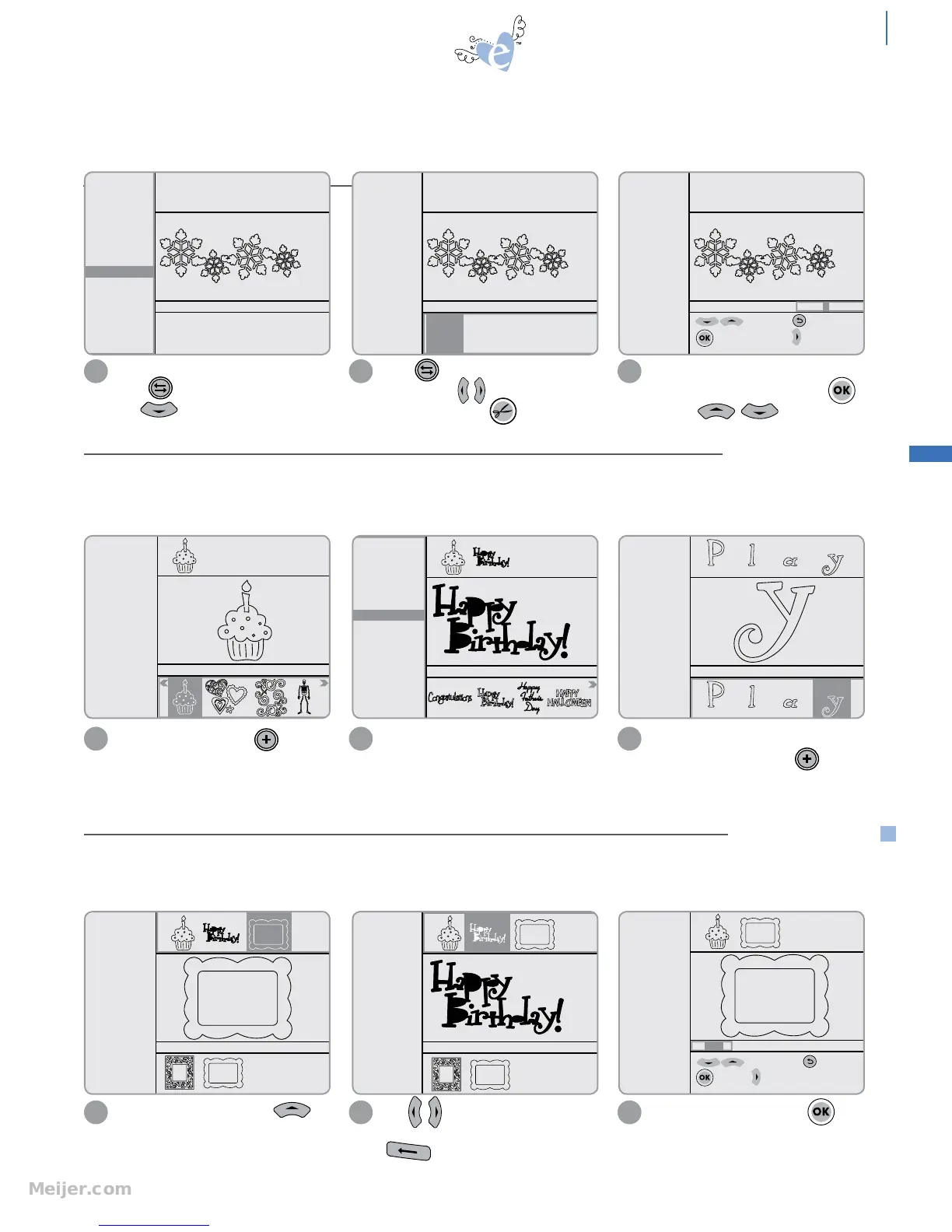
When cutting multiple shapes, the Machine can temporarily store a number of shapes into the Queue before modifying them
or cutting them all at once.
For shapes that include a Border option,
press to toggle to Options Menu.
Use to highlight Border option.
1
You can also change the style, size or
quantity of any shape before adding it
to Queue.
21
Highlight shape and press to add to
Queue. Shape will now appear in Queue
Display at top of screen.
6"
6" 12" 18" 24"
SPEED: 4
PRESSURE: 2
12"x12"
Cardstock L
Solid
Shadow
Border
H: 2.31" W: 6.00" QTY: 1
Starter and Rockin’
Janie
6"
SPEED: 4
PRESSURE: 2
12"x12"
Cardstock L
Solid
Shadow
Border
H: 2.31" W: 6.00" QTY: 1
6" 12" 18" 24"
Starter and Rockin’
Janie
6"
to edit size; to Esc
to apply changes; to QTY
H: 2.31" W: 6.00" QTY: 1
Starter and Rockin’
Janie
Starter and Rockin’
Janie
SPEED: 4
PRESSURE: 2
12"x12"
Cardstock L
Outline
Shadow
Pieces
H: 2.25" W: 1.51" QTY: 1
Starter and Rockin’
Janie
SPEED: 4
PRESSURE: 2
12"x12"
Cardstock L
Solid
Shadow
H: 2.25" W: 4.04" QTY: 1
Press to toggle to Selection
Display. Press to highlight desired
Border length. Press to cut.
2
Note: Border size (height) cannot be
edited. To change quantity, press
and use to change
quantity.
3
SPEED: 4
PRESSURE: 2
12"x12"
Cardstock L
Solid
Shadow
Tag
Charm
H: 2.25" W: 1.79" QTY: 1
Starter and Rockin’
Janie
For fonts, add all characters to
Selection Display and press
to add everything to Queue.
3
From Selection Display, press
to go to Queue Display.
1
H: 2.25" W: 2.95" QTY: 1
Starter and Rockin’
Janie
H: 2.25" W: 4.04" QTY: 1
Starter and Rockin’
Janie
to edit height to Esc
to apply to width
H: 2.25" W: 2.95" QTY: 1
Starter and Rockin’
Janie
suggested min
height=2.5"
Use to scroll through items in
Queue and highlight to edit. Press
to delete.
2
To edit size or quantity, press .
3
beyond the basics
ADD TO QUEUE
EDIT QUEUE
Shapes will remain in Queue when a cartridge is removed and another is inserted. This way, shapes from multiple cartridges
can be added to the Queue.
Bord er: option on some shapes to create a repeated design in lengths of 6" (15.2cm), 12" (30.5cm), 18" (45.7 cm) or
24" (61.0 cm). An optional 24" Cutting Mat is needed to cut 18" and 24" Borders.


 To Next Page