22
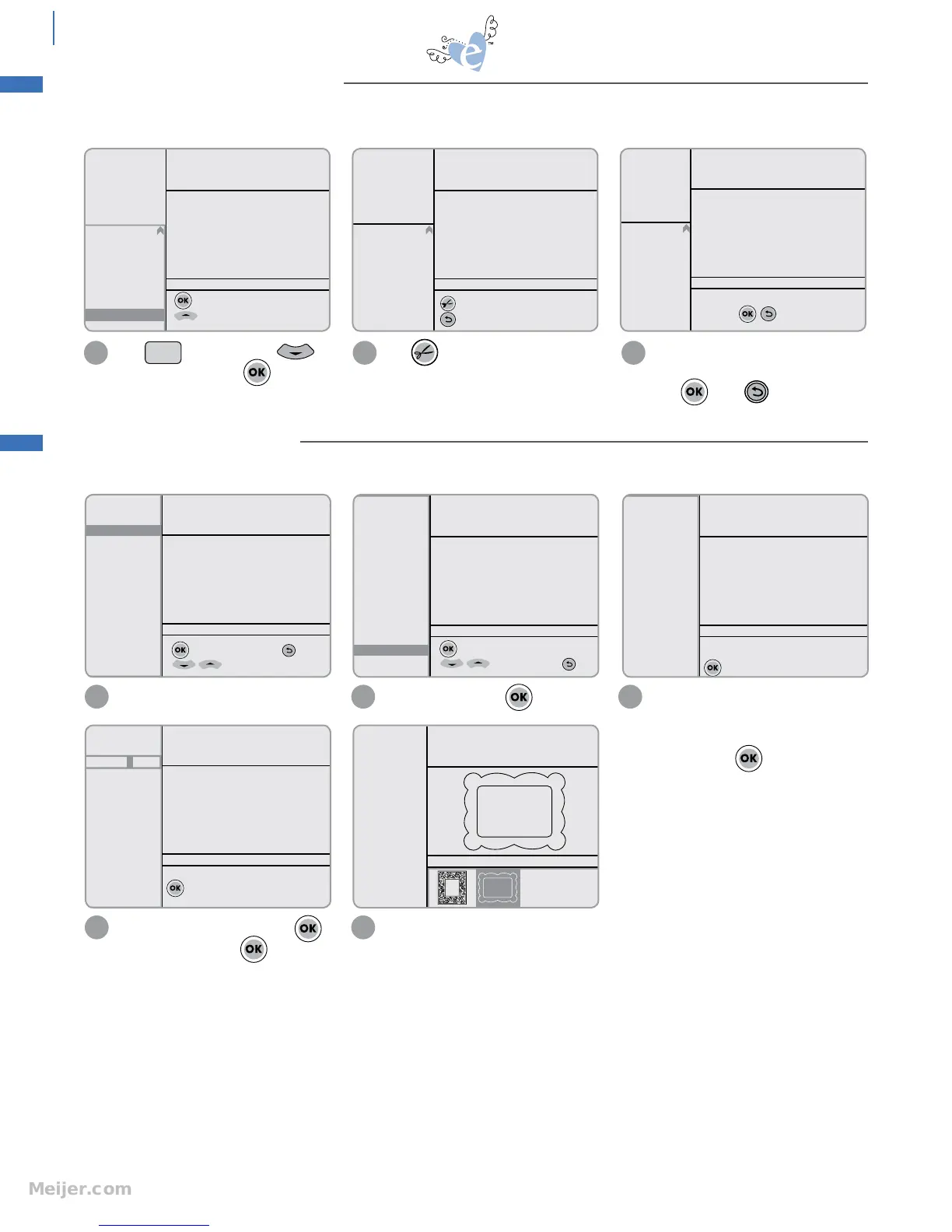
This option lets you input the width and length of material to be cut so that Machine will cut to custom size.
In Options Menu, select material size
option.
Scroll down and press to select
Dimensions.
Place top left corner of material on
Blade Starting Point in top left corner
of Cutting Mat. Load Cutting Mat into
Machine. Press .
1 2 3
SPEED: 4
PRESSURE: 3
12"x12"
Cardstock M
H: 3.00" W: 3.00" QTY: 1
to select material size; to Esc
for more options
SPEED: 4
PRESSURE: 3
12"x12"
Cardstock M
H: 3.00" W: 3.00" QTY: 1
to select Custom Dimensions
for more options; to Esc
12"x12"
8 1/2" x 11"
8"x8"
6"x6"
A4
12"x24"
Dimensions
Laser
SPEED: 4
PRESSURE: 3
12"x12"
Cardstock M
H: 3.00" W: 3.00" QTY: 1
Place top left corner of material on the
Blade Starting Point of cutting mat
to continue
12"x12"
8 1/2" x 11"
8"x8"
6"x6"
A4
12"x24"
Dimensions
Laser
Use Keypad to enter width. Press .
Enter height and press .
Move Cutting Blade to top left of material.
The machine will now keep the size of the
design within the dimensions given.
4 5
SPEED: 4
PRESSURE: 3
D6.35 x0
"
Cardstock M
H: 3.00" W: 3.00" QTY: 1
Use keypad to enter material width
to continue
12"x12"
8 1/2" x 11"
8"x8"
6"x6"
A4
12"x24"
Dimensions
Laser
SPEED: 4
PRESSURE: 3
D6.35x7.62"
Cardstock M
H: 3.00" W: 3.93" QTY: 1
Starter and Rockin’
Janie
Solid
Shadow
advanced
To ensure that Cutting Blade and Laser are aligned, a one-time, initial calibration may need to be performed.
Press on Keypad. Press
to highlight Laser. Press .
1
to start Laser Calibration
for more options
SPEED: 4
PRESSURE: 3
12"x12"
Cardstock M
+ Languages
+ Dimension
Version
Scoring Adj.
+ Sound
+ Cart. Name
+ Paper Saver
Laser
H: 3.00" W: 3.00" QTY: 1
to cut the x
Esc
SPEED: 4
PRESSURE: 3
12"x12"
Cardstock M
+ Languages
+ Dimension
Version
Scoring Adj.
+ Sound
+ Cart. Name
+ Paper Saver
Laser
H: 3.00" W: 3.00" QTY: 1
Move laser to center of the X
and press . Esc
SPEED: 4
PRESSURE: 3
12"x12"
Cardstock M
+ Languages
+ Dimension
Version
Scoring Adj.
+ Sound
+ Cart. Name
+ Paper Saver
Laser
H: 3.00" W: 3.00" QTY: 1
2
Press on Blade Positioner Control to
cut a small X on your material.
3
Use Blade Positioner Control to move
laser point to center of small X.
Press . Press twice to Escape.
Setup
LASER CALIBRATION SETUP
DIMENSIONS SETTING


 To Next Page