17
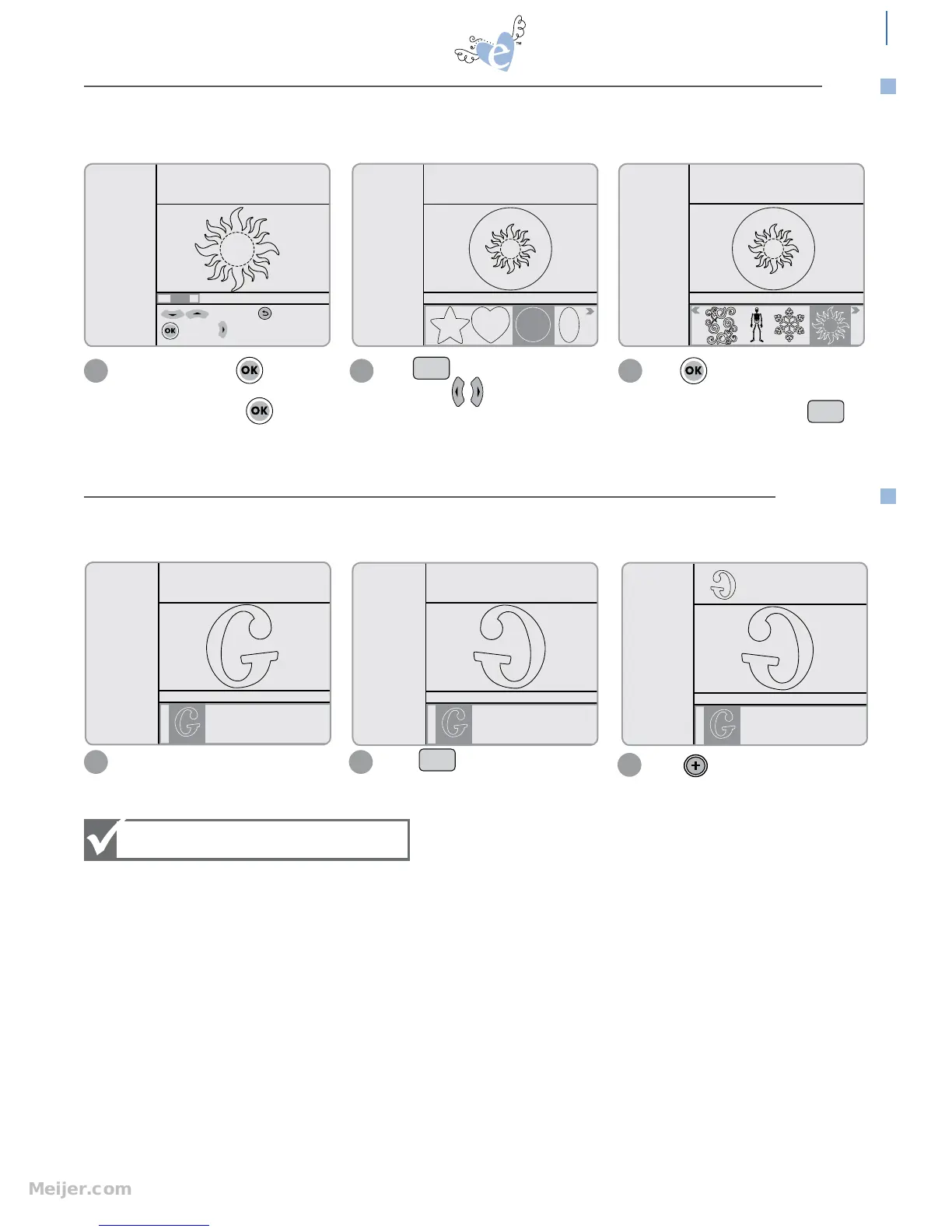
PIP (Picture in Picture) – takes the selected shape and encloses it inside of a circle, square, flower, star or any number of
shapes. These are easy to choose by scrolling through the Selection Display on the Handheld Remote Control.
Highlight design. Press to edit
Size. The size you select will be the size
of the outer shape. Press .
Press to view Picture in Picture
feature. Use to scroll through
shapes in Selection Display.
Press to select. The inside design
will now cut out of the outside shape.
To turn off the feature, press .
1 2 3
to edit size; to Esc
to apply to width
suggested min
height=3.5"
H: 4.00" W: 4.00" QTY: 1
Starter and Rockin’
Janie
SPEED: 4
PRESSURE: 2
12"x12"
Cardstock L
H: 4.00" W: 4.00" QTY: 1
Starter and Rockin’
Janie
SPEED: 4
PRESSURE: 2
12"x12"
Cardstock L
Outline
Shadow
Pieces
H: 4.00" W: 4.00" QTY: 1
Starter and Rockin’
Janie
PIP
PIP
beyond the basics
PIP
Highlight design or font. Press to view a mirror image of
highlighted design or font.
MIRROR displays the selected design or font in reverse.
1 2
Pressing Mirror key once = ON
Pressing again = OFF
SPEED: 4
PRESSURE: 2
12"x12"
Cardstock L
Solid
Shadow
Tag
Charm
H: 2.25" W: 1.49" QTY: 1
Starter and Rockin’
Janie
SPEED: 4
PRESSURE: 2
12"x12"
Cardstock L
Solid
Shadow
Tag
Charm
H: 2.25" W: 1.49" QTY: 1
Starter and Rockin’
Janie
Press to add mirror image to
Queue. When Mirror feature is turned
off, mirror image will remain in Queue.
3
SPEED: 4
PRESSURE: 2
12"x12"
Cardstock L
Solid
Shadow
Tag
Charm
H: 2.25" W: 1.49" QTY: 1
Starter and Rockin’
Janie
Mirror
MIRROR


 To Next Page