User Manual 77
DOL 534 • DOL 539
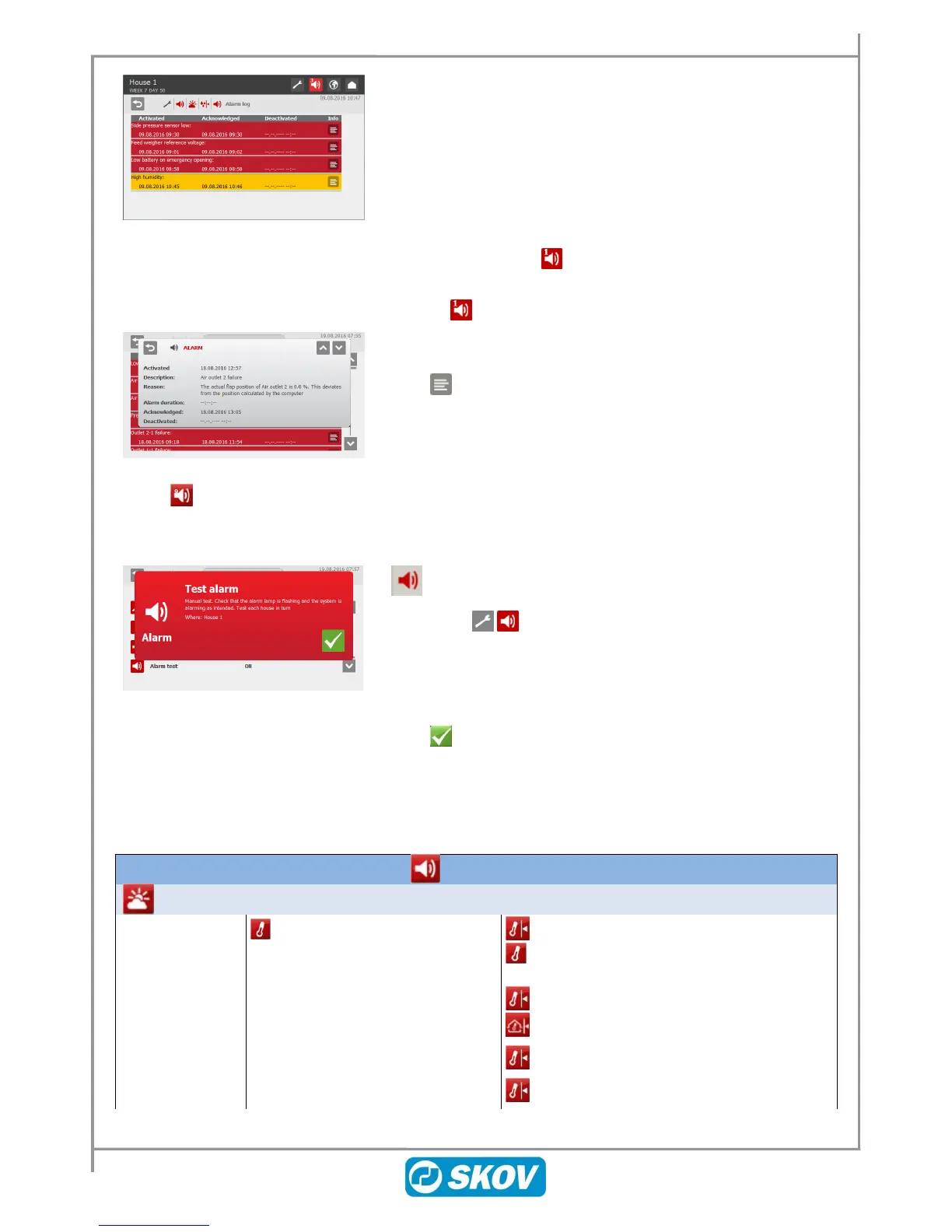
The colours in the alarm log reflect the status of alarms:
Red: active alarm
Yellow: active warning
Grey: deactivated alarm (alarm state ceased)
DOL 53X saves up to 20 active and deactivated alarms. When the
21
st
alarm is generated, the controller deletes the oldest alarm from
its memory.
The icon for alarm log indicates the number of active alarms, as
long as an alarm situation is not deactivated.
Press on to open the alarm log.
Press to open the alarm log and see the general description of
the type of alarm and the duration of the alarm situation.
5.3 Alarm Test
Regular testing of alarms contributes to ensuring that they actually work when needed. Therefore, you should
test the alarms every week.
Alarms
In the menu
Press Alarm test, and press ON in order to start testing.
Check that the alarm lamp is flashing.
Check that the alarm system works as intended.
Click to finish testing.
DOL 53X has a range of alarms which the controller generates if a technical error occurs or the alarm limits are
exceeded. A few of the alarms are always connected, e.g. Power failure. You can connect and disconnect the
others and for some you can set the alarm limits.
It is always the user’s responsibility to ensure that the alarm settings are correct.
Disabled
Hard alarm
Soft alarm
Low temp. limit with
FreeRange
Summer temp. at 20° C/68°
F outside temp.
Summer temp. at 30° C/86°
F outside temp.



 To Next Page