133
SJ30AJE, SJ30ARJE 196274AF
Platform Section 5 – Procedures
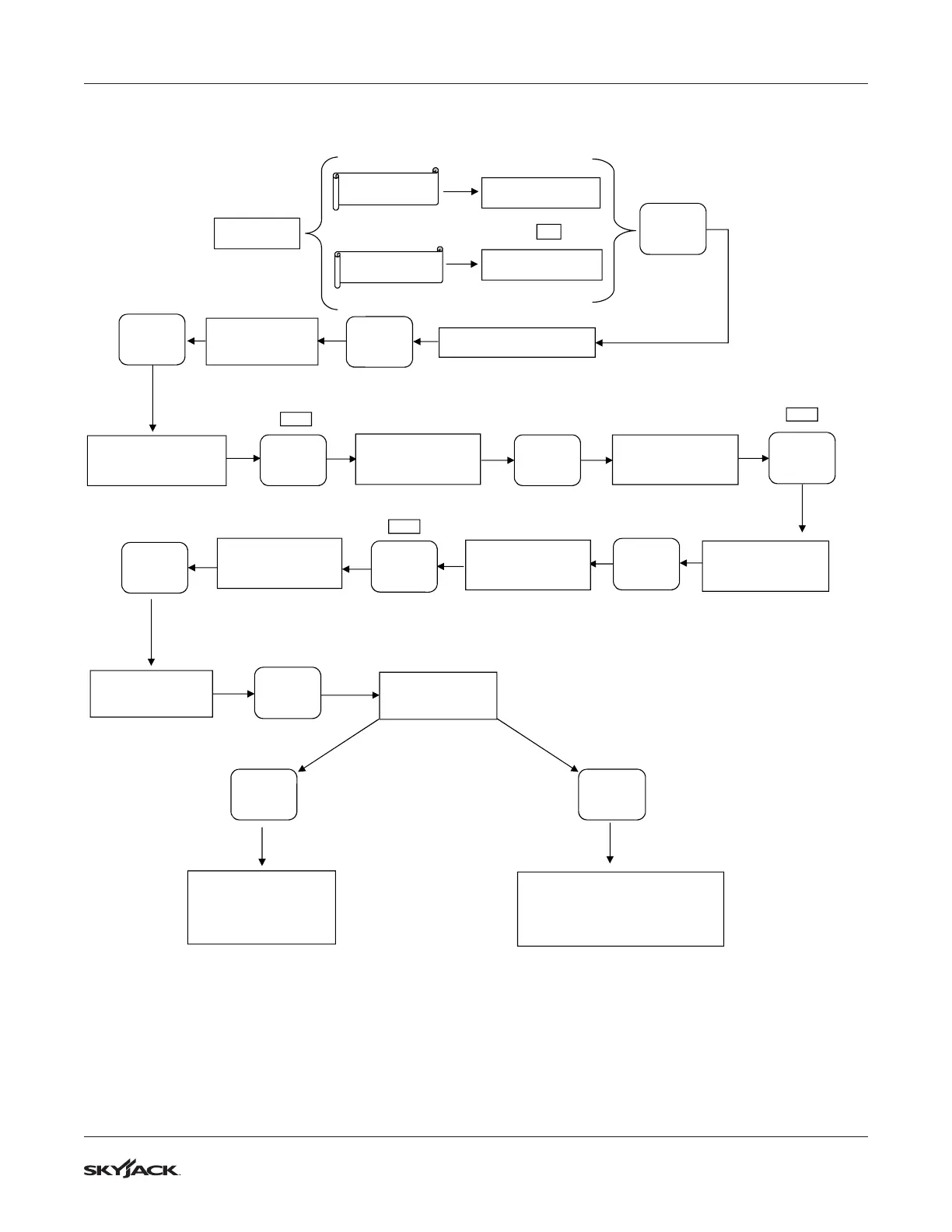
5.2-4 How to Unlock and Modify the SCM Settings
1. Recycle power to the OCM with the e-stop to re-enable the password protection.
2. If the OCM is inactive for more than 5 minutes, the password must be re-entered.
1217AB
NOTE:
MODE= XX/XX STD
FUNCTIONS OFF
UNLOCK SETUP?
PRESS SELECT
(FLASHING)
SOFTWARE REVISION
STARTING
SCREEN
ENTER PASSWORD
0**
0 (FLASHING)
SET PMU MOD PCT
PRESS SELECT
(FLASHING)
ENTER PASSWORD
7**
7 (FLASHING)
ENTER PASSWORD
70*
0 (FLASHING)
ENTER PASSWORD
75*
5 (FLASHING)
ENTER PASSWORD
750
0 (FLASHING)
ENTER PASSWORD
755
5 (FLASHING)
SETUP UNLOCKED
PRESS - OR +
(FLASHING)
MODE= XX/XX LTD
FUNCTIONS OFF
▲
▬▬▬
┼
▲
▬▬▬
┼
▲
▬▬▬
┼
▲
▬▬▬
┼
▲
▬▬▬
┼
▲
▬▬▬
┼
5X
7X
MENU
▬▬▬▬
SELECT
MENU
▬▬▬▬
SELECT
MENU
▬▬▬▬
SELECT
MENU
▬▬▬▬
SELECT
SAVE
▬▬▬▬
EXIT
CE & AS Models
ANSI/CSA & KC
Models
OR
MENU
▬▬▬▬
SELECT
To adjust
PUMP/FUNCTION
speeds, see
"How to Adjust the SCM
Pump Motor Speed"
To Adjust the
THRESH/MAXOUT/LOWRNG/
RAMPUP/RAMPDN, see
"How to Set the SCM Valve
Characteristics"



 To Next Page