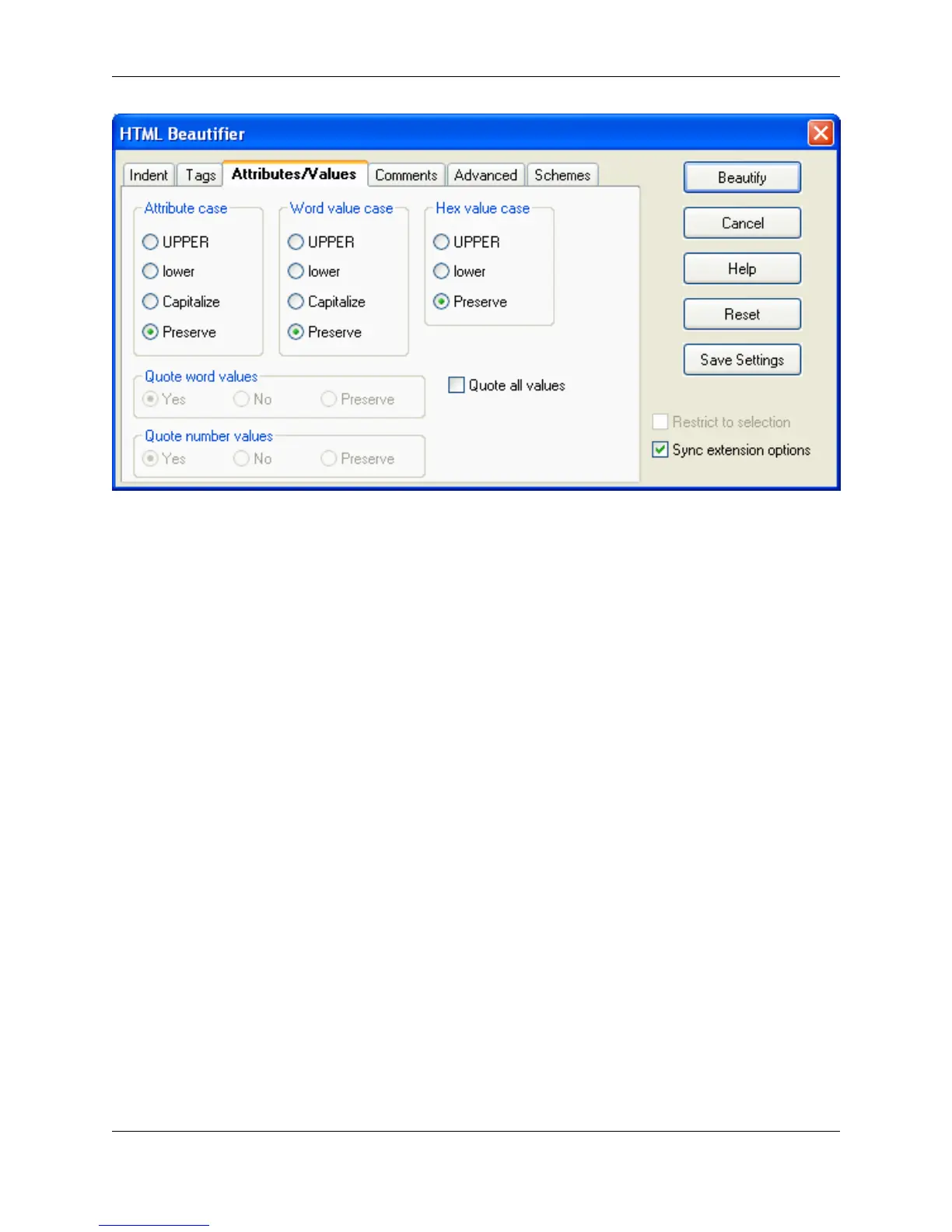
The Attributes/Values tab contains the following settings:
• Attribute case - Specifies how you want attributes cased inside the body of a tag. For example, if you
choose UPPER, then <td align="right"> would be beautified to <td ALIGN="right">.
• Word value case - Specifies how you want word values cased after the = of an attribute inside the
body of a tag. For example, if you choose UPPER, then <td align="right"> would be beautified to <td
align=RIGHT>.
• Hex value case - Specifies how you want hex values cased after the = of an attribute inside the body of
a tag. For example, if you choose UPPER, then <body bgcolor="#ffffff"> would be beautified to <body
bgcolor="#FFFFFF">.
• Quote word values - Specifies whether you want word values enclosed in double quotes after the = of
an attribute inside the body of a tag. For example, <td align=right> would be beautified to <td
align="right">. Select Preserve if you want word values left alone.
• Quote number values - Specifies whether you want number values enclosed in double quotes after
the = of an attribute inside the body of a tag. For example, <td width=590> would be beautified to <td
width="590">. Select Preserve if you want number values left alone.
• Quote all values - When on, all values will be quoted after the = of an attribute inside the body of a tag.
For example, <td align=right> would be beautified to <td align="right">.
Comments Tab
Figure 7.28. HTML Beautifier: Comments Tab
HTML
275



 To Next Page