Configuration
3.7
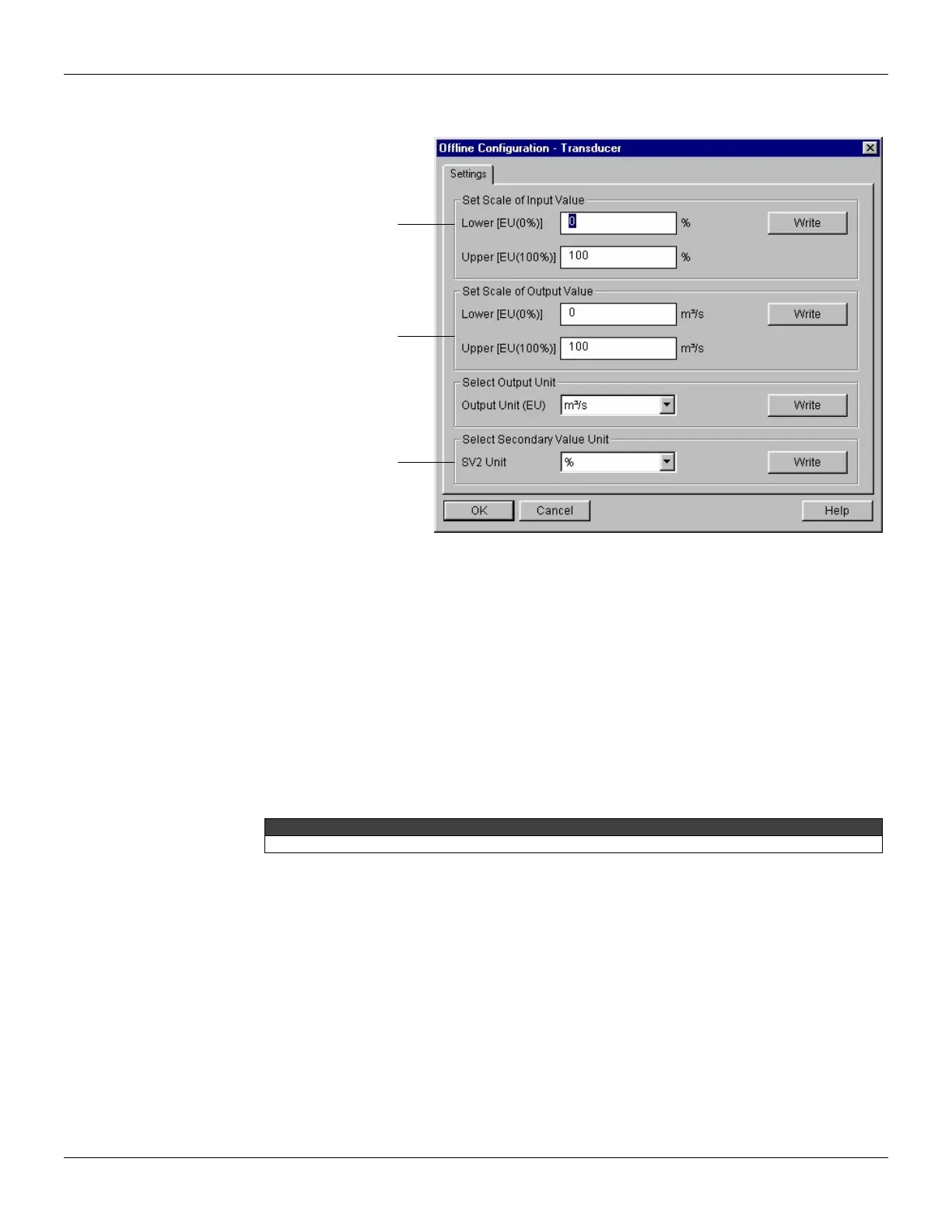
To make the configuration of transducer block, we need to select Device - Offline Configuration -
Transducer on the main menu:
Figure 3.3 - Simatic PDM - Offline Configuration - Transducer
How to Configure the Analog Input Block
The analog input block takes the input data from the transducer block, selected by channel number,
and makes it available to other function blocks at its output. The transducer block provides the input
unit of the analog input, and when the unit is changed in the transducer, the PV_SCALE unit is
changed too. Optionally, a filter may be applied in the process value signal, whose time constant is
PV_FTIME. Considering a step change to the input, this is the time in seconds to the PV reaches
63,2% of the final value. If the PV_FTIME value is zero, the filter is disabled. For more details,
please, see the Function Blocks Specifications.
To configure the analog input block in offline mode, please, go to the main menu and select Device
Offline Configuration - Analog Input Block. Using this window, the user can configure the block
mode operation, selects the channel, scales and unit for input and output value and the damping.
TP303 has damping function implemented.
application, the
user can set the
scale of input
value.
select the scale
and unit of output
value according to
his application.
select the
secondary value
unit according to
the transducer
diagram.



 To Next Page