Configuration
3.17
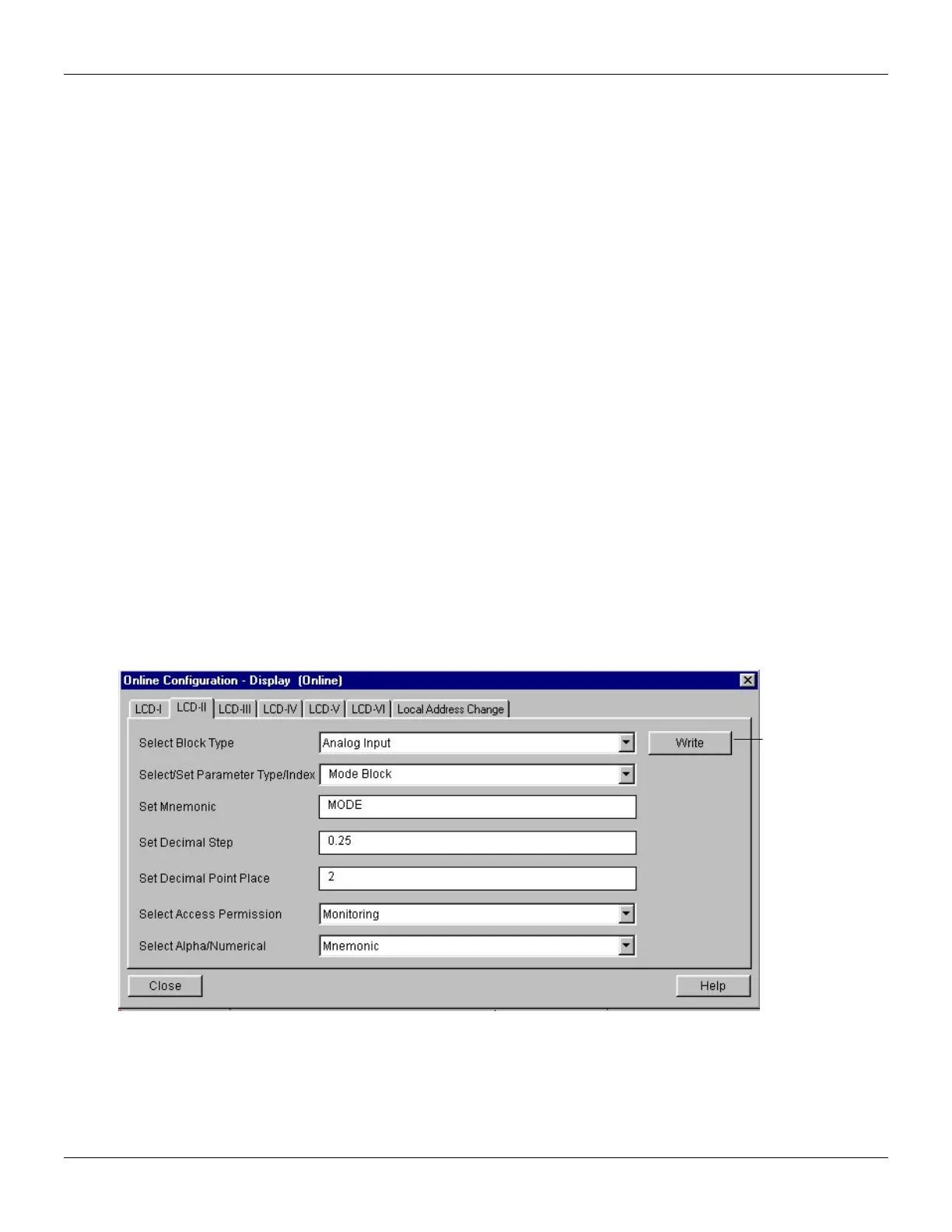
Select/Set Parameter Type/Index
This is the index related to the parameter to be actuated or viewed (0, 1, 2…). For each block, there
are some pre-defined indexes. Refer to the Function Blocks Manual to know the desired indexes
and then just enter the desired index.
Set Mnemonic
This is the mnemonic for the parameter identification (it accepts a maximum of 16 characters in the
alphanumeric field of the display). Choose the mnemonic, preferably with no more than 5 characters
because, this way, it will not be necessary to rotate it on the display.
Set Decimal Step
It is the increment and decrement in decimal units when the parameter is Float or Float Status
value, or integer, when the parameter is in whole units.
Set Decimal Point Place.
This is the number of digits after the decimal point (0 to 3 decimal digits).
Set Access Permission
The access allows the user to read, in the case of the Monitoring option, and to write when "action"
option is selected, then the display will show the increment and decrement arrows.
Set Alpha Numerical
These parameters include two options: value and mnemonic. In option value, it is possible to display
data both in the alphanumeric and in the numeric fields; this way, in the case of a data higher than
10000, it will be shown in the alphanumeric field.
In option mnemonic, the display may show the data in the numeric field and the mnemonic in the
alphanumeric field.
For devices where the software version is higher or equal to 1.10, please see the configuration of
local adjustment using the local adjustment, in the installation, operation and maintenance
procedures manual.
In case you wish to visualize a certain tag, opt for the index relative equal to "tag". To configure
other parameters just select LCD-II up to LCD-VI windows:
Figure 3.17 - Parameters for Local Adjustment Configuration
The Local Address Change window allows the user to enable/disable the access to changing the
physical device address.
The option “Write”
should be selected
in order to execute
the upgrade of loc
adjustment
programming tree.
After this step, all
the selected
parameters will be
shown on the LCD
display.



 To Next Page