Chapter 3 Connecting computers and other devices
docs.smarttech.com/kb/171897 23
Connecting USB drives, peripherals, and other devices
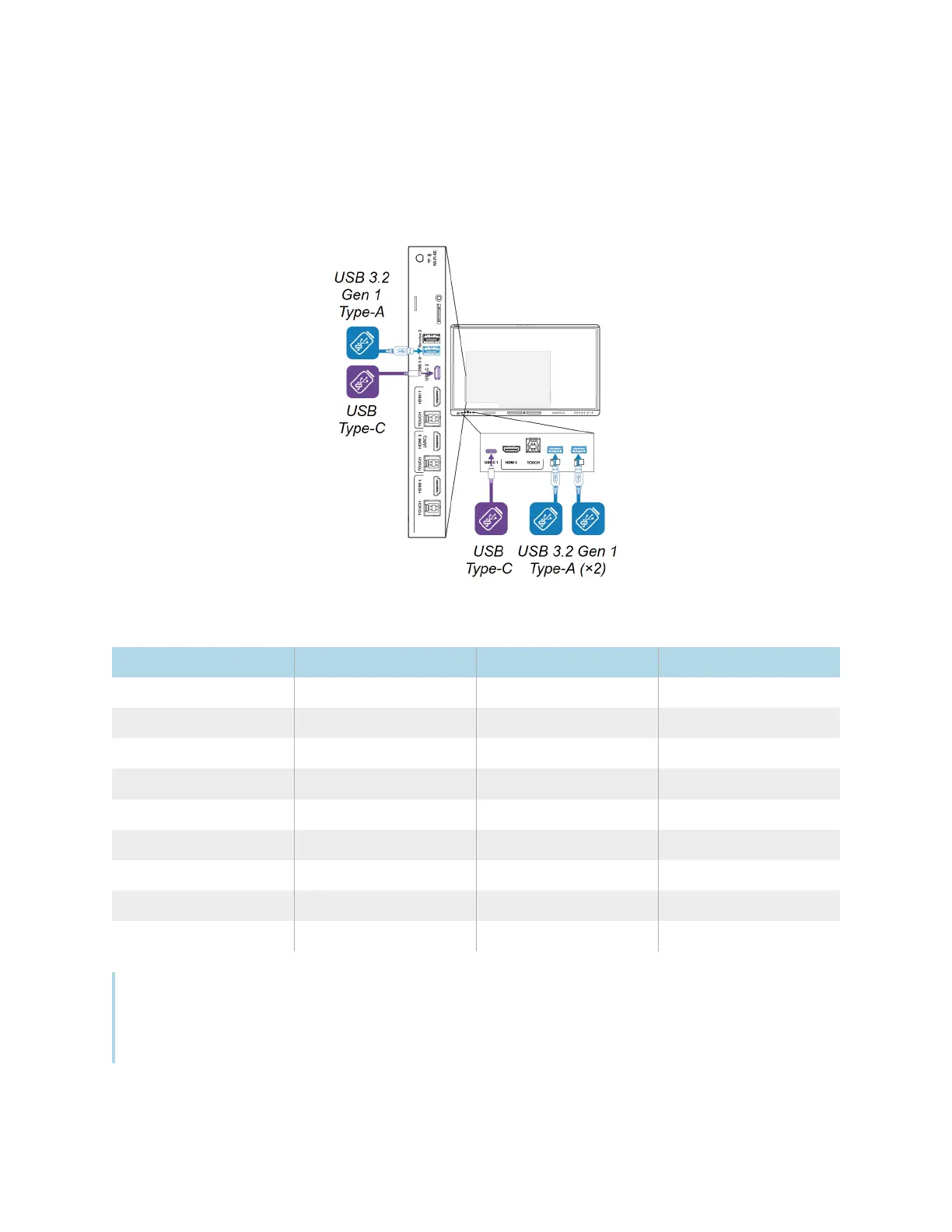
The display includes the following USB receptacles. You can connect USB drives, peripherals (such as
keyboards), and other devices to these receptacles and use the devices with iQ, connected computers,
and OPS modules installed in the OPS accessory slot.
This table shows the supported USB speeds for each input:
Input USB 2.0 Type-A USB 3.2 Gen 1 Type-A USB Type-C
iQ Hi-Speed SuperSpeed SuperSpeed
USB-C 1 Hi-Speed Hi-Speed Hi-Speed
USB-C 2 Hi-Speed Hi-Speed Hi-Speed
HDMI 1 Hi-Speed SuperSpeed SuperSpeed
HDMI 2 Hi-Speed SuperSpeed SuperSpeed
HDMI 3 Hi-Speed SuperSpeed SuperSpeed
HDMI 4 Hi-Speed SuperSpeed SuperSpeed
VGA Hi-Speed SuperSpeed SuperSpeed
OPS accessory slot Hi-Speed SuperSpeed SuperSpeed
Notes
l
Hi-Speed = 480 Mbps
l
SuperSpeed = 5 Gbps












 To Next Page