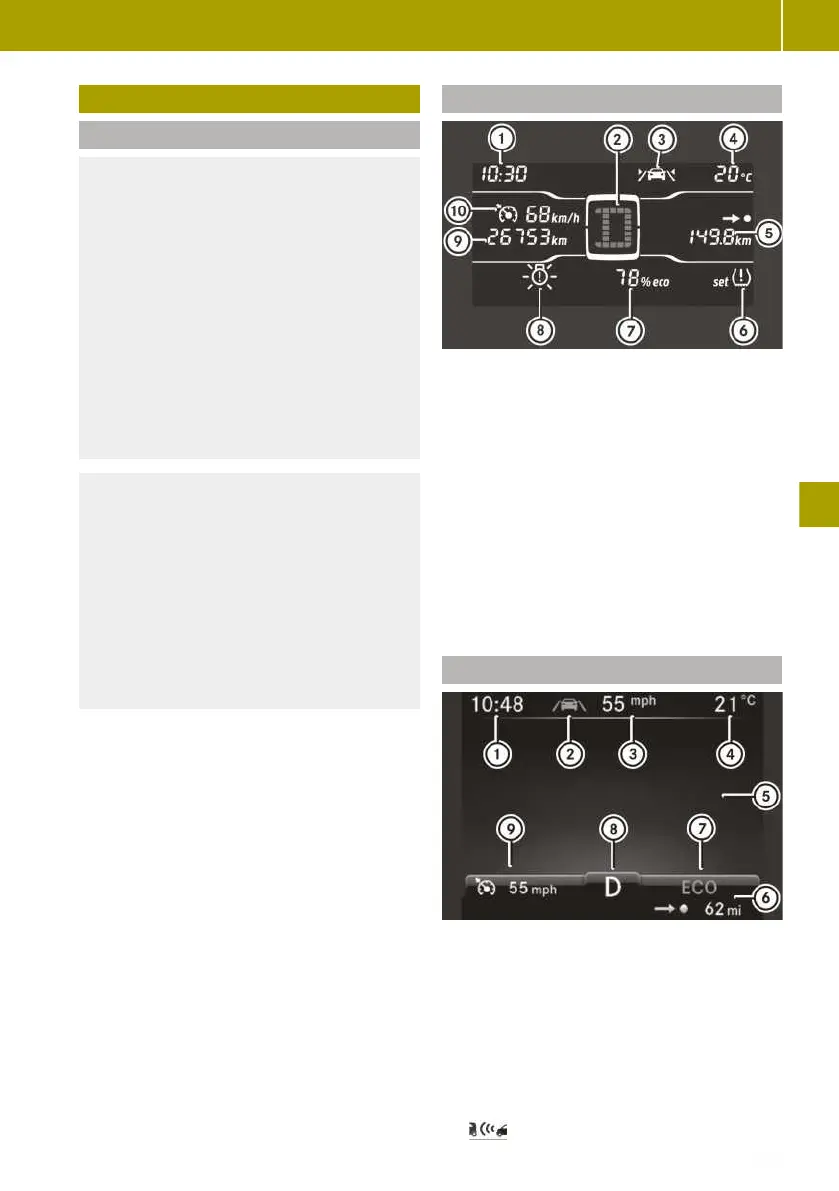
Overview of the on-board computer
Please note
G
WARNING
If you operate information and communi-
cation equipment integrated in the vehi-
cle when driving, you could be distracted
from the traffic situation. This could also
cause you to lose control of the vehicle.
There is a risk of an accident.
Only operate this equipment when the
traffic situation permits. If you cannot be
sure of this, stop the vehicle paying
attention to road and traffic conditions
and operate the equipment with the vehi-
cle stationary.
G
WARNING
If the instrument cluster has failed or
malfunctioned, you may not recognise
function restrictions relevant to safety.
The operating safety of your vehicle may
be impaired. There is a risk of an acci-
dent.
Drive on carefully. Have the vehicle
checked at a qualified specialist work-
shop immediately.
If the operating safety of your vehicle is
impaired, you must park the vehicle safely
as soon as possible. Consult a qualified
specialist workshop.
Display messages and displays in the
instrument cluster are only shown for cer-
tain systems. Vehicle owners and drivers
are responsible for ensuring that the vehi-
cle is operating safely. A vehicle which is
not operating safely can cause an accident.
The display shows the outside temperature
on the far right in the header. Drivers must
pay special attention to road conditions
when temperatures are around freezing
point. Changes in the outside temperature
are displayed after a short delay.
After opening the door, the on-board com-
puter is activated for approximately
15 minutes. To permanently activate the
on-board computer, the ignition must be
switched on.
Monochrome display overview
:
Time
;
Transmission display
=
Lane Keeping Assist indicator lamp
?
Outside temperature display and black
ice warning Ò
A
Trip meter, remaining range, service
display
B
Tyre pressure monitor
C
eco score display
D
Brake light failure warning lamp
E
Total distance recorder
F
Cruise control, limiter
Colour display overview
:
Time
;
Lane Keeping Assist indicator lamp
=
Digital speedometer
?
Outside temperature display with black
ice warning Ò
A
Display field for display messages,
menus and lists
B
Remaining range
C
ECO mode, radar-based recuperation
Overview of the on-board computer
109
>> Operating the on-board computer.
Z















 To Next Page